Skip to content
OnMSFT.com
  • Home
  • About
  • Contact
  • Windows
  • Surface
  • Xbox
  • How-To
  • OnPodcast
  • Edge
  • Teams
  • Gaming
Menu
  • Home
  • About
  • Contact
  • Windows
  • Surface
  • Xbox
  • How-To
  • OnPodcast
  • Edge
  • Teams
  • Gaming
  1. Home
  2. News
  3. Microsoft’s Notepad app is reportedly getting tabs in Windows 11 – OnMSFT.com

Microsoft’s Notepad app is reportedly getting tabs in Windows 11 – OnMSFT.com

Kevin Okemwa Kevin Okemwa
December 26, 2022
1 min read

Ever since Microsoft began rolling out Windows 11, its Notepad app has received a significant number of improvements and features such as native ARM64 support, improved accessibility as well as performance.

\n

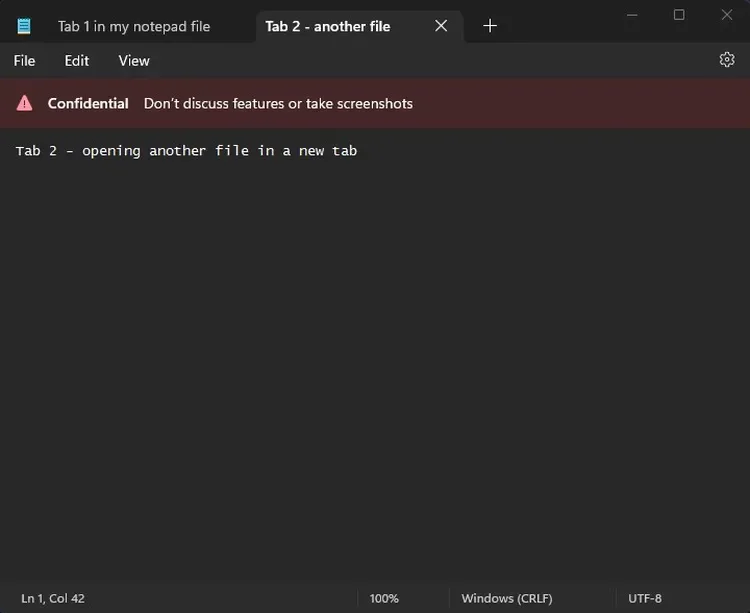
And now, Microsoft seems to have a neat feature in the works. According to a leak from a senior Microsoft product manager in the Endpoint CxE CAT team and noted by Windows Central, the Notepad app in Windows 11 is getting tabs. However, the Tweet has since been deleted.

\n

\n

\n

\n

\n

\n

\n

\n

\n

\n

\n

\n

\n

\n

The Tweet was also accompanied by a screenshot that displayed two tabs. At the top of each tab was a note that indicated “confidential, don’t discuss features or take screenshots.” This could mean that Microsoft isn’t ready to launch the new feature just yet and it is currently in the testing phase. Here’s a glimpse of the image shared:
\n

Microsoft's humble NotePad might be getting tabs in Windows 11

\n

Tabs will help users work across multiple locations simultaneously. Perhaps, we might bet to see this feature roll out to Windows Insiders in the near future. Microsoft already rolled out this feature to the Files Explorer app in Windows 11 earlier this year.

\n

The Notepad app will be the first in-built app across Microsoft’s products to get the tab experience, that is, in case it proceeds with this release. Share your thoughts with us in the comment section.
\n

\n

\n

\n

\n

\n

\n

\n

\n

\n

\n

\n

\n

\n

Share This Post:

Share this article:
Tags:
Notepad Windows 11
Previous Article Best Android Emulators for Windows 10/11 – OnMSFT.com Next Article Here is our Xbox 2022 wrap up – OnMSFT.com

Related Articles

Chrome for Android Prepares Gemini “Let Chrome Browse for You” Setting

March 7, 2026

Microsoft, Google Say Claude Will Stay in Their Platforms Despite Pentagon Designation

March 7, 2026

Chrome’s Projects Panel Will Show Gemini and AI Mode Activity

March 7, 2026

Leave a Comment Cancel reply

Your email address will not be published. Required fields are marked *

Recent Posts

  • Chrome for Android Prepares Gemini “Let Chrome Browse for You” Setting
  • Microsoft, Google Say Claude Will Stay in Their Platforms Despite Pentagon Designation
  • Chrome’s Projects Panel Will Show Gemini and AI Mode Activity
  • Chrome’s GlowUp Design Brings Tab Strip Declutter, Tab Glow Effect, and Glass Toolbar
  • X Tests New Ad Format That Recommends Products Under Posts

Recent Comments

No comments to show.
OnMSFT.com

OnMSFT.com covers Microsoft news, reviews, and how-to guides. Formerly known as WinBeta, we have been your source for Microsoft news since 1998.

Categories

  • Windows
  • Surface
  • Xbox
  • How-To
  • OnPodcast
  • Gaming
  • Edge
  • Teams

Recent Posts

  • Chrome for Android Prepares Gemini "Let Chrome Browse for You" Setting
  • Microsoft, Google Say Claude Will Stay in Their Platforms Despite Pentagon Designation
  • Chrome's Projects Panel Will Show Gemini and AI Mode Activity
  • Chrome’s GlowUp Design Brings Tab Strip Declutter, Tab Glow Effect, and Glass Toolbar
  • X Tests New Ad Format That Recommends Products Under Posts

Quick Links

  • About OnMSFT.com
  • Contact OnMSFT
  • Join Our Team
  • Privacy Policy
© 2010–2026 OnMSFT.com LLC. All rights reserved.
About OnMSFT.comContact OnMSFTPrivacy Policy
