
Skip to content
OnMSFT.com
  • Home
  • About
  • Contact
  • Windows
  • Surface
  • Xbox
  • How-To
  • OnPodcast
  • Edge
  • Teams
  • Gaming
Menu
  • Home
  • About
  • Contact
  • Windows
  • Surface
  • Xbox
  • How-To
  • OnPodcast
  • Edge
  • Teams
  • Gaming
  1. Home
  2. News
  3. New features for OneNote Class Notebooks

New features for OneNote Class Notebooks

Oliver Fuh Oliver Fuh
October 5, 2015
1 min read

\n

Microsoft has just added new features to OneNote class notebooks for education. Last month, we reported on Microsoft plans to add more features to Office 365, including simplified plans for students and teachers, class notebooks, interactive presentation software sway, and many more.

\n

The latest feature additions are among the top feature requests from teachers around the world, as well as ones Microsoft announced back in May: the ability to manipulate finely manipulate users and permissions within class notebooks. Now teachers can:

\n

    \n

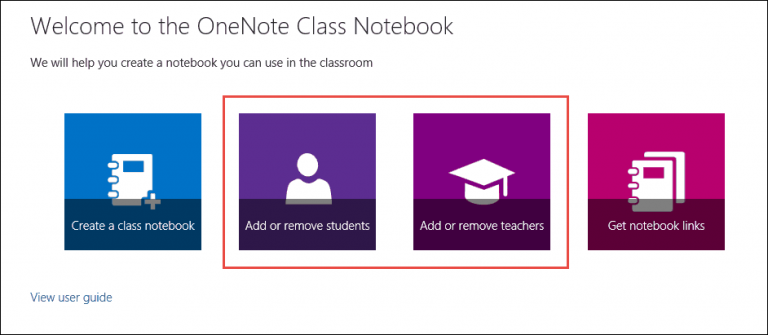
  • Remove students or co-teacher permissions from a class notebook – this can be done through the Add or remove teachers tile. This can be used to remove the permissions and abilities of students or faculty who are no longer part of the classroom.
  • \n

  • Add student groups to a class notebook – a time saving feature which will allows teachers to add whole classes to the notebook by just typing one name, instead of manually entering each student’s name as before.
  • \n

  • Update group membership changes from a class notebook – The Class Notebook app can now grab updates in group membership from the school directory. This can be done automatically through the Add or Remove Students tile.
  • \n

\n

Teacher-features-2

\n

Microsoft has also added OneNote Class Notebook support for right-to-left languages, including Arabic, Hebrew, and Persian.

\n\nFurther reading: Education, Office 365, OneNote

Share this article:
Tags:
Education Office 365 OneNote
Previous Article Microsoft drops major hints on HoloLens appearance at Windows 10 event Next Article Microsoft Announces Partner Events In October To “share Exciting News” – OnMSFT.com

Related Articles

Microsoft teases Xbox Helix, a powerful next-gen console with PC game support

Microsoft teases Xbox Helix, a powerful next-gen console with PC game support

March 5, 2026

Google flags battery-draining apps with warning labels on Play Store

March 5, 2026

Chrome May Soon Open Your Webcam for Photo Uploads on Desktop

March 5, 2026

Leave a Comment Cancel reply

Your email address will not be published. Required fields are marked *

Recent Posts

  • Microsoft teases Xbox Helix, a powerful next-gen console with PC game support
  • Google flags battery-draining apps with warning labels on Play Store
  • Chrome May Soon Open Your Webcam for Photo Uploads on Desktop
  • Chrome Tests Reading Mode for Text-Heavy PDFs
  • YouTube App Shows Ads That Won’t Close During Fullscreen Videos

Recent Comments

No comments to show.
OnMSFT.com

OnMSFT.com covers Microsoft news, reviews, and how-to guides. Formerly known as WinBeta, we have been your source for Microsoft news since 1998.

Categories

  • Windows
  • Surface
  • Xbox
  • How-To
  • OnPodcast
  • Gaming
  • Edge
  • Teams

Recent Posts

  • Microsoft teases Xbox Helix, a powerful next-gen console with PC game support
  • Google flags battery-draining apps with warning labels on Play Store
  • Chrome May Soon Open Your Webcam for Photo Uploads on Desktop
  • Chrome Tests Reading Mode for Text-Heavy PDFs
  • YouTube App Shows Ads That Won’t Close During Fullscreen Videos

Quick Links

  • About OnMSFT.com
  • Contact OnMSFT
  • Join Our Team
  • Privacy Policy
© 2010–2026 OnMSFT.com LLC. All rights reserved.
About OnMSFT.comContact OnMSFTPrivacy Policy