Skip to content
OnMSFT.com
  • Home
  • About
  • Contact
  • Windows
  • Surface
  • Xbox
  • How-To
  • OnPodcast
  • Edge
  • Teams
  • Gaming
Menu
  • Home
  • About
  • Contact
  • Windows
  • Surface
  • Xbox
  • How-To
  • OnPodcast
  • Edge
  • Teams
  • Gaming
  1. Home
  2. News
  3. Microsoft Outlook will soon let users collaborate in emails using Loop component – onmsft.com

Microsoft Outlook will soon let users collaborate in emails using Loop component – onmsft.com

Kevin Okemwa Kevin Okemwa
September 22, 2022
1 min read

Loop component was launched in Microsoft Teams back in 2021 to create a new way for users to think, plan, and create together. Where users can send out a component on the platform, then everyone in the chat can edit inline and changes will be visible immediately.

The same feature tagged 93234 in the Microsoft 365 Roadmap is expected to reach general availability for Outlook on the Web and Windows desktop in November rather than September as earlier indicated. It should have reached complete wide availability by late December, not late September.
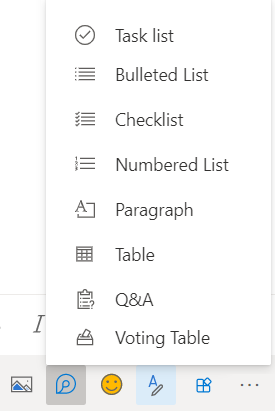
Loop components in Outlook

By simply inserting a Loop component via the toolbar or copying and pasting components between email and Teams chats, users will be able to collaborate, edit the content inline and see the changes made in real-time. It is similar to the approach used in Microsoft Teams.

However, does not support eDiscovery workflows. Therefore, you should consider turning it off if your organization makes use of them because it is enabled by default.


 

Share This Post:

Share this article:
Tags:
Loop Components Microsoft 365 Microsoft Outlook Microsoft Teams
Previous Article What to play on Game Pass: shooters (part 1) – onmsft.com Next Article Polaroid enters the music business with a radio station, music app and bluetooth speaker – onmsft.com

Related Articles

Chrome and Gemini icons representing Gemini Live voice assistant integration in Chrome

Chrome tests Gemini Live voice assistant in a floating overlay panel

March 14, 2026

Chrome’s Organizer feature may sync Gemini and AI conversations across devices

March 14, 2026

After Chrome, Edge tests launching the browser automatically when you sign into Windows

March 13, 2026

Leave a Comment Cancel reply

Your email address will not be published. Required fields are marked *

Recent Posts

  • Chrome tests Gemini Live voice assistant in a floating overlay panel
  • Chrome’s Organizer feature may sync Gemini and AI conversations across devices
  • After Chrome, Edge tests launching the browser automatically when you sign into Windows
  • iPhone Fold Latest Rumors: Display, Cameras, RAM and Price Details Revealed
  • Samsung fears first mobile operating loss due to memory price surge

Recent Comments

No comments to show.
OnMSFT.com

OnMSFT.com covers Microsoft news, reviews, and how-to guides. Formerly known as WinBeta, we have been your source for Microsoft news since 1998.

Categories

  • Windows
  • Surface
  • Xbox
  • How-To
  • OnPodcast
  • Gaming
  • Edge
  • Teams

Recent Posts

  • Chrome tests Gemini Live voice assistant in a floating overlay panel
  • Chrome’s Organizer feature may sync Gemini and AI conversations across devices
  • After Chrome, Edge tests launching the browser automatically when you sign into Windows
  • iPhone Fold Latest Rumors: Display, Cameras, RAM and Price Details Revealed
  • Samsung fears first mobile operating loss due to memory price surge

Quick Links

  • About OnMSFT.com
  • Contact OnMSFT
  • Join Our Team
  • Privacy Policy
© 2010–2026 OnMSFT.com LLC. All rights reserved.
About OnMSFT.comContact OnMSFTPrivacy Policy
