Skip to content
OnMSFT.com
  • Home
  • About
  • Contact
  • News
  • How-to
  • Feature stories
  • Deals
  • Microsoft / office 365
  • Reviews
Menu
  • Home
  • About
  • Contact
  • News
  • How-to
  • Feature stories
  • Deals
  • Microsoft / office 365
  • Reviews
  1. Home
  2. News
  3. Microsoft Edge Canary and Dev add new “Buy now, pay later” option – onmsft.com

Microsoft Edge Canary and Dev add new “Buy now, pay later” option – onmsft.com

Rabia Noureen Rabia Noureen
November 16, 2021
1 min read

Right in time for the holiday season, Microsoft Edge Insiders in the Canary and Dev channels can now try an early preview of a new “Buy now, pay later” BNPL feature. When shopping on the web, the BNPL option now lets Edge testers split up their purchases into 4 interest-free installments over 6 weeks instead of paying the total amount right away.

If select shopping sites already offer a “Buy now, pay later option,” Microsoft Edge is integrating BNPL at the browser level via a partnership with Zip, a third-party Fintech company. After linking their Microsoft account to a Zip account, Edge users will be able to use BNPL for any purchase on the web between $35 and $1,000.

Microsoft edge canary and dev add new "buy now, pay later" option - onmsft. Com - november 16, 2021

To get started, you’ll first need to head to this web page to create a new zip account. Once done, connect it with your Microsoft account and click the BNPL option which appears on the checkout page.

This new “Buy now, pay later” experience should help Edge users better manage their expenses while shopping online. However, this feature is currently only available for Edge Insiders in the Canary and Dev channels, and the company plans to roll it out later this month to the production channel in Edge 96.

Share This Post:

Share this article:
Tags:
Edge Insider Microsoft Edge
Previous Article Microsoft is bringing back the blue BSOD on Windows 11 Next Article Microsoft opens first 100% carbon free energy datacenter region in Sweden – onmsft.com

Related Articles

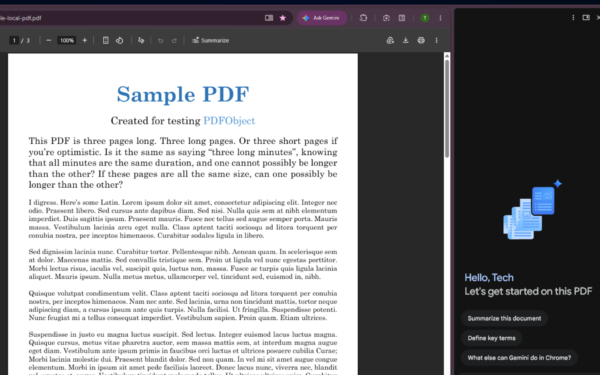
Gemini in Chrome side panel showing PDF summary options alongside an open document

Chrome could soon automatically summarize PDFs with Gemini

April 8, 2026

Snapdragon X2 Elite Gaming Shows Real Progress but Still Falls Short for Serious Players

April 8, 2026

ASUS Says No New Motherboards Needed for Intel Core Ultra 200S Plus

April 8, 2026

Leave a Comment Cancel reply

Your email address will not be published. Required fields are marked *

Recent Posts

  • Chrome could soon automatically summarize PDFs with Gemini
  • Snapdragon X2 Elite Gaming Shows Real Progress but Still Falls Short for Serious Players
  • ASUS Says No New Motherboards Needed for Intel Core Ultra 200S Plus
  • Google is Killing Chrome’s Link Preview Feature from Desktop
  • ASUS Snapdragon X2 Laptops Get Sudden Price Increase After Reviews

Recent Comments

  1. XxRIVTYxX on Intel Says It Tried to Help Before Crimson Desert Dropped Arc Support
  2. Gaurav Kumar on Chrome Prepares Nudge to ‘Move Tabs to the Side’ as Vertical Tabs Near Release
OnMSFT.com

The Tech News Site

Categories

  • Windows
  • Surface
  • Xbox
  • How-To
  • OnPodcast
  • Gaming
  • Edge
  • Teams

Recent Posts

  • Chrome could soon automatically summarize PDFs with Gemini
  • Snapdragon X2 Elite Gaming Shows Real Progress but Still Falls Short for Serious Players
  • ASUS Says No New Motherboards Needed for Intel Core Ultra 200S Plus
  • Google is Killing Chrome's Link Preview Feature from Desktop
  • ASUS Snapdragon X2 Laptops Get Sudden Price Increase After Reviews

Quick Links

  • About OnMSFT.com
  • Contact OnMSFT
  • Join Our Team
  • Privacy Policy
© 2010–2026 OnMSFT.com LLC. All rights reserved.
About OnMSFT.comContact OnMSFTPrivacy Policy
