Skip to content
OnMSFT.com
  • Home
  • About
  • Contact
  • Windows
  • Surface
  • Xbox
  • How-To
  • OnPodcast
  • Edge
  • Teams
  • Gaming
Menu
  • Home
  • About
  • Contact
  • Windows
  • Surface
  • Xbox
  • How-To
  • OnPodcast
  • Edge
  • Teams
  • Gaming
  1. Home
  2. News
  3. A closer look at Viva Engage Leadership Corner and Answers with Microsoft Viva – OnMSFT.com

A closer look at Viva Engage Leadership Corner and Answers with Microsoft Viva – OnMSFT.com

Kevin Okemwa Kevin Okemwa
September 23, 2022
1 min read

Yesterday, Microsoft launched a couple of new tools designed to enhance hybrid work and productivity. Among them were Answers in Viva and Leadership Corner which will be available in 2023 to licensed Viva suite users within the Viva Engage app. Today, we will be focusing on these features.

\n

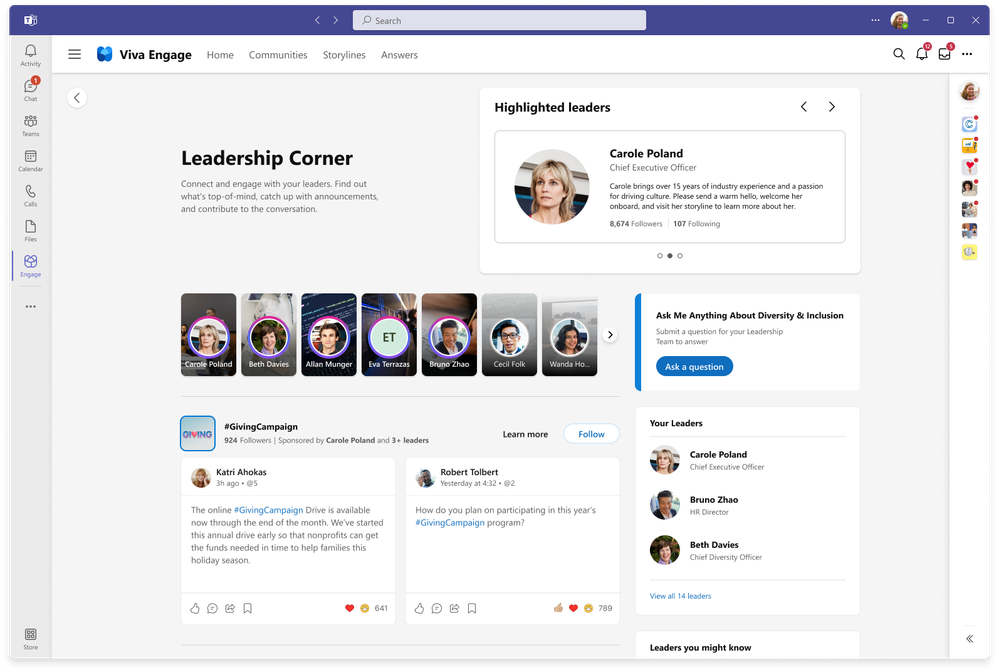
First up is Leadership Corner, a platform that helps enhance productivity for both employees and employers. Employees can get to view and take part in activities from their leaders such as surveys and discussions with #Campaigns and AMAs (Ask Me Anything) and finally allow them to interact with new leaders in the organization.
\n

\n

\n

\n

\n

thumbnail image 1 of blog post titled New ways to connect with leaders and find solutions in Viva Engage

\n

Employers will have access to a new leader dashboard with organizational analytics, storyline announcements that they can use to communicate with their teams, enhanced social campaign experiences, and finally the newly introduced “Ask Me Anything” style events. All these features will help break the communication gap between employees and employers, thus optimizing the organization’s operations.

\n

thumbnail image 2 of blog post titled New ways to connect with leaders and find solutions in Viva Engage

\n

Microsoft further released a walk-through video of Viva Engage on Microsoft Mechanics, the video highlights how to make the most out of the recently launched tools. Share your thoughts concerning these tools with us below.


\n

\n

\n

\n

\n

Share This Post:

Share this article:
Tags:
Microsoft Viva
Previous Article What to play on Game Pass: shooters (part 2) – OnMSFT.com Next Article As Apple runs away with the earbud market, Google fights back – OnMSFT.com

Related Articles

Chrome for Android Prepares Gemini “Let Chrome Browse for You” Setting

March 7, 2026

Microsoft, Google Say Claude Will Stay in Their Platforms Despite Pentagon Designation

March 7, 2026

Chrome’s Projects Panel Will Show Gemini and AI Mode Activity

March 7, 2026

Leave a Comment Cancel reply

Your email address will not be published. Required fields are marked *

Recent Posts

  • Chrome for Android Prepares Gemini “Let Chrome Browse for You” Setting
  • Microsoft, Google Say Claude Will Stay in Their Platforms Despite Pentagon Designation
  • Chrome’s Projects Panel Will Show Gemini and AI Mode Activity
  • Chrome’s GlowUp Design Brings Tab Strip Declutter, Tab Glow Effect, and Glass Toolbar
  • X Tests New Ad Format That Recommends Products Under Posts

Recent Comments

No comments to show.
OnMSFT.com

OnMSFT.com covers Microsoft news, reviews, and how-to guides. Formerly known as WinBeta, we have been your source for Microsoft news since 1998.

Categories

  • Windows
  • Surface
  • Xbox
  • How-To
  • OnPodcast
  • Gaming
  • Edge
  • Teams

Recent Posts

  • Chrome for Android Prepares Gemini "Let Chrome Browse for You" Setting
  • Microsoft, Google Say Claude Will Stay in Their Platforms Despite Pentagon Designation
  • Chrome's Projects Panel Will Show Gemini and AI Mode Activity
  • Chrome’s GlowUp Design Brings Tab Strip Declutter, Tab Glow Effect, and Glass Toolbar
  • X Tests New Ad Format That Recommends Products Under Posts

Quick Links

  • About OnMSFT.com
  • Contact OnMSFT
  • Join Our Team
  • Privacy Policy
© 2010–2026 OnMSFT.com LLC. All rights reserved.
About OnMSFT.comContact OnMSFTPrivacy Policy
