Skip to content
OnMSFT.com
  • Home
  • About
  • Contact
  • Windows
  • Surface
  • Xbox
  • How-To
  • OnPodcast
  • Edge
  • Teams
  • Gaming
Menu
  • Home
  • About
  • Contact
  • Windows
  • Surface
  • Xbox
  • How-To
  • OnPodcast
  • Edge
  • Teams
  • Gaming
  1. Home
  2. News
  3. Vivaldi 3.0 launches with a focus on privacy offering integrated tracking controls; also arrives on Android

Vivaldi 3.0 launches with a focus on privacy offering integrated tracking controls; also arrives on Android

Abhishek Baxi Abhishek Baxi
April 22, 2020
2 min read

The latest version of Vivaldi, a popular desktop browser for Windows (and Mac and Linux), is now available with a focus on privacy.

The latest version – Vivaldi 3.0 – arrives at the time when people are spending a lot more time online and the company hopes that the new browser will protect them from trackers, block unwanted ads, and provide them with several unique and useful features.

Both the desktop and mobile versions come with built-in privacy tools – Tracker and Ad blocker – to create a more private and fast web experience. With the Tracker blocker, Vivaldi is incorporating DuckDuckGo’s Tracker Radar for seamless protection from web trackers that gather personal information of users.

To up the ante on its privacy pitch, Vivaldi claims that while it has never tracked its users, it will now not let others track users either. There’s also the Ad blocker (disabled by default) that blocks intrusive ads without downloading extensions, bolstering privacy and speed.

You can enable or disable the Tracker blocker with the shield icon to the left of the address field and also choose the level of blocking for any website.

There are also some new features like a unique clock in the Status Bar, improved Spatial Navigation, and several new customization options. Here’s the complete changelog.
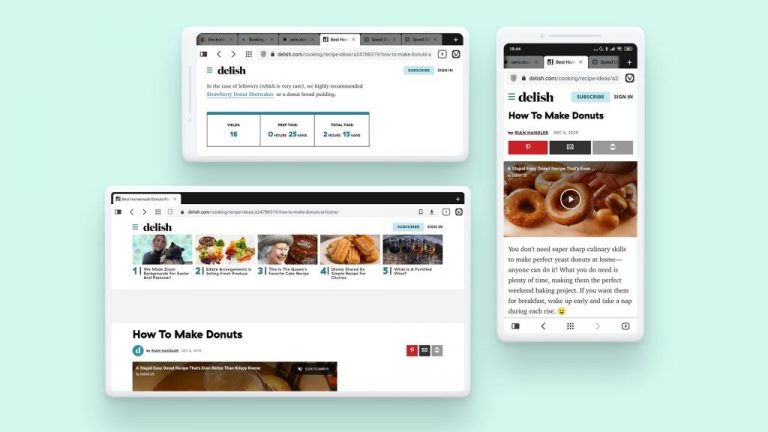
Vivaldi browser for Android

After a few months in beta, the first version of Vivaldi browser for Android has also launched. It is available for devices with Android 5 or higher and is compatible with tablets and Chromebooks as well. It comes with a native Ad blocker and tracking protection.

If you use Vivaldi on desktop as well as mobile, you can sync your browsing data – Bookmarks, Speed Dials, saved passwords, autofill information, History (only typed URLs for now), Notes – securely with end-to-end encryption.

Have you tried Vivaldi before? Would you want to explore it now or are you a happy camper with your current browser? Tell us in the comments!


Share This Post:

Tags: Vivaldi
Share this article:
Tags:
Vivaldi
Previous Article Microsoft hires new CVP for expanding health-care vertical Next Article This Could Be The Official Logo For Microsoft’s Upcoming Xbox Series X Next Gen Console – onmsft.com

Related Articles

Chrome and Gemini icons representing Gemini Live voice assistant integration in Chrome

Chrome tests Gemini Live voice assistant in a floating overlay panel

March 14, 2026

Chrome’s Organizer feature may sync Gemini and AI conversations across devices

March 14, 2026

After Chrome, Edge tests launching the browser automatically when you sign into Windows

March 13, 2026

Leave a Comment Cancel reply

Your email address will not be published. Required fields are marked *

Recent Posts

  • Chrome tests Gemini Live voice assistant in a floating overlay panel
  • Chrome’s Organizer feature may sync Gemini and AI conversations across devices
  • After Chrome, Edge tests launching the browser automatically when you sign into Windows
  • iPhone Fold Latest Rumors: Display, Cameras, RAM and Price Details Revealed
  • Samsung fears first mobile operating loss due to memory price surge

Recent Comments

No comments to show.
OnMSFT.com

OnMSFT.com covers Microsoft news, reviews, and how-to guides. Formerly known as WinBeta, we have been your source for Microsoft news since 1998.

Categories

  • Windows
  • Surface
  • Xbox
  • How-To
  • OnPodcast
  • Gaming
  • Edge
  • Teams

Recent Posts

  • Chrome tests Gemini Live voice assistant in a floating overlay panel
  • Chrome’s Organizer feature may sync Gemini and AI conversations across devices
  • After Chrome, Edge tests launching the browser automatically when you sign into Windows
  • iPhone Fold Latest Rumors: Display, Cameras, RAM and Price Details Revealed
  • Samsung fears first mobile operating loss due to memory price surge

Quick Links

  • About OnMSFT.com
  • Contact OnMSFT
  • Join Our Team
  • Privacy Policy
© 2010–2026 OnMSFT.com LLC. All rights reserved.
About OnMSFT.comContact OnMSFTPrivacy Policy