Skip to content
OnMSFT.com
  • Home
  • About
  • Contact
  • Windows
  • Surface
  • Xbox
  • How-To
  • OnPodcast
  • Edge
  • Teams
  • Gaming
Menu
  • Home
  • About
  • Contact
  • Windows
  • Surface
  • Xbox
  • How-To
  • OnPodcast
  • Edge
  • Teams
  • Gaming
  1. Home
  2. News
  3. Microsoft Teams Makes It Easier To Search For Meetings Participants – onmsft.com

Microsoft Teams Makes It Easier To Search For Meetings Participants – onmsft.com

Rabia Noureen Rabia Noureen
March 29, 2021
1 min read

Microsoft is planning to revamp the Microsoft Teams participant roster to make it easier for users to search for in-meeting participants. The company announced the change through the Microsoft 365 Admin Center ahead of the general availability in mid-April.

The app’s meeting roster search box, which currently allows organizers to search or invite people to join a meeting, will lose the dropdown menu, and it will add a new search field that should act as a filter. This change will enable users to search in meeting participants and take action on them directly from the participant roster. It is important to note that this update will only affect the Teams desktop and Web apps, and it does not apply to the mobile client. You can see how this new search experience will look below.
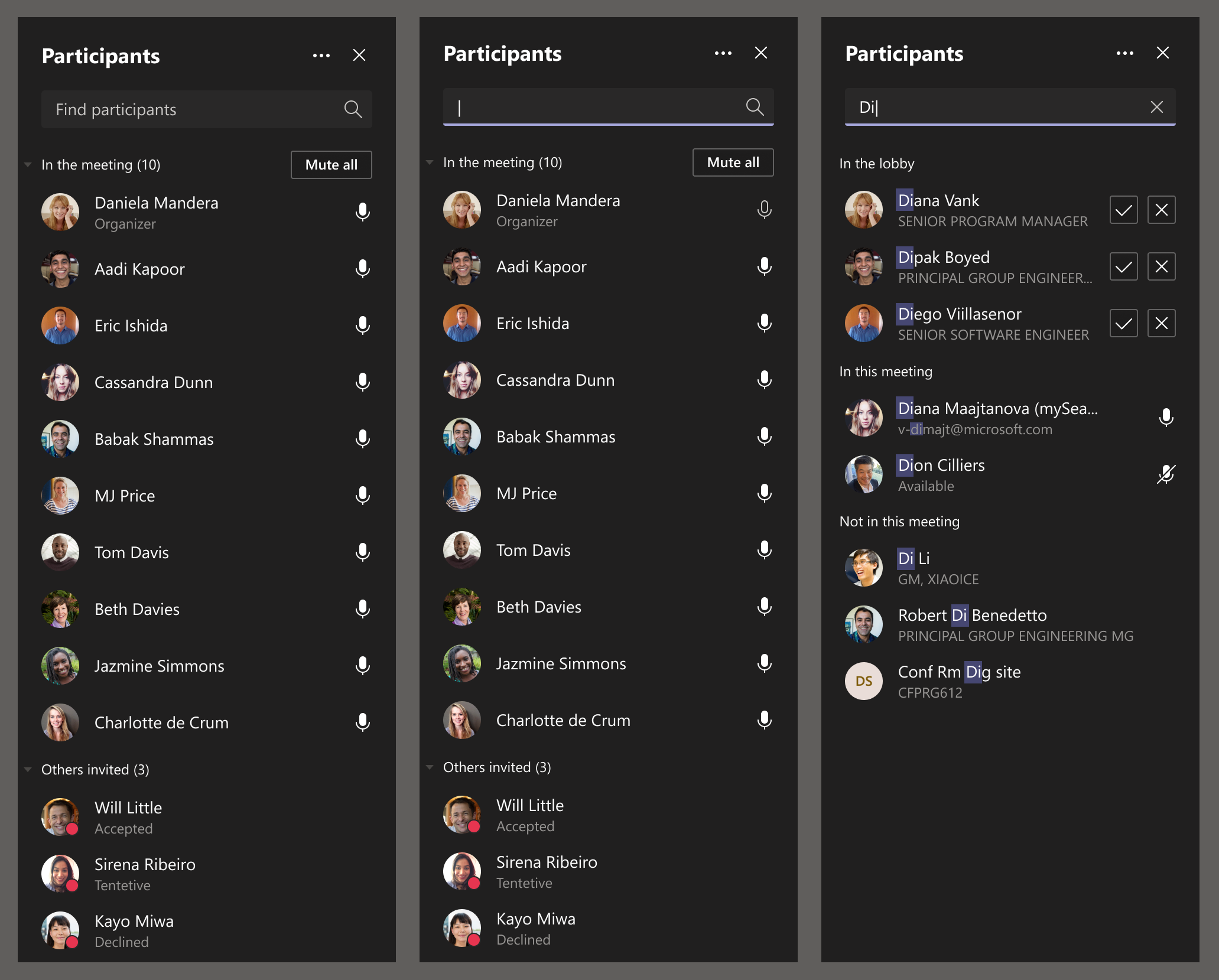
Controls

Microsoft is also changing the way the list of participants appears for the lobby, in meeting, presenters, and attendees participant sections during Microsoft Teams meetings. With this change, the initial view will now display a maximum of 20 participants for each of these sections, and with an option to view the full list. Moreover, meeting organizers will be able to review the list of participants before adding them to the active meeting.
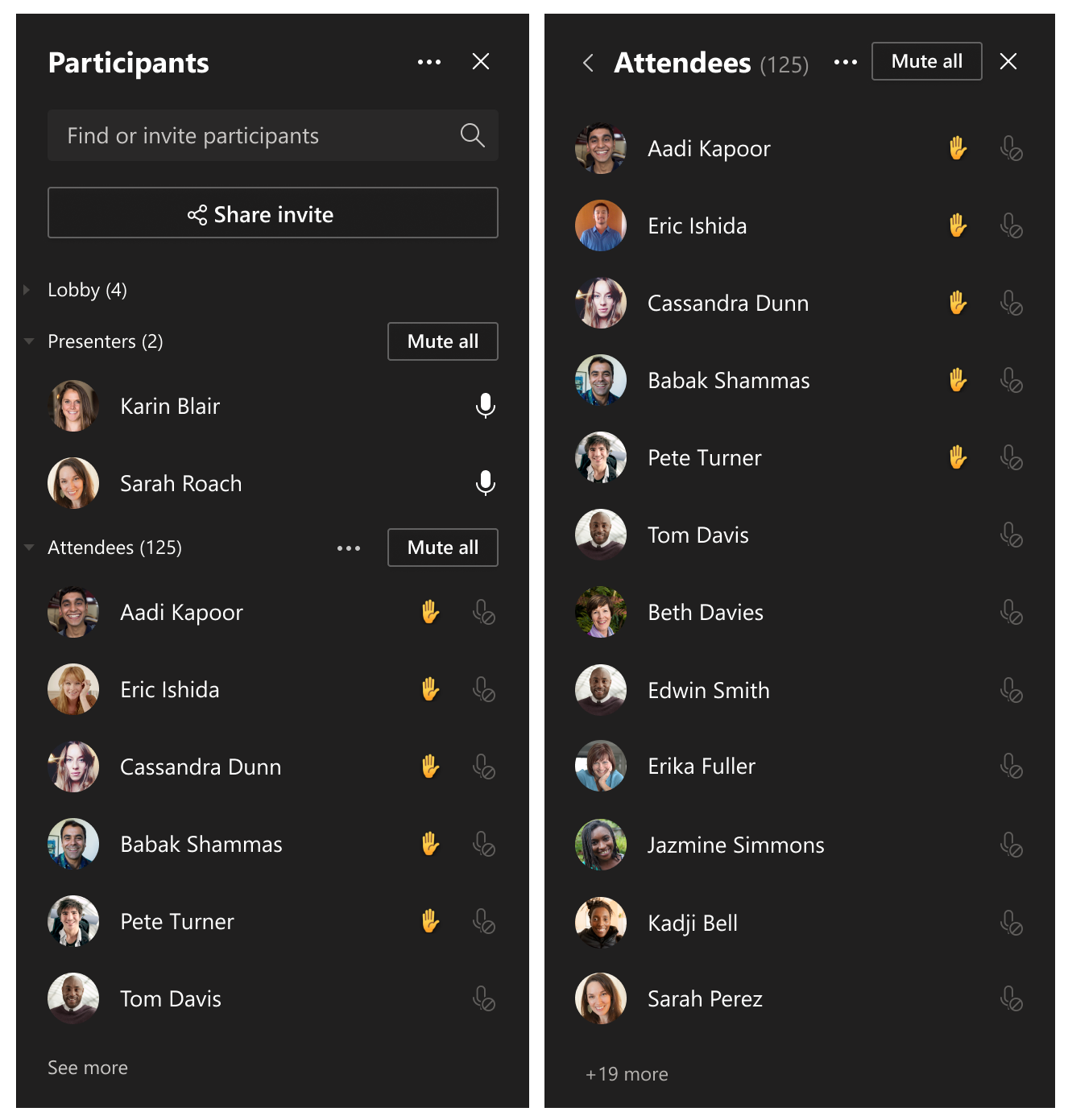
Participant pane - new

Microsoft says that these changes are currently rolling out in the Teams desktop and Web apps, and the deployment should be complete in the coming weeks. Let us know in the comments if you think revamping the app’s meeting participant roster is a good idea.


Share This Post:

Share this article:
Tags:
Microsoft 365 Microsoft Teams
Previous Article OneDrive Tips And Tricks For Professionals Next Article Microsoft Store Spring Sale Kicks Off With Big Surface And PC Deals

Related Articles

Red Magic 11 runs PC games like GTA 5 and Cyberpunk 2077 on Android at 60 FPS

April 4, 2026

New Ryzen 9 9950X3D2 loses performance on air cooling

April 4, 2026

Legion Go 2 now costs $1,999 at Best Buy, pricing no longer makes sense

April 4, 2026

Leave a Comment Cancel reply

Your email address will not be published. Required fields are marked *

Recent Posts

  • Red Magic 11 runs PC games like GTA 5 and Cyberpunk 2077 on Android at 60 FPS
  • New Ryzen 9 9950X3D2 loses performance on air cooling
  • Legion Go 2 now costs $1,999 at Best Buy, pricing no longer makes sense
  • ELSA Launches GigaIO Gryf Portable AI System with Modular Design
  • NASA Artemis II astronauts face Outlook issues in space as mission hits unexpected software glitch

Recent Comments

  1. XxRIVTYxX on Intel Says It Tried to Help Before Crimson Desert Dropped Arc Support
  2. Gaurav Kumar on Chrome Prepares Nudge to ‘Move Tabs to the Side’ as Vertical Tabs Near Release
OnMSFT.com

The Tech News Site

Categories

  • Windows
  • Surface
  • Xbox
  • How-To
  • OnPodcast
  • Gaming
  • Edge
  • Teams

Recent Posts

  • Red Magic 11 runs PC games like GTA 5 and Cyberpunk 2077 on Android at 60 FPS
  • New Ryzen 9 9950X3D2 loses performance on air cooling
  • Legion Go 2 now costs $1,999 at Best Buy, pricing no longer makes sense
  • ELSA Launches GigaIO Gryf Portable AI System with Modular Design
  • NASA Artemis II astronauts face Outlook issues in space as mission hits unexpected software glitch

Quick Links

  • About OnMSFT.com
  • Contact OnMSFT
  • Join Our Team
  • Privacy Policy
© 2010–2026 OnMSFT.com LLC. All rights reserved.
About OnMSFT.comContact OnMSFTPrivacy Policy
