
Skip to content
OnMSFT.com
  • Home
  • About
  • Contact
  • News
  • How-to
  • Feature stories
  • Deals
  • Microsoft / office 365
  • Reviews
Menu
  • Home
  • About
  • Contact
  • News
  • How-to
  • Feature stories
  • Deals
  • Microsoft / office 365
  • Reviews
  1. Home
  2. News
  3. The latest WindowsBlind 11 update lets you make Windows 11 look like Windows 95 – onmsft.com

The latest WindowsBlind 11 update lets you make Windows 11 look like Windows 95 – onmsft.com

Kevin Okemwa Kevin Okemwa
December 21, 2022
1 min read

If you aren’t conversant with Stardock, the company among other things gives users the ability to customize their PC beyond the default options provided by Windows. The platform also features products like WindowsBlinds which let users make their Windows 10 or Windows 11 interfaces look like previous versions of windows, such as WindowsXP.

With WindowsBlinds, you can customize window frames, task bars, start menu, and more based on your preference. Having released WindowBlinds 11 earlier this year, Stardock now features a modern theme that resembles a futuristic version of Windows, and in equal measure a retro theme that features everything that you loved about Windows XP.

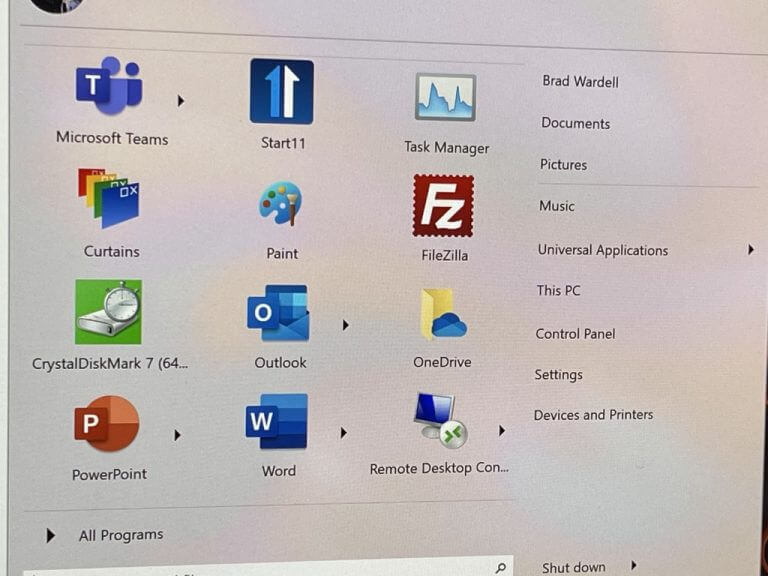
But did you know that you can now roll back further down memory lane? Stardock’s latest update to WindowBlinds 11 features a true classic Windows theme which has been included as a default option. The new theme will roll you back to the Windows 95 era at no additional cost.

The latest WindowsBlind 11 update lets you make Windows 11 look like Windows 95 - onmsft.com - December 21, 2022

That said, when you pair this new theme with Start11, your Start menu, frames, and taskbar will be themed too allowing you to enjoy and embrace the interface change fully.

Aside from the new theme, Stardock has indicated that the new update also features bug fixes. The team further highlighted that there more themes in the works that we are likely to see in the future as part of a WindowBlinds 11 update.

Share This Post:

Share this article:
Tags:
Stardock
Previous Article Assassin’s Creed Valhalla gets crossover content from Monster Hunter World – onmsft.com Next Article Microsoft should eye Netflix for a deal, just not a buyout – onmsft.com

Related Articles

Chrome tests Google Drive file uploads in the AI Mode compose box

April 14, 2026
Gemini image creation using right click desktop Chrome

Chrome lets you remake images with Gemini on desktop using just a right-click

April 13, 2026
Samsung Display crosses 5 million QD-OLED monitor shipments as demand grows fast, with new panels and strong premium market expansion worldwide.

Samsung Display Ships 5 Million QD-OLED Monitor Panels in Four Years

April 9, 2026

Leave a Comment Cancel reply

Your email address will not be published. Required fields are marked *

Recent Posts

  • Chrome tests Google Drive file uploads in the AI Mode compose box
  • Chrome lets you remake images with Gemini on desktop using just a right-click
  • Samsung Display Ships 5 Million QD-OLED Monitor Panels in Four Years
  • Intel Arc Pro B70 Teardown Reveals Blower Cooler and Early Board Design Details
  • Users Modify RTX 5090 Lightning Z Hardware to Unlock MSI’s Restricted 2500W BIOS

Recent Comments

  1. XxRIVTYxX on Intel Says It Tried to Help Before Crimson Desert Dropped Arc Support
  2. Gaurav Kumar on Chrome Prepares Nudge to ‘Move Tabs to the Side’ as Vertical Tabs Near Release
OnMSFT.com

The Tech News Site

Categories

  • Windows
  • Surface
  • Xbox
  • How-To
  • OnPodcast
  • Gaming
  • Edge
  • Teams

Recent Posts

  • Chrome tests Google Drive file uploads in the AI Mode compose box
  • Chrome lets you remake images with Gemini on desktop using just a right-click
  • Samsung Display Ships 5 Million QD-OLED Monitor Panels in Four Years
  • Intel Arc Pro B70 Teardown Reveals Blower Cooler and Early Board Design Details
  • Users Modify RTX 5090 Lightning Z Hardware to Unlock MSI’s Restricted 2500W BIOS

Quick Links

  • About OnMSFT.com
  • Contact OnMSFT
  • Join Our Team
  • Privacy Policy
© 2010–2026 OnMSFT.com LLC. All rights reserved.
About OnMSFT.comContact OnMSFTPrivacy Policy