Skip to content
OnMSFT.com
  • Home
  • About
  • Contact
  • Windows
  • Surface
  • Xbox
  • How-To
  • OnPodcast
  • Edge
  • Teams
  • Gaming
Menu
  • Home
  • About
  • Contact
  • Windows
  • Surface
  • Xbox
  • How-To
  • OnPodcast
  • Edge
  • Teams
  • Gaming
  1. Home
  2. News
  3. Intelligent message translation now supported in Teams for mobile devices – OnMSFT.com

Intelligent message translation now supported in Teams for mobile devices – OnMSFT.com

Kevin Okemwa Kevin Okemwa
October 31, 2022
1 min read

Ever since the COVID-19 pandemic hit, the workplace environment has not been the same. This is because most organizations had to warm up to the work from home idea, as a measure to prevent the further spread of the virus. Communications tools are a huge part of hybrid work to ensure that flow of communication within the organization is flawless.

Building upon this premise, Microsoft is launching yet another feature, Intelligent message translation in Microsoft Teams for mobile devices, which is designed to help users translate a chat message sent in a foreign language to their preferred language. At the moment, Teams supports the translation to and from more than 100 languages.

The Intelligent message translation feature is rolling out for both Microsoft Teams iOS & Android mobile devices. With this in place, users can further personalize their chat translation behavior by turning on automatic translation. “When collaborators are chatting in different languages, the intelligent message translation feature uses their account preferences to inform the user when they would benefit from translation, and then personalizes chat translation behavior,” says Microsoft.
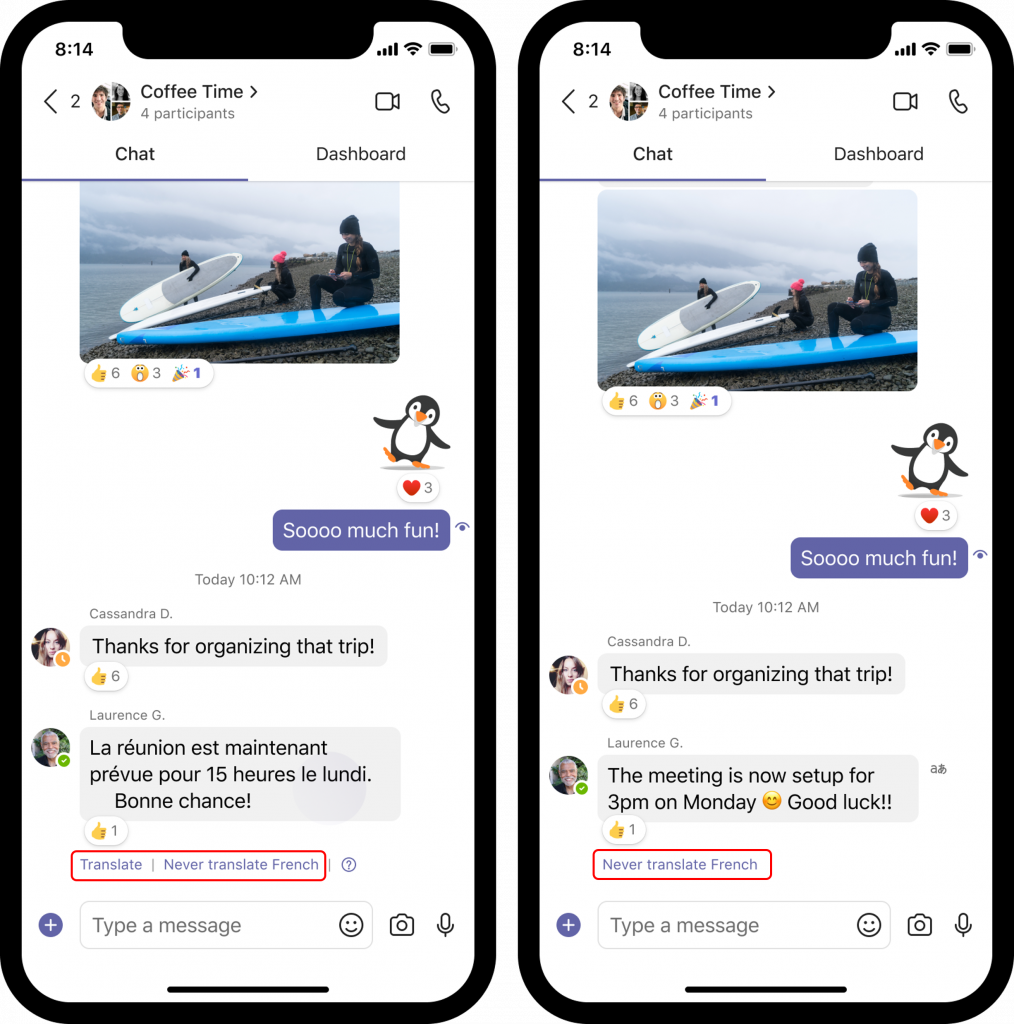
Intelligent message translation now supported in Teams for mobile devices - OnMSFT.com - October 31, 2022

As highlighted above, Teams will automatically provide you with a prompt whenever you receive a chat message in an unfamiliar language asking you to translate it to your preferred language.

However, if you are familiar with a language you can tap on the Never translate (language) button which will in turn leave the message as is in the chat. In turn, the language will be included in the Never translate list in Teams mobile.

If you have the latest release of Microsoft Teams for iOS & Android mobile devices, then you should be able to access this feature.


Share This Post:

Share this article:
Tags:
Microsoft Teams
Previous Article The best free optimization tools for Windows PC – OnMSFT.com Next Article Microsoft Issues workaround for Outlook sign in issues – OnMSFT.com

Related Articles

OpenAI says ChatGPT ‘Adult Mode’ Needs More Time

March 9, 2026

Claude Opus 4.6 Discovers 22 Firefox Vulnerabilities in Just Two Weeks

March 9, 2026
OpenClaw can now connect with Gmail, Drive, and Docs using Google’s new CLI

OpenClaw can now connect with Gmail, Drive, and Docs using Google’s new CLI

March 9, 2026

Leave a Comment Cancel reply

Your email address will not be published. Required fields are marked *

Recent Posts

  • OpenAI says ChatGPT ‘Adult Mode’ Needs More Time
  • Claude Opus 4.6 Discovers 22 Firefox Vulnerabilities in Just Two Weeks
  • OpenClaw can now connect with Gmail, Drive, and Docs using Google’s new CLI
  • Chrome Prepares Nudge to ‘Move Tabs to the Side’ as Vertical Tabs Near Release
  • How Apple Made the $599 MacBook Neo Without Using Plastic

Recent Comments

No comments to show.
OnMSFT.com

OnMSFT.com covers Microsoft news, reviews, and how-to guides. Formerly known as WinBeta, we have been your source for Microsoft news since 1998.

Categories

  • Windows
  • Surface
  • Xbox
  • How-To
  • OnPodcast
  • Gaming
  • Edge
  • Teams

Recent Posts

  • OpenAI says ChatGPT 'Adult Mode' Needs More Time
  • Claude Opus 4.6 Discovers 22 Firefox Vulnerabilities in Just Two Weeks
  • OpenClaw can now connect with Gmail, Drive, and Docs using Google’s new CLI
  • Chrome Prepares Nudge to 'Move Tabs to the Side' as Vertical Tabs Near Release
  • How Apple Made the $599 MacBook Neo Without Using Plastic

Quick Links

  • About OnMSFT.com
  • Contact OnMSFT
  • Join Our Team
  • Privacy Policy
© 2010–2026 OnMSFT.com LLC. All rights reserved.
About OnMSFT.comContact OnMSFTPrivacy Policy
