
Microsoft has just published its monthly recap of all the new features added to its Teams collaboration platform in May 2021. This month, the software giant is highlighting several enhancements made to the meetings, chat, and calling functionalities in Microsoft Teams to make the hybrid collaboration experience more engaging. Here’s what you need to know.
Meetings and webinars features

First up are the improvements being made to meetings and webinars. The new Dynamic view that began rolling out to public preview users last month is now generally available in Microsoft Teams. Additionally, the app is also getting a new Presenter mode for PowerPoint Live presentations that allows presenters to customize how their video feed and slides are displayed on the screen. The first Standout mode layout is rolling out now, while the Reporter and Side-by-side mode of the modes will be available soon.
Another improvement comes in terms of large meeting support for Teams. The app now supports webinars with up to 1,000 participants, which can scale to 10,000 attendees in view-only broadcast mode. It provides access to custom attendee registration pages, host controls, several presentation options, and post-event report generation capabilities. Some of the other features added to Teams in May can be seen below:
- New in-meeting sharing experience is now generally available in Microsoft Teams
- The Microsoft Teams desktop app for MacOS now lets users include their computer’s sound when sharing either their desktop or a window in a meeting.
- Meeting organizers can add a timer for all breakout rooms created in a meeting session.
- Microsoft Teams now supports Large gallery view and Together Mode for web meetings.
- The AI-based noise suppression capability is available on MacOS.
- Microsoft Teams makes it easier to search for meetings participants
- Meeting organizers can now disable attendees’ video streams
Polls in Teams is also gaining some new capabilities, including support for intelligent question suggestions, multiple-choice options, and more. Finally, Microsoft noted that participants with view-only permissions would no longer be able to download non-channel Teams meeting recordings on OneDrive.
Chat and collaboration features
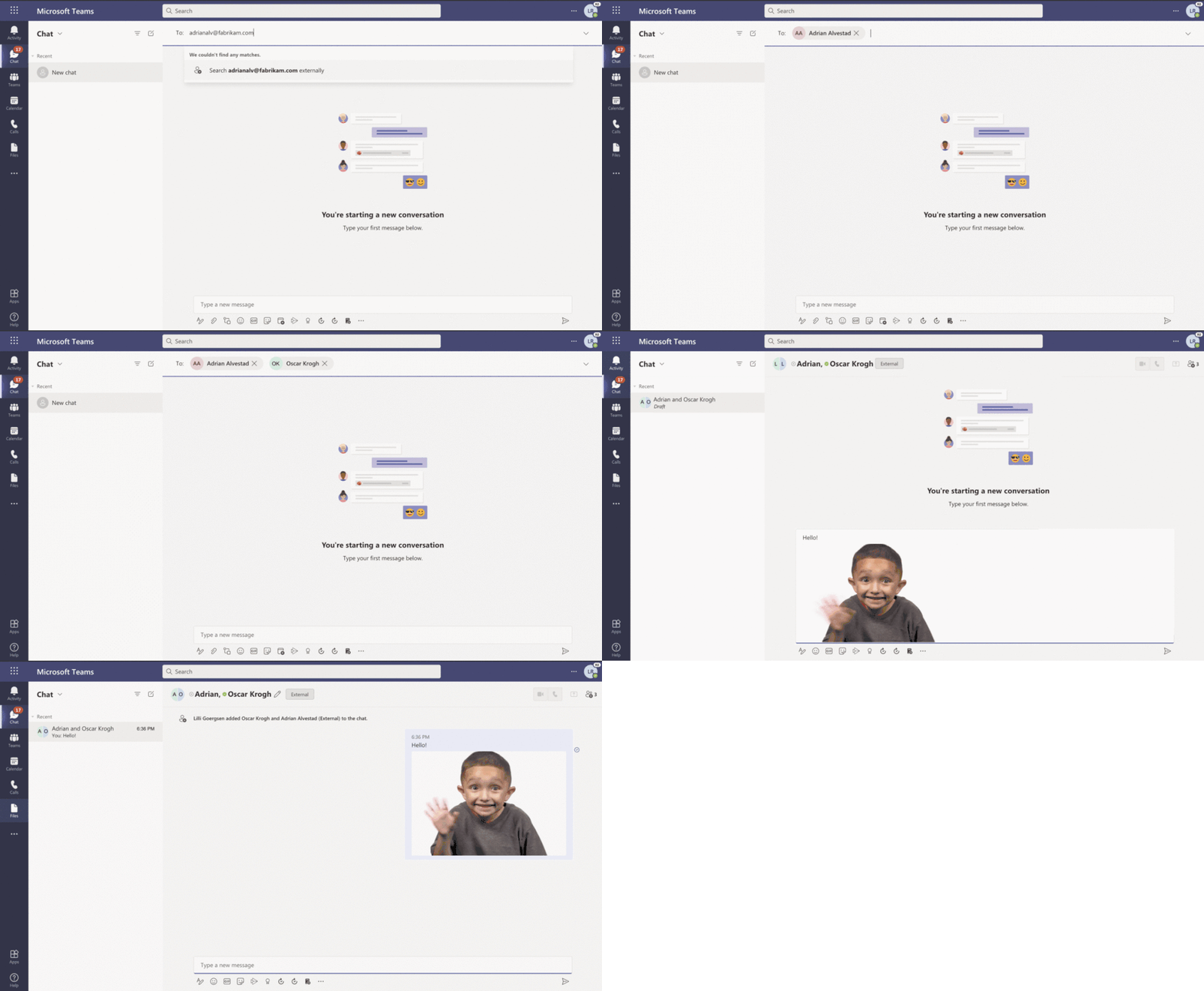
Next up are improvements to chat and collaboration in Microsoft Teams. The app is getting a new external group chat feature that lets users initiate and participate in group chats with people from outside their organization. It is rolling out now globally on Teams desktop, web, and mobile clients.
The Microsft Viva Insights app in Teams is adding new guided meditations and mindfulness experiences from Headspace, and these features will be accessible via the app Home page. This update will enable users to relax their minds to focus on major projects or before an important meeting. The Approvals App in Teams is also receiving Adobe Sign Integration.
New Calling features and Teams certified devices
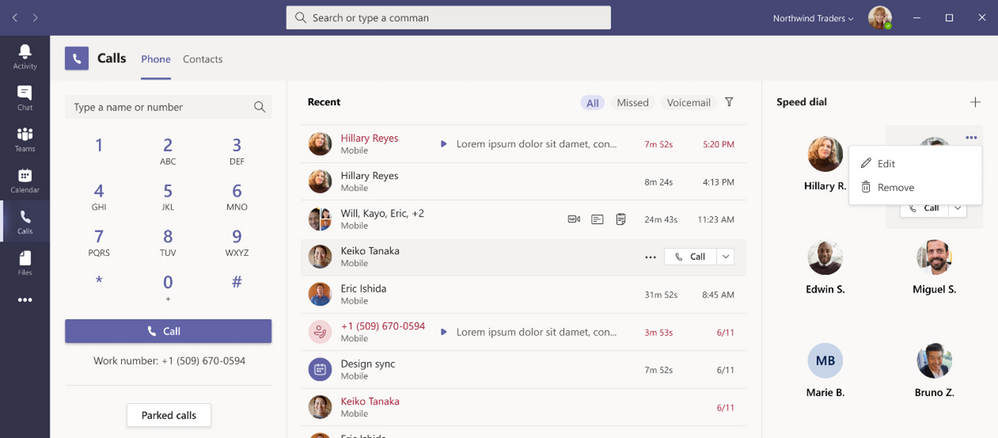
Moving along, there are new Calling features for Teams. First on our list is an improved Calling experience on the desktop, which includes a streamlined view that combines voicemail, contacts, and calling history on one screen. Call Merge is another new feature is that lets users merge their ongoing 1:1 call into another 1:1 or group call.
In the devices category, a new Teams Casting feature enables users to wirelessly share their iOS or Android device content in a Teams Room. There are also new devices from Creston, Poly, and Yealink to support all types of Teams services, and the list includes Crestron Flex Microsoft Teams Rooms, Voyager Focus 2 Bluetooth headset, and Yealink MVC840 Microsoft Teams Room system.
Other updates
For education customers, Microsoft Teams has introduced a new Supervised Chat functionality that prevents restricted users from starting new chats unless an appropriate supervisor is present in the meeting. This option is now generally available for Microsoft Teams desktop, web, and mobile users.
Lastly, Microsoft has detailed plenty of updates for specific users such as frontline workers and Government customers as well as some security, compliance, and privacy features for IT Admins. In case you missed it, the company also unveiled a bunch of new capabilities for developers at its annual Build developer conference this month and you can find more details in our separate post.


