Skip to content
OnMSFT.com
  • Home
  • About
  • Contact
  • Windows
  • Surface
  • Xbox
  • How-To
  • OnPodcast
  • Edge
  • Teams
  • Gaming
Menu
  • Home
  • About
  • Contact
  • Windows
  • Surface
  • Xbox
  • How-To
  • OnPodcast
  • Edge
  • Teams
  • Gaming
  1. Home
  2. News
  3. Microsoft Teams Now Lets Meeting Organizers Set A Time Limit For Breakout Rooms – onmsft.com

Microsoft Teams Now Lets Meeting Organizers Set A Time Limit For Breakout Rooms – onmsft.com

Rabia Noureen Rabia Noureen
April 19, 2021
2 min read

Last month, we reported that Microsoft Teams is getting a big update which will make it easier for organizers to manage Breakout rooms in meetings. Indeed, these features and enhancements have started rolling out globally to all desktop users, according to the Microsoft 365 roadmap.

The first new functionality that is coming to Microsoft Teams meetings is the ability to set timers for Breakout rooms. The organizers will now be able to set a time limit for all breakout rooms created in a meeting session. To do this, head to the Breakout rooms Settings panel and turn on the “Set a time limit” toggle button.
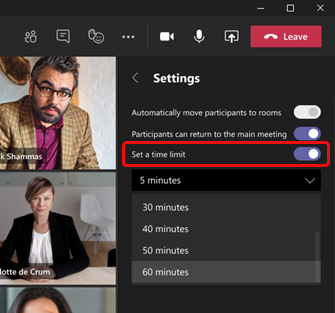
Breakout timer

The timer starts when the first participant joins the meeting, and it will automatically alert all attendees that the Breakout room session will close in 60 seconds. Once the timer expires, the room will automatically close, and participants will come back to the main meeting. The meeting organizer can also provide an option to participants to choose to disconnect or return to the main meeting room.

Next up, the app is also introducing a participant reassignment capability in Breakout sessions. Previously, reassignment could only be done when rooms were closed. Thanks to this feature, the organizer will also see an option to move joined participants across rooms and main meeting while Breakout rooms are open.

Finally, Microsoft Teams will now keep room configuration and assignments over multiple sessions or recurring meetings. This means that all attendees will remain assigned to their Breakout rooms, and the meeting organizer will need to change them manually.

The new Breakout room functionality is a welcome change for Microsoft Teams users. The ability to set timers could be helpful in a classroom setting where a teacher may want to split students into different groups for brainstorming sessions. While the update started rolling out a couple of days ago, and it’s not available to everyone just yet. We hope that the deployment will be complete by the end of this month.


Share This Post:

Share this article:
Tags:
Microsoft 365 Microsoft Teams
Previous Article How To Spotlight Someone In A Microsoft Teams Meeting Next Article New Xbox Update Brings Game Pass Recommendations And Suspend Games Feature

Related Articles

ByteDance pauses launch of Seedance 2.0 AI video tool after copyright complaints

March 15, 2026

Anthropic Offers Double Claude Usage Limits Until March 27

March 15, 2026
Elon Musk Confirms Tesla TeraFab Chip Project Announcement in 7 Days

Elon Musk Plans to Reveal World’s Largest Chip Fab Project Next Week

March 15, 2026

Leave a Comment Cancel reply

Your email address will not be published. Required fields are marked *

Recent Posts

  • ByteDance pauses launch of Seedance 2.0 AI video tool after copyright complaints
  • Anthropic Offers Double Claude Usage Limits Until March 27
  • Elon Musk Plans to Reveal World’s Largest Chip Fab Project Next Week
  • Meta considers major layoffs while pouring billions into AI
  • MacBook Neo Looks Impressive Until You See the 8GB RAM

Recent Comments

No comments to show.
OnMSFT.com

The Tech News Site

Categories

  • Windows
  • Surface
  • Xbox
  • How-To
  • OnPodcast
  • Gaming
  • Edge
  • Teams

Recent Posts

  • ByteDance pauses launch of Seedance 2.0 AI video tool after copyright complaints
  • Anthropic Offers Double Claude Usage Limits Until March 27
  • Elon Musk Plans to Reveal World’s Largest Chip Fab Project Next Week
  • Meta considers major layoffs while pouring billions into AI
  • MacBook Neo Looks Impressive Until You See the 8GB RAM

Quick Links

  • About OnMSFT.com
  • Contact OnMSFT
  • Join Our Team
  • Privacy Policy
© 2010–2026 OnMSFT.com LLC. All rights reserved.
About OnMSFT.comContact OnMSFTPrivacy Policy
