Skip to content
OnMSFT.com
  • Home
  • About
  • Contact
  • Windows
  • Surface
  • Xbox
  • How-To
  • OnPodcast
  • Edge
  • Teams
  • Gaming
Menu
  • Home
  • About
  • Contact
  • Windows
  • Surface
  • Xbox
  • How-To
  • OnPodcast
  • Edge
  • Teams
  • Gaming
  1. Home
  2. News
  3. Microsoft Teams now lets Meeting participants search for attendees in the roster – onmsft.com

Microsoft Teams now lets Meeting participants search for attendees in the roster – onmsft.com

Rabia Noureen Rabia Noureen
May 11, 2021
1 min read

Microsoft announced its plans to revamp the Microsoft Teams participant roster back in March this year. The company has now started rolling out this update to its Teams apps on the web and desktop, according to the Microsoft 365 roadmap.

The improved search experience in the participant roster replaces the existing dropdown menu with an intelligent search field. Interestingly, the new search field now acts as a filter and allows users to find in-meeting attendees and take action on them directly from the participant roster. The app still provides an option to search for people and request them they join the ongoing meeting.
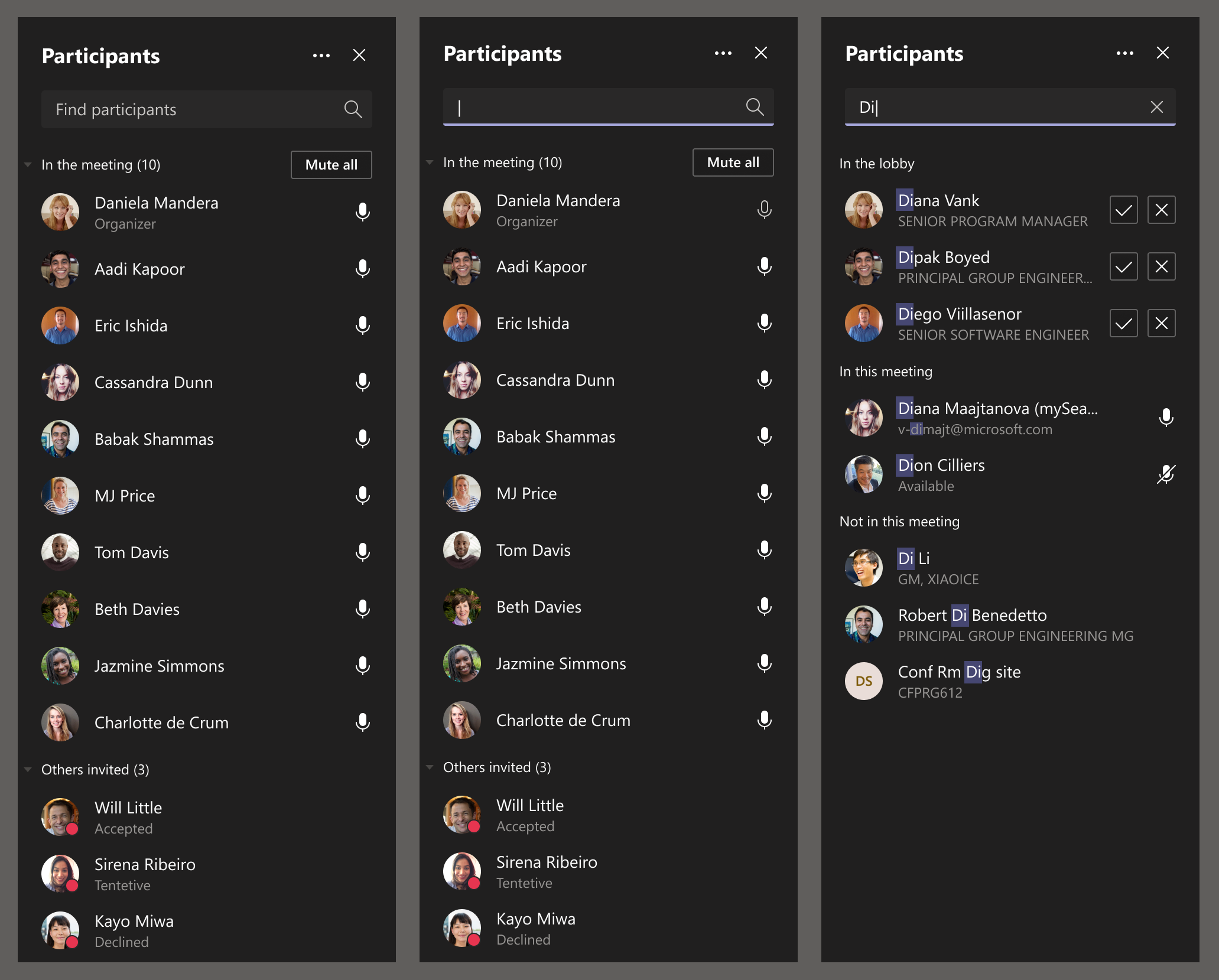
Controls

Furthermore, Microsoft has also made some changes to the way the list of participants appears during Teams meetings. The meeting roster will now display a maximum of 20 participants for the lobby, attendees participant, in meeting, and presenters sections. However, organizers will be able to check out the full list of participants in the lobby view before admitting them into the meeting.
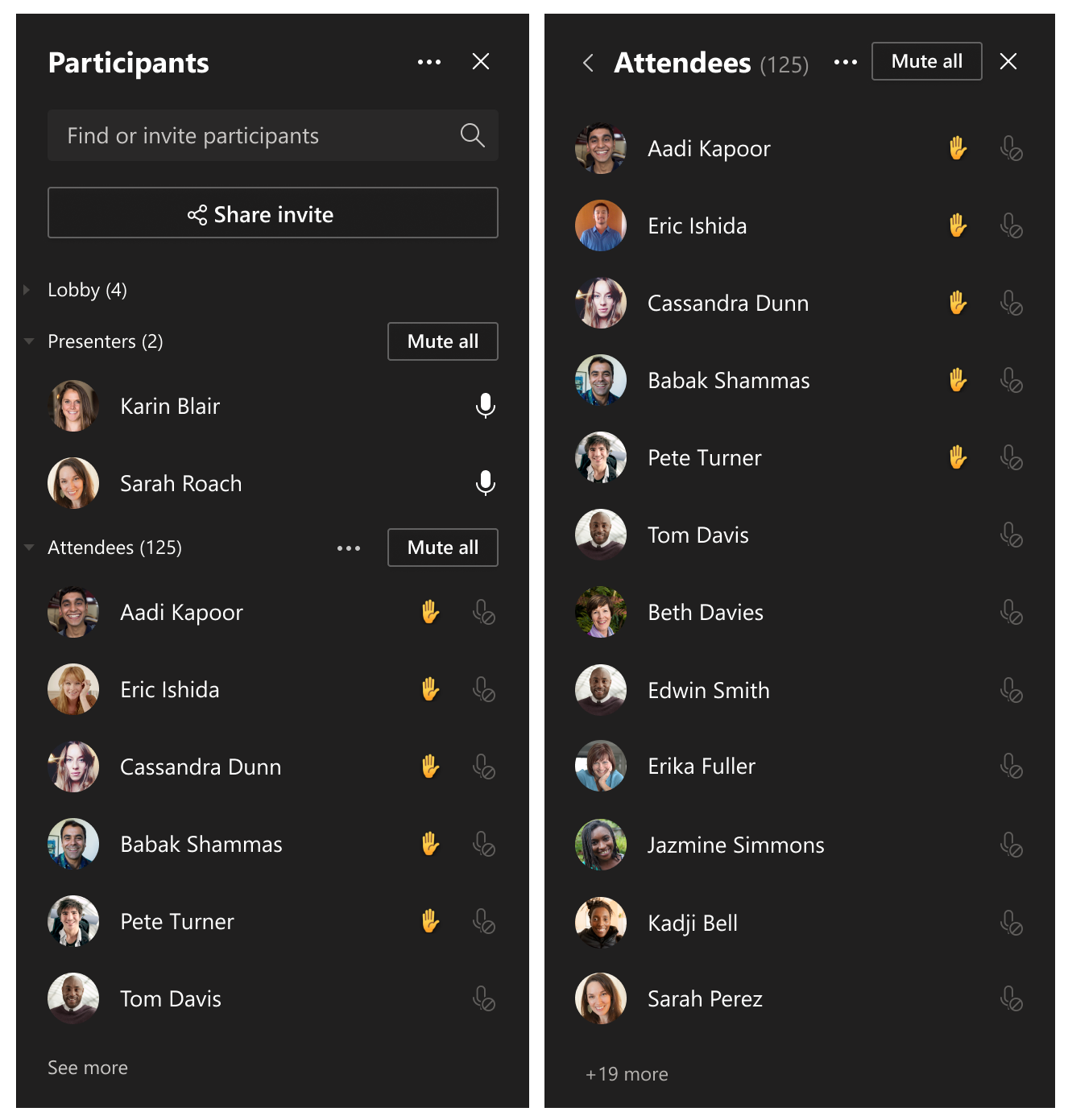
Participant pane - new

The new features started rolling out last week, and the deployment should be complete in mid-May. It is also worth noting that these changes aren’t available for the Teams mobile apps. Have you spotted the new search experience on your PCs? Let us know in the comments down below.


Share This Post:

Share this article:
Tags:
Microsoft 365 Microsoft Teams
Previous Article Microsoft Edge Canary on Android can now display Coupons on shopping sites – onmsft.com Next Article Dell brings 11th Gen H-series to XPS 15 and 17 with RTX GPU options – onmsft.com

Related Articles

Chrome and Gemini icons representing Gemini Live voice assistant integration in Chrome

Chrome tests Gemini Live voice assistant in a floating overlay panel

March 14, 2026

Chrome’s Organizer feature may sync Gemini and AI conversations across devices

March 14, 2026

After Chrome, Edge tests launching the browser automatically when you sign into Windows

March 13, 2026

Leave a Comment Cancel reply

Your email address will not be published. Required fields are marked *

Recent Posts

  • Chrome tests Gemini Live voice assistant in a floating overlay panel
  • Chrome’s Organizer feature may sync Gemini and AI conversations across devices
  • After Chrome, Edge tests launching the browser automatically when you sign into Windows
  • iPhone Fold Latest Rumors: Display, Cameras, RAM and Price Details Revealed
  • Samsung fears first mobile operating loss due to memory price surge

Recent Comments

No comments to show.
OnMSFT.com

OnMSFT.com covers Microsoft news, reviews, and how-to guides. Formerly known as WinBeta, we have been your source for Microsoft news since 1998.

Categories

  • Windows
  • Surface
  • Xbox
  • How-To
  • OnPodcast
  • Gaming
  • Edge
  • Teams

Recent Posts

  • Chrome tests Gemini Live voice assistant in a floating overlay panel
  • Chrome’s Organizer feature may sync Gemini and AI conversations across devices
  • After Chrome, Edge tests launching the browser automatically when you sign into Windows
  • iPhone Fold Latest Rumors: Display, Cameras, RAM and Price Details Revealed
  • Samsung fears first mobile operating loss due to memory price surge

Quick Links

  • About OnMSFT.com
  • Contact OnMSFT
  • Join Our Team
  • Privacy Policy
© 2010–2026 OnMSFT.com LLC. All rights reserved.
About OnMSFT.comContact OnMSFTPrivacy Policy
