Skip to content
OnMSFT.com
  • Home
  • About
  • Contact
  • Windows
  • Surface
  • Xbox
  • How-To
  • OnPodcast
  • Edge
  • Teams
  • Gaming
Menu
  • Home
  • About
  • Contact
  • Windows
  • Surface
  • Xbox
  • How-To
  • OnPodcast
  • Edge
  • Teams
  • Gaming
  1. Home
  2. News
  3. Dynamic View For Microsoft Teams Meetings Is Now Available In Public Preview – onmsft.com

Dynamic View For Microsoft Teams Meetings Is Now Available In Public Preview – onmsft.com

Rabia Noureen Rabia Noureen
April 12, 2021
2 min read

Last year, Microsoft unveiled a slew of updates for its Teams collaboration platform, including Dynamic view, live reactions, Together mode, and video filters. The company has now announced that the new Dynamic View is now generally available for public preview users in the Windows 10 and macOS desktop apps.

The new AI-powered feature enables Microsoft Teams users to share content side by side with meeting participants. “We have redesigned the meeting stage in order to optimize your experience of consuming shared content and engaging with video and audio participants. Dynamic View ensures that important items like audio/video thumbnails, content, pins/spotlights are shown as large as possible on your screen by smartly moving and resizing them based on the scenario,” the company explained.
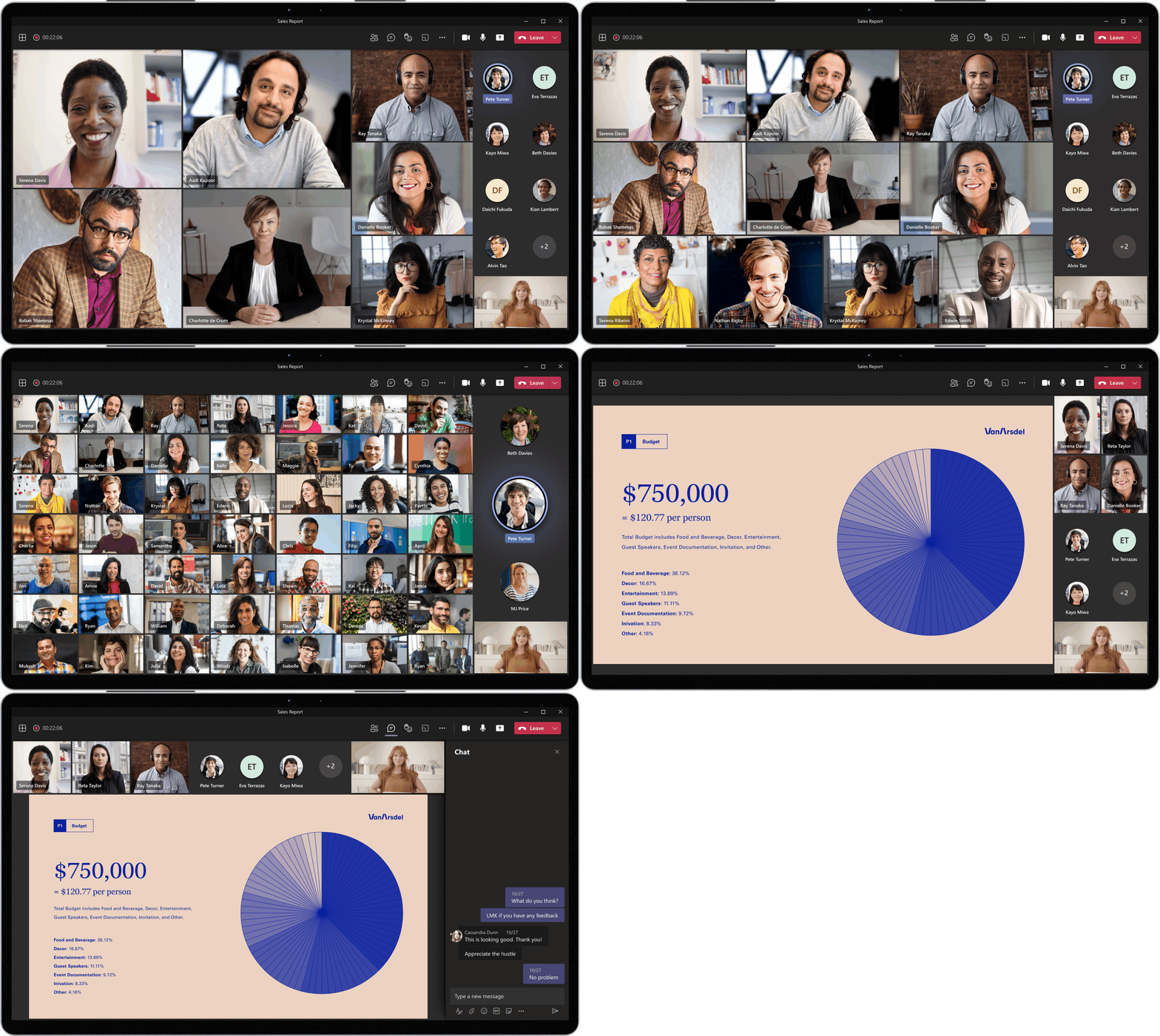
Dynamic view showcase

The feature is enabled by default in the public preview channel of Teams for all desktop users. Microsoft noted that this update introduces a new optimized visual experience in Teams Meetings, and users will see the following improvements:

  • The app will automatically optimize the layout to enlarge the shared content, with more participants being visible.
  • Users can spotlight/pin particular participants in the meeting alongside the presentation to make their tiles larger than other participants.
  • The meeting stage will show video and audio participants separately, and audio-only attendees will appear in smaller tiles.
  • The Together Mode will appear alongside content during meetings.
  • Users can now dock the participant gallery to the top of their screen to improve eye contact with other people.

The new capability has been designed to improve the existing meetings experience in the Teams desktop app, which only displays the video feed of the speaker in a tiny frame when watching shared content. Do you think that the Dynamic View will help improve the visibility of the shared content and key participants during meetings? Sound off in the comments down below.


Share This Post:

Share this article:
Tags:
Microsoft 365 Microsoft Teams
Previous Article New Surface Pro 7 And Surface Book 3 Firmware Updates Are Available With Camera Experience And Stability Improvements – onmsft.com Next Article Microsoft Laptop 4 Teased Ahead Of Spring Event

Related Articles

Chrome and Gemini icons representing Gemini Live voice assistant integration in Chrome

Chrome tests Gemini Live voice assistant in a floating overlay panel

March 14, 2026

Chrome’s Organizer feature may sync Gemini and AI conversations across devices

March 14, 2026

After Chrome, Edge tests launching the browser automatically when you sign into Windows

March 13, 2026

Leave a Comment Cancel reply

Your email address will not be published. Required fields are marked *

Recent Posts

  • Chrome tests Gemini Live voice assistant in a floating overlay panel
  • Chrome’s Organizer feature may sync Gemini and AI conversations across devices
  • After Chrome, Edge tests launching the browser automatically when you sign into Windows
  • iPhone Fold Latest Rumors: Display, Cameras, RAM and Price Details Revealed
  • Samsung fears first mobile operating loss due to memory price surge

Recent Comments

No comments to show.
OnMSFT.com

OnMSFT.com covers Microsoft news, reviews, and how-to guides. Formerly known as WinBeta, we have been your source for Microsoft news since 1998.

Categories

  • Windows
  • Surface
  • Xbox
  • How-To
  • OnPodcast
  • Gaming
  • Edge
  • Teams

Recent Posts

  • Chrome tests Gemini Live voice assistant in a floating overlay panel
  • Chrome’s Organizer feature may sync Gemini and AI conversations across devices
  • After Chrome, Edge tests launching the browser automatically when you sign into Windows
  • iPhone Fold Latest Rumors: Display, Cameras, RAM and Price Details Revealed
  • Samsung fears first mobile operating loss due to memory price surge

Quick Links

  • About OnMSFT.com
  • Contact OnMSFT
  • Join Our Team
  • Privacy Policy
© 2010–2026 OnMSFT.com LLC. All rights reserved.
About OnMSFT.comContact OnMSFTPrivacy Policy
