Skip to content
OnMSFT.com
  • Home
  • About
  • Contact
  • Windows
  • Surface
  • Xbox
  • How-To
  • OnPodcast
  • Edge
  • Teams
  • Gaming
Menu
  • Home
  • About
  • Contact
  • Windows
  • Surface
  • Xbox
  • How-To
  • OnPodcast
  • Edge
  • Teams
  • Gaming
  1. Home
  2. News
  3. Microsoft Teams gets new ‘My Day’ view in ‘Tasks by Planner and To Do’ App

Microsoft Teams gets new ‘My Day’ view in ‘Tasks by Planner and To Do’ App

OnMSFT Staff OnMSFT Staff
April 6, 2023
1 min read

Microsoft has announced the launch of the new ‘My Day’ view in the ‘Tasks by Planner and To Do’ app for Microsoft Teams. The new feature is designed to help users keep track of their tasks and remain organized, declutter the workspace, and also consolidate the tasks list.

To access the ‘My Day’ view feature in Teams, here’s what you’ll need to do:

  1. Launch Microsoft Teams.
  2. Next, select the Apps tab located in the left-hand sidebar.
  3. Now, search for Tasks by Planner and To Do and click on it.

Alternatively, you can opt to pin the app for easier accessibility every time you want to make use of it. Simply, right-click the app and pin it on the left navigation bar on Microsoft Teams. You’ll find the My Day view feature in the left-hand panel.
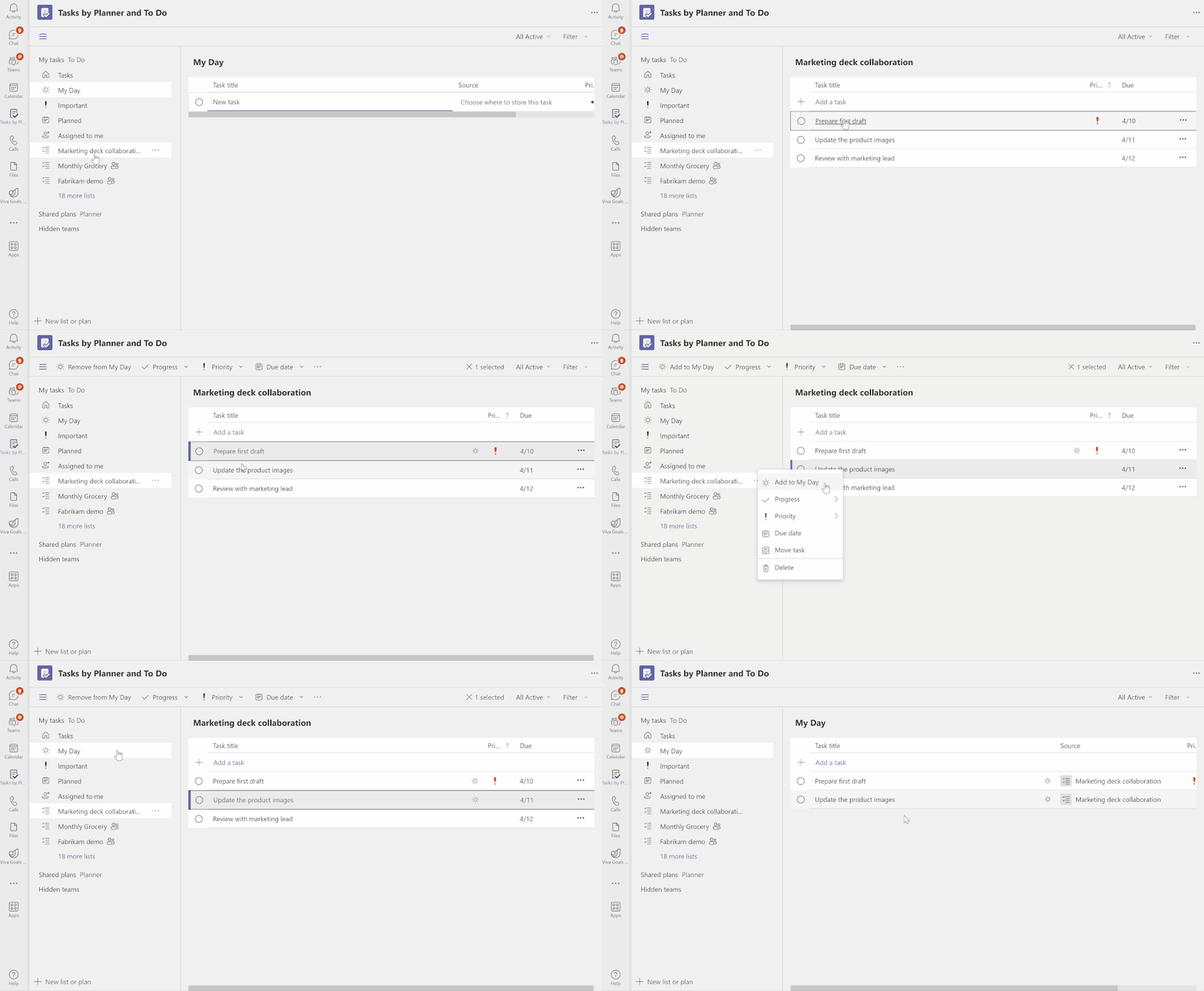
thumbnail image 1 captioned Add tasks to My Day from your lists

From this point, you can start adding tasks to stay organized. All you need to do is right-click on the task and select the Add to My Day option. This way you’ll be able to complete your tasks in a timely manner and avoid stretching deadlines.

In Teams-related news, we invite you to check out all the new features Microsoft rolled out to both Microsoft Teams (free) and Microsoft Teams for Education in March 2023.


Share this article:
Previous Article Fresh Microsoft Edge Dev build ships with filter options in the address bar and more Next Article Bing Chat makes its way to SwiftKey on Android

Related Articles

Watching YouTube in Edge? Copilot may suggest what to watch next

March 21, 2026
Denis Dyack calls NVIDIA DLSS 5 a mistake, warns it changes game art direction and could harm AAA game development future.

DLSS 5 “Needs to Go Back to the Drawing Board,” Eternal Darkness Dev Says

March 21, 2026

Crimson Desert players spot possible AI-generated art after launch

March 21, 2026

Leave a Comment Cancel reply

Your email address will not be published. Required fields are marked *

Recent Posts

  • Watching YouTube in Edge? Copilot may suggest what to watch next
  • DLSS 5 “Needs to Go Back to the Drawing Board,” Eternal Darkness Dev Says
  • Crimson Desert players spot possible AI-generated art after launch
  • Chrome is adding a scanning animation and ‘Checking download for safety’ message for risky downloads
  • Microsoft says Windows 11 will get faster, quieter, and more customizable

Recent Comments

No comments to show.
OnMSFT.com

The Tech News Site

Categories

  • Windows
  • Surface
  • Xbox
  • How-To
  • OnPodcast
  • Gaming
  • Edge
  • Teams

Recent Posts

  • Watching YouTube in Edge? Copilot may suggest what to watch next
  • DLSS 5 “Needs to Go Back to the Drawing Board,” Eternal Darkness Dev Says
  • Crimson Desert players spot possible AI-generated art after launch
  • Chrome is adding a scanning animation and 'Checking download for safety' message for risky downloads
  • Microsoft says Windows 11 will get faster, quieter, and more customizable

Quick Links

  • About OnMSFT.com
  • Contact OnMSFT
  • Join Our Team
  • Privacy Policy
© 2010–2026 OnMSFT.com LLC. All rights reserved.
About OnMSFT.comContact OnMSFTPrivacy Policy
