Skip to content
OnMSFT.com
  • Home
  • About
  • Contact
  • News
  • How-to
  • Feature stories
  • Deals
  • Microsoft / office 365
  • Reviews
Menu
  • Home
  • About
  • Contact
  • News
  • How-to
  • Feature stories
  • Deals
  • Microsoft / office 365
  • Reviews
  1. Home
  2. News
  3. New Side-by-side and Reporter presenter modes and more – what’s new in Microsoft Teams in August – onmsft.com

New Side-by-side and Reporter presenter modes and more – what’s new in Microsoft Teams in August – onmsft.com

Rabia Noureen Rabia Noureen
August 31, 2021
2 min read

Microsoft today detailed its monthly roundup for what’s new in Teams. This month, the firm is highlighting updates such as new Breakout Rooms capabilities, presenter modes, calling features, devices, and much more. Here’s a look at everything you need to know.

Meetings & webinars features

Thumbnail image 1 of blog post titled what’s new in microsoft teams | august 2021

In the “meetings and webinars” category, the Presenter mode in Microsoft Teams has introduced new Reporter and Side-by-Side options for meetings. These features have been designed to help presenters deliver more engaging and professional presentations. Microsoft Teams is also getting a new participant assignment experience in Breakout Rooms. This update should speed up the assignment process and make it easier to find their rooms or participants.

Additionally, Microsoft Teams will now offer real-time transcription and captioning in 27 additional languages. The list includes some popular languages such as Japanese, German, Hindi, and Portuguese (Brazil). The firm is also adding support for automatic recording and live transcription in Teams meetings. This feature requires IT Admins to turn on the Allow Transcription and Allow cloud recording policies.

Calling features

Thumbnail image 9 of blog post titled what’s new in microsoft teams | july 2021

Moving on to calls, Microsoft Teams has added dual-tone multi-frequency (DTMF) support for users on Citrix VDI. This means that the Citrix Workspace users get the ability to use the Microsoft Teams dial pad to join the meeting. You can learn more about this feature on this support page.

Next up is a new feature called call transfer. This new feature enables users to seamlessly move an ongoing Teams VoIP/PSTN/group call across different devices.

Microsoft Teams Rooms update on Android
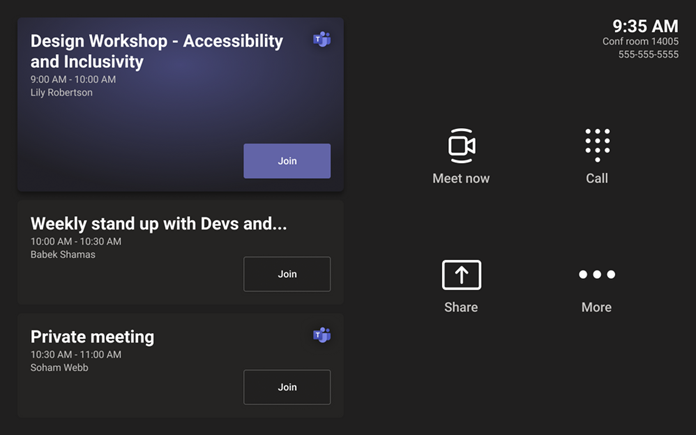
Thumbnail image 4 of blog post titled what’s new in microsoft teams | august 2021

Microsoft has released a new update for Microsoft Teams Rooms on Android. The latest update brings support for sharing screens via an HDMI connection. The Microsoft Teams Admin Center now includes a new feature that enables IT Admins to remotely complete sign-in and provisioning processes. Moreover, Teams Rooms can also be configured automatically to answer a “Meet Now” call and select Teams Rooms can now transmit 1080p resolution.

The Redmond giant has also announced some new devices to support all types of Teams meetings. More specifically, there is a new personal webcam from AudioCodes that can be installed via USB on any laptop or monitor.

Other updates

For education, Microsoft Teams has added a new Reading Progress tool to help students improve their reading skills. On the development side of things, there is a new Developer Portal for Teams that allows developers to build their own immersive Together Mode scenes for meetings.

Last but not least, Microsoft has detailed a handful of new capabilities for IT Admins and Governments customers, and you can find more information in the blog post.


Share This Post:

Share this article:
Tags:
Microsoft 365 Microsoft Teams
Previous Article Windows 11 won’t have Android apps ready at launch Next Article Windows Update will tell if Windows 10 PCs can run Windows 11

Related Articles

Gemini image creation using right click desktop Chrome

Chrome lets you remake images with Gemini on desktop using just a right-click

April 13, 2026
Samsung Display crosses 5 million QD-OLED monitor shipments as demand grows fast, with new panels and strong premium market expansion worldwide.

Samsung Display Ships 5 Million QD-OLED Monitor Panels in Four Years

April 9, 2026
Intel Arc Pro B70 teardown reveals blower cooler design, PCB layout, firmware details, and early insights into Battlemage workstation GPU hardware.

Intel Arc Pro B70 Teardown Reveals Blower Cooler and Early Board Design Details

April 9, 2026

Leave a Comment Cancel reply

Your email address will not be published. Required fields are marked *

Recent Posts

  • Chrome lets you remake images with Gemini on desktop using just a right-click
  • Samsung Display Ships 5 Million QD-OLED Monitor Panels in Four Years
  • Intel Arc Pro B70 Teardown Reveals Blower Cooler and Early Board Design Details
  • Users Modify RTX 5090 Lightning Z Hardware to Unlock MSI’s Restricted 2500W BIOS
  • Intel Arc GPUs Finally Run Crimson Desert After Driver Update, But Issues Remain

Recent Comments

  1. XxRIVTYxX on Intel Says It Tried to Help Before Crimson Desert Dropped Arc Support
  2. Gaurav Kumar on Chrome Prepares Nudge to ‘Move Tabs to the Side’ as Vertical Tabs Near Release
OnMSFT.com

The Tech News Site

Categories

  • Windows
  • Surface
  • Xbox
  • How-To
  • OnPodcast
  • Gaming
  • Edge
  • Teams

Recent Posts

  • Chrome lets you remake images with Gemini on desktop using just a right-click
  • Samsung Display Ships 5 Million QD-OLED Monitor Panels in Four Years
  • Intel Arc Pro B70 Teardown Reveals Blower Cooler and Early Board Design Details
  • Users Modify RTX 5090 Lightning Z Hardware to Unlock MSI’s Restricted 2500W BIOS
  • Intel Arc GPUs Finally Run Crimson Desert After Driver Update, But Issues Remain

Quick Links

  • About OnMSFT.com
  • Contact OnMSFT
  • Join Our Team
  • Privacy Policy
© 2010–2026 OnMSFT.com LLC. All rights reserved.
About OnMSFT.comContact OnMSFTPrivacy Policy
