Skip to content
OnMSFT.com
  • Home
  • About
  • Contact
  • Windows
  • Surface
  • Xbox
  • How-To
  • OnPodcast
  • Edge
  • Teams
  • Gaming
Menu
  • Home
  • About
  • Contact
  • Windows
  • Surface
  • Xbox
  • How-To
  • OnPodcast
  • Edge
  • Teams
  • Gaming
  1. Home
  2. News
  3. New Windows 11 Insider builds drop for Dev, Canary, and Beta Channels, all three get new Facebook widget

New Windows 11 Insider builds drop for Dev, Canary, and Beta Channels, all three get new Facebook widget

Kip Kniskern Kip Kniskern
May 4, 2023
2 min read

Microsoft released new Windows 11 Insider builds today for the Dev Channel with build 23451, the Beta Channel with 22621.1690 and 22624.1690, and the Canary Channel with 25357. All three channels are getting a new version of the Facebook widget:

Facebook is rolling out a preview version of their widget. To give it a try, download the Facebook app from the Microsoft Store or update to the latest version of the app. Then open the widgets board and navigate to the widgets picker by clicking the “+” button at the top-right of the board to pin your widget.
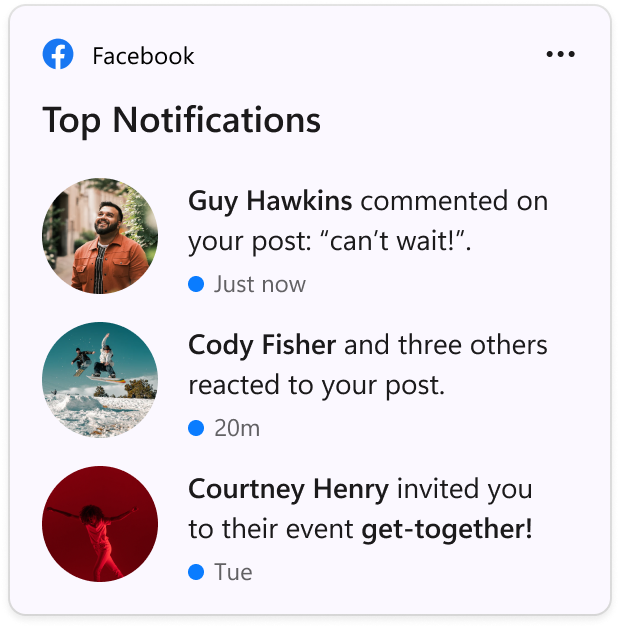
The Facebook widget.

The Canary Channel also includes the new volume mixer experience in Quick Settings now being available for all Canary Channel users.

For the Beta Channel, both versions are trying out the addition of an alert to add a recovery email address or phone number. Also in testing is a change from “Recommended” to “For You” in the Start Menu. Build 22624.1690 includes fiexes to a crash when entering your PIN with the touch keyboard on the login screen, additional fixes to 2FA code patterns not being recognized, and more. You can check out the Windows Insider blog post for all the details.

The Dev Channel includes some new features, including a Modernized Details Pane in File Explorer, some testing with Windows Spotlight treatments, and enhanced Narrator interactions with Excel. Again, be sure to check out the Dev Channel Windows Insider blog post for all the details.


Check out more from onmsft.com!

Share this article:
Previous Article LinkedIn experiments with AI assistance for job hunters Next Article Google preempts developer conference news by advertising its Pixel Fold early

Related Articles

Chrome and Gemini icons representing Gemini Live voice assistant integration in Chrome

Chrome tests Gemini Live voice assistant in a floating overlay panel

March 14, 2026

Chrome’s Organizer feature may sync Gemini and AI conversations across devices

March 14, 2026

After Chrome, Edge tests launching the browser automatically when you sign into Windows

March 13, 2026

Leave a Comment Cancel reply

Your email address will not be published. Required fields are marked *

Recent Posts

  • Chrome tests Gemini Live voice assistant in a floating overlay panel
  • Chrome’s Organizer feature may sync Gemini and AI conversations across devices
  • After Chrome, Edge tests launching the browser automatically when you sign into Windows
  • iPhone Fold Latest Rumors: Display, Cameras, RAM and Price Details Revealed
  • Samsung fears first mobile operating loss due to memory price surge

Recent Comments

No comments to show.
OnMSFT.com

OnMSFT.com covers Microsoft news, reviews, and how-to guides. Formerly known as WinBeta, we have been your source for Microsoft news since 1998.

Categories

  • Windows
  • Surface
  • Xbox
  • How-To
  • OnPodcast
  • Gaming
  • Edge
  • Teams

Recent Posts

  • Chrome tests Gemini Live voice assistant in a floating overlay panel
  • Chrome’s Organizer feature may sync Gemini and AI conversations across devices
  • After Chrome, Edge tests launching the browser automatically when you sign into Windows
  • iPhone Fold Latest Rumors: Display, Cameras, RAM and Price Details Revealed
  • Samsung fears first mobile operating loss due to memory price surge

Quick Links

  • About OnMSFT.com
  • Contact OnMSFT
  • Join Our Team
  • Privacy Policy
© 2010–2026 OnMSFT.com LLC. All rights reserved.
About OnMSFT.comContact OnMSFTPrivacy Policy
