Skip to content
OnMSFT.com
  • Home
  • About
  • Contact
  • News
  • How-to
  • Feature stories
  • Deals
  • Microsoft / office 365
  • Reviews
Menu
  • Home
  • About
  • Contact
  • News
  • How-to
  • Feature stories
  • Deals
  • Microsoft / office 365
  • Reviews
  1. Home
  2. Microsoft / office 365
  3. New Offline experience for Teams, video conferencing monitors, and more, here’s everything added to Teams in January 2021

New Offline experience for Teams, video conferencing monitors, and more, here’s everything added to Teams in January 2021

Rabia Noureen Rabia Noureen
January 29, 2021
2 min read

Microsoft has released a roundup of all the updates made to its Teams communication platform in January 2021. Some of the detailed features have already been announced, including the new Approvals app, an offline experience, and more. Here’s a look at everything you need to know.

Chat & Collaboration features


The first key area of improvement is chat and collaboration. In January 2021, the company rolled out several enhancements to Teams, including a new tool for managing Approval requests. The Approvals app brings users the ability to create, manage, and share approvals directly within Microsoft Teams. It is compatible with all supported platforms, including Microsoft Dynamics 365, Power Automate, as well as SharePoint.

In addition, there is a new offline experience with support for queueing messages in chats and channels in Teams. The offline autosend option will queue all messages when a device goes offline to send them later when the internet connection is resumed. IT Admins can now include up to 10,000 users in an org-wide team, full details can be found here.

Meetings and Calling features
thumbnail image 2 of blog post titled What’s New in Microsoft Teams | January 2021

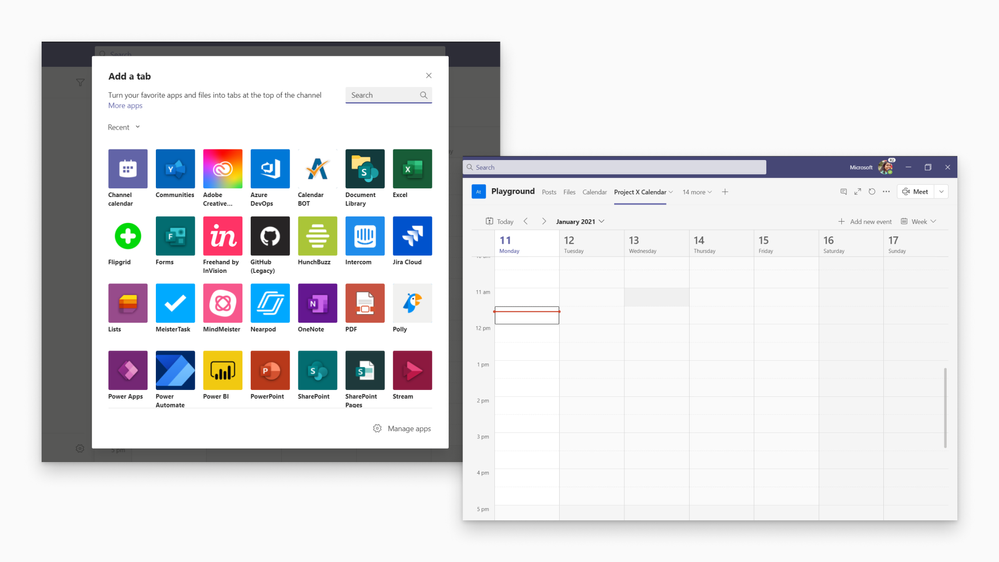
Moving on to Meetings, the collaboration platform picked up the ability to add a shared calendar to a Teams channel. The shared calendar provides quick access to all scheduled meetings, and it automatically sends notifications to the channel as soon as a member creates a new meeting.

Microsoft Teams also gained support for meeting chat moderation settings, allowing the meeting organizers to manage participants’ ability to chat before, during, and after a meeting. The firm has increased the free Audio Conferencing offer until June 30th, 2021.

For calling experiences in Teams, Microsoft noted that Cataleya, ULTATEL, Atos, and Patton had joined the list of certified SBCs. This integration will make it easier for Teams users to make and receive calls via the Public Switched Telephone Network (PSTN) in scenarios when linked with Microsoft Phone System. To get started, be sure to check out this page.

Microsoft Teams devices and more

Teams Button Dell Monitor

Teams devices also have plenty of news, and the company has detailed all the new phones, peripherals, and displays built for the collaboration service. The list includes Logitech Rally Bar, Crestron Flex Mercury Mini, Yealink A30, AudioCodes RXV80, and three video conferencing monitors by Dell. These monitors come with a dedicated Microsoft Teams button that lets users instantly join Microsoft Teams meetings. The newly announced Dell monitors will be available in February 2021.

Lastly, there are also some security updates and quite a few new features for Teams for Education, first-line workers, and Government customers. Microsoft Teams has announced a handful of capabilities for Power Platform and custom development, which can be found in the blog post.


Share This Post:

Tags: Microsoft 365 | Microsoft Teams
Share this article:
Tags:
Microsoft 365 Microsoft Teams
Previous Article Hands-on with The Medium, the first Xbox Series X|S exclusive game of 2021 Next Article Microsoft’s CVP for Education says Chromebooks are “faster, cheaper … we have our work cut out for us”

Related Articles

Chrome tests Google Drive file uploads in the AI Mode compose box

April 14, 2026
Gemini image creation using right click desktop Chrome

Chrome lets you remake images with Gemini on desktop using just a right-click

April 13, 2026
Samsung Display crosses 5 million QD-OLED monitor shipments as demand grows fast, with new panels and strong premium market expansion worldwide.

Samsung Display Ships 5 Million QD-OLED Monitor Panels in Four Years

April 9, 2026

Leave a Comment Cancel reply

Your email address will not be published. Required fields are marked *

Recent Posts

  • Chrome tests Google Drive file uploads in the AI Mode compose box
  • Chrome lets you remake images with Gemini on desktop using just a right-click
  • Samsung Display Ships 5 Million QD-OLED Monitor Panels in Four Years
  • Intel Arc Pro B70 Teardown Reveals Blower Cooler and Early Board Design Details
  • Users Modify RTX 5090 Lightning Z Hardware to Unlock MSI’s Restricted 2500W BIOS

Recent Comments

  1. XxRIVTYxX on Intel Says It Tried to Help Before Crimson Desert Dropped Arc Support
  2. Gaurav Kumar on Chrome Prepares Nudge to ‘Move Tabs to the Side’ as Vertical Tabs Near Release
OnMSFT.com

The Tech News Site

Categories

  • Windows
  • Surface
  • Xbox
  • How-To
  • OnPodcast
  • Gaming
  • Edge
  • Teams

Recent Posts

  • Chrome tests Google Drive file uploads in the AI Mode compose box
  • Chrome lets you remake images with Gemini on desktop using just a right-click
  • Samsung Display Ships 5 Million QD-OLED Monitor Panels in Four Years
  • Intel Arc Pro B70 Teardown Reveals Blower Cooler and Early Board Design Details
  • Users Modify RTX 5090 Lightning Z Hardware to Unlock MSI’s Restricted 2500W BIOS

Quick Links

  • About OnMSFT.com
  • Contact OnMSFT
  • Join Our Team
  • Privacy Policy
© 2010–2026 OnMSFT.com LLC. All rights reserved.
About OnMSFT.comContact OnMSFTPrivacy Policy
