
Just a couple days after announcing the general availability of the Windows 10 October 2018 update, Microsoft had to stop the public rollout over the weekend after acknowledging that installing the update could erase personal files. It’s still not clear how widespread the issue is, but Head of the Windows Insider Program Dona Sarkar has since explained that Microsoft “has the tools” to recover lost personal data.
#WindowsInsiders If you’ve run into the “missing files after update” issue for 1809/October 2018 Fall update, please call our support line. They have the tools to get you back to a good state. This build is no longer available to download manually: https://t.co/Ce9WVILknp pic.twitter.com/fvisQi1c8g
— Dona Sarkar (@donasarkar) October 6, 2018
Windows 10 users who have encountered the issue are invited to contact Microsoft Support asap, but as spotted by Bleeping Computer, the company is also inviting consumers to stop using affected PCs. This recommendation was quietly added to the Windows 10 update history support page, with a new statement asking users to “please minimize your use of the affected device and contact us directly.”
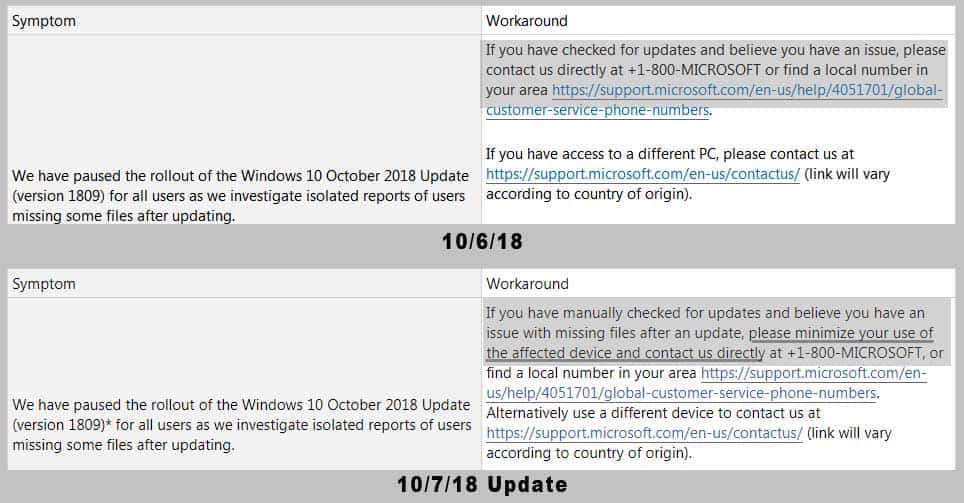
Image credit: Bleeping Computer.
Presumably, this recommendation has been made to avoid making deleted files unrecoverable. According to a Reddit user who contacted Microsoft Support, the technicians may invite affected customers to run System Restore to go back to Windows 10 version 1803, but that may not be possible if System Restore has been disabled in Settings. In that case, tech support will be able to take control of the PC remotely and try other ways to recover lost data.
Further reading: Windows 10, Windows 10 October 2018 Update


