Skip to content
OnMSFT.com
  • Home
  • About
  • Contact
  • Windows
  • Surface
  • Xbox
  • How-To
  • OnPodcast
  • Edge
  • Teams
  • Gaming
Menu
  • Home
  • About
  • Contact
  • Windows
  • Surface
  • Xbox
  • How-To
  • OnPodcast
  • Edge
  • Teams
  • Gaming
  1. Home
  2. News
  3. Microsoft Authenticator app gets new logo and enterprise features

Microsoft Authenticator app gets new logo and enterprise features

Laurent Giret Laurent Giret
November 4, 2021
1 min read

Microsoft has updated its Authenticator app for iOS and Android today, and the new bits bring a refreshed icon and new account management features for enterprise users. The old app icon used a white lockpick over a blue background, and the new logo reverses the color palette with a blue lockpick over a white background.

The Microsoft Authenticator already lets users manage MSA accounts within the app, and with this latest update users with Azure AD school accounts will get the same capabilities. The account management options include changing passwords, updating your work or school account’s authentication methods, and reviewing your recent activity.
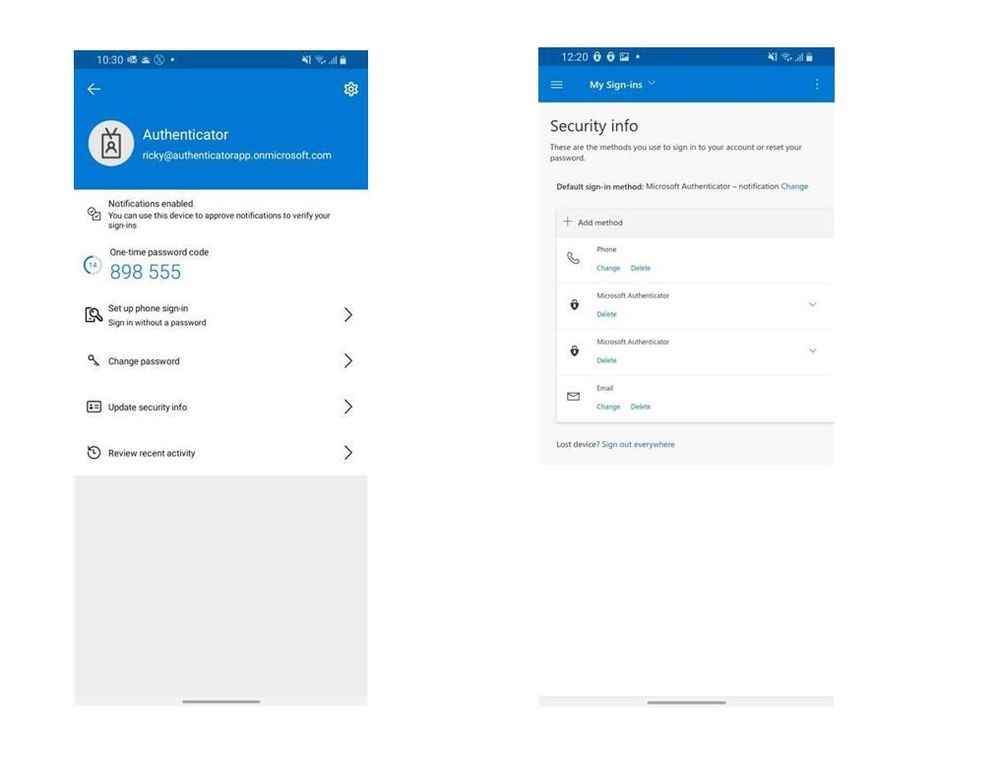
Thumbnail image 2 of blog post titled microsoft authenticator app – easier ways to add or manage enterprise accounts, and a cool new icon

For users who have yet to add their work or school accounts in Microsoft Authenticator, this latest update also makes this experience more seamless. Now, users can sign in with their credentials in Microsoft Authenticator without needing to scan a QR Code from another screen.

If you’re not seeing the new app icon on your iOS and Android devices yet, Microsoft says that it will roll out gradually throughout the month. Microsoft Authenticator is a very useful app for consumers and enterprise users living in the Microsoft ecosystem, and you can get it from the download links below.

‎microsoft authenticator
Download
QR-Code
‎Microsoft Authenticator
Developer:
Microsoft Corporation
Price:
Free

Microsoft authenticator
Download
QR-Code
Microsoft Authenticator
Developer:
Microsoft Corporation
Price:
Free

Share This Post:

Share this article:
Tags:
Android iOS Microsoft Authenticator
Previous Article Excel on the web introduces Office Scripts buttons in preview – onmsft.com Next Article Microsoft Edge testing “Citation” feature to automate online research – onmsft.com

Related Articles

Chrome and Gemini icons representing Gemini Live voice assistant integration in Chrome

Chrome tests Gemini Live voice assistant in a floating overlay panel

March 14, 2026

Chrome’s Organizer feature may sync Gemini and AI conversations across devices

March 14, 2026

After Chrome, Edge tests launching the browser automatically when you sign into Windows

March 13, 2026

Leave a Comment Cancel reply

Your email address will not be published. Required fields are marked *

Recent Posts

  • Chrome tests Gemini Live voice assistant in a floating overlay panel
  • Chrome’s Organizer feature may sync Gemini and AI conversations across devices
  • After Chrome, Edge tests launching the browser automatically when you sign into Windows
  • iPhone Fold Latest Rumors: Display, Cameras, RAM and Price Details Revealed
  • Samsung fears first mobile operating loss due to memory price surge

Recent Comments

No comments to show.
OnMSFT.com

OnMSFT.com covers Microsoft news, reviews, and how-to guides. Formerly known as WinBeta, we have been your source for Microsoft news since 1998.

Categories

  • Windows
  • Surface
  • Xbox
  • How-To
  • OnPodcast
  • Gaming
  • Edge
  • Teams

Recent Posts

  • Chrome tests Gemini Live voice assistant in a floating overlay panel
  • Chrome’s Organizer feature may sync Gemini and AI conversations across devices
  • After Chrome, Edge tests launching the browser automatically when you sign into Windows
  • iPhone Fold Latest Rumors: Display, Cameras, RAM and Price Details Revealed
  • Samsung fears first mobile operating loss due to memory price surge

Quick Links

  • About OnMSFT.com
  • Contact OnMSFT
  • Join Our Team
  • Privacy Policy
© 2010–2026 OnMSFT.com LLC. All rights reserved.
About OnMSFT.comContact OnMSFTPrivacy Policy


