Skip to content
OnMSFT.com
  • Home
  • About
  • Contact
  • Windows
  • Surface
  • Xbox
  • How-To
  • OnPodcast
  • Edge
  • Teams
  • Gaming
Menu
  • Home
  • About
  • Contact
  • Windows
  • Surface
  • Xbox
  • How-To
  • OnPodcast
  • Edge
  • Teams
  • Gaming
  1. Home
  2. How-to
  3. Lumia 950: How To Get 4 Columns Of Tiles On Your Home Screen – onmsft.com

Lumia 950: How To Get 4 Columns Of Tiles On Your Home Screen – onmsft.com

Kareem Anderson Kareem Anderson
November 26, 2015
2 min read

Moving from a Lumia 1520 to the new Lumia 950 can be a bit of an adjustment in more ways than one. Those of us going from the heavier 6-inch screen of the Lumia 1520 down to a featherweight 5.2-inch screen of the 950 can take a bit of relearning, as well as readjustments to the new screen ratios.

Understandably, anyone coming from a larger screen Lumia such as the 1520 or the 640 XL may fear losing out on their information-dense Action Center or Start Screen due to reduced screen real estate. Fear not, Microsoft has made a few software tweaks with Windows 10 Mobile that enable smaller screen Windows phones to feel just like their larger screen big brothers.

To enable or regain an information dense Action Center or Start Screen follow the steps below.

Step 1

  • Navigate the current Action Center and select ‘All Settings.’

ll18

Step 2

  • Select System Settings. Go into Personalization, then Start, and set “Show more tiles” to On

Step 3

  • Go back to System Settings, then select Display Settings

Step 4

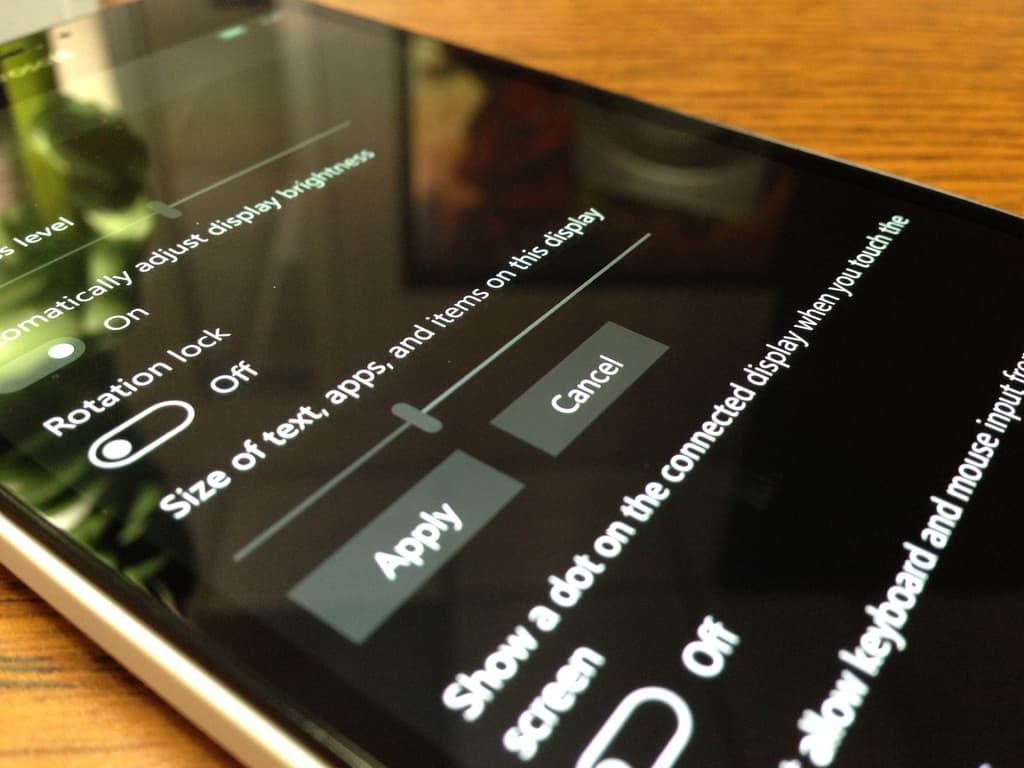
  • Adjust the cursor under Size of text, apps, and items on this display.
  • Note: The lower the percentage, the smaller elements on the screen will appear. While the cursor will go as little as 300% and Microsoft recommends 400%, I’ve found that 350% is a suitable compromise. At 350% elements are small enough to add a fifth utility title on the Action Center as well adding a fourth column of Live Tiles to the Start Screen.
IMG_0790

Step 5

  • Hit apply

Step 6

  • Restart the device

There you have it, an additional row of Live Tiles for the Start Screen as well as a added utility tile to the Action Center should have you comfortably navigating your new device as if it was your old one, in a good way.

Share This Post:

Share this article:
Tags:
Action Center Live Tiles Lumia 950
Previous Article NFL And Microsoft To Stream Panthers Vs. Cowboys Game On Thanksgiving For Free – onmsft.com Next Article Azure Preview Portal Updated, General Availability Coming Soon – onmsft.com

Related Articles

How to Fix the Phone Link App Not Working on Windows 11 – onmsft.com

December 29, 2022

5 easy ways to make desktop shortcuts on Windows 11 – onmsft.com

December 29, 2022

How to customize precision touchpads on Windows – onmsft.com

December 22, 2022

Leave a Comment Cancel reply

Your email address will not be published. Required fields are marked *

Recent Posts

  • Installing Web Apps in Chrome May Soon Take More Than One Click
  • Nvidia CEO Jensen Huang sees $1 trillion demand for Blackwell and Rubin AI chips
  • Nvidia introduces DLSS 5 to improve game realism with generative AI
  • Dictionary Publisher Files Copyright Lawsuit Against OpenAI
  • Shopify exec says AI shopping agents are the future of e-commerce

Recent Comments

No comments to show.
OnMSFT.com

The Tech News Site

Categories

  • Windows
  • Surface
  • Xbox
  • How-To
  • OnPodcast
  • Gaming
  • Edge
  • Teams

Recent Posts

  • Installing Web Apps in Chrome May Soon Take More Than One Click
  • Nvidia CEO Jensen Huang sees $1 trillion demand for Blackwell and Rubin AI chips
  • Nvidia introduces DLSS 5 to improve game realism with generative AI
  • Dictionary Publisher Files Copyright Lawsuit Against OpenAI
  • Shopify exec says AI shopping agents are the future of e-commerce

Quick Links

  • About OnMSFT.com
  • Contact OnMSFT
  • Join Our Team
  • Privacy Policy
© 2010–2026 OnMSFT.com LLC. All rights reserved.
About OnMSFT.comContact OnMSFTPrivacy Policy
