Skip to content
OnMSFT.com
  • Home
  • About
  • Contact
  • Windows
  • Surface
  • Xbox
  • How-To
  • OnPodcast
  • Edge
  • Teams
  • Gaming
Menu
  • Home
  • About
  • Contact
  • Windows
  • Surface
  • Xbox
  • How-To
  • OnPodcast
  • Edge
  • Teams
  • Gaming
  1. Home
  2. How-to
  3. How to find archived emails on Outlook – onmsft.com

How to find archived emails on Outlook – onmsft.com

kip@onmsft.com kip@onmsft.com
August 9, 2022
1 min read

Archiving your Outlook emails is a nifty method to save your critical emails for accessing them at a later time. So if you’re an Outlook user looking to pull up your archived emails for use at a later time, then you’re at the right place.

\

In what follows, we’ll look at how you can find your archived outlook emails. So let’s dive in.

\

How to find your archived email on Outlook

\

A separate folder for your archived email is created on its own as soon as you create a new Outlook account. So even if you don’t haven’t archived anything yet, a place for your archived files still exists. Here’s how you can access it:

\

    \

  • Open your Outlook account.
  • \

  • Select the View tab.
  • \

  • Now select Folder Pane and then click on Normal.
  • \

  • Click on the Archive folder, located in the folder list.
  • \

\

Do this and you’ll find all your archived from here.

\

Access your archived emails on Outlook Web

\

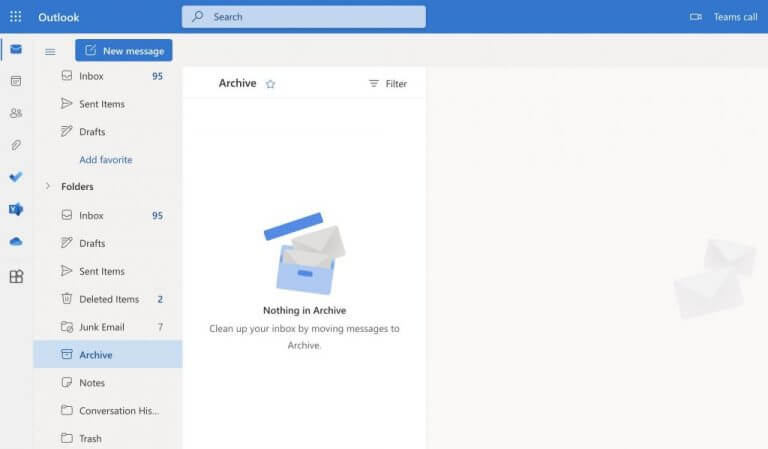
The process will be slightly different if you access your Outlook account through the Outlook web app. Here’s how.

\

    \

  1. Head to outlook.com and log in to your account.
  2. \

  3. Select the Folders tab from the left-hand corner.
  4. \

  5. From there, click on Archive.
  6. \

\

outlook mails

\

That’s it. Your archived mail will appear here. Or, in our case, it’s a message about no mails in the archive, as you can see above.

\

Finding your archived mails on Outlook

\

The Outlook email archive feature can come in handy when you have an overload of emails that, for whatever reason, you can’t delete at the moment. Through archiving those emails, you can avoid deleting them and still have the critical data stored for any future reference.

\

Share This Post:

Share this article:
Tags:
emails Microsoft Outlook
Previous Article Marvel’s Midnight Suns video game delayed on Xbox and other platforms – onmsft.com Next Article New white version of Xbox Elite Controller shows up in unboxing video – onmsft.com

Related Articles

How to Fix the Phone Link App Not Working on Windows 11 – onmsft.com

December 29, 2022

5 easy ways to make desktop shortcuts on Windows 11 – onmsft.com

December 29, 2022

How to customize precision touchpads on Windows – onmsft.com

December 22, 2022

Leave a Comment Cancel reply

Your email address will not be published. Required fields are marked *

Recent Posts

  • Chrome tests Gemini Live voice assistant in a floating overlay panel
  • Chrome’s Organizer feature may sync Gemini and AI conversations across devices
  • After Chrome, Edge tests launching the browser automatically when you sign into Windows
  • iPhone Fold Latest Rumors: Display, Cameras, RAM and Price Details Revealed
  • Samsung fears first mobile operating loss due to memory price surge

Recent Comments

No comments to show.
OnMSFT.com

OnMSFT.com covers Microsoft news, reviews, and how-to guides. Formerly known as WinBeta, we have been your source for Microsoft news since 1998.

Categories

  • Windows
  • Surface
  • Xbox
  • How-To
  • OnPodcast
  • Gaming
  • Edge
  • Teams

Recent Posts

  • Chrome tests Gemini Live voice assistant in a floating overlay panel
  • Chrome’s Organizer feature may sync Gemini and AI conversations across devices
  • After Chrome, Edge tests launching the browser automatically when you sign into Windows
  • iPhone Fold Latest Rumors: Display, Cameras, RAM and Price Details Revealed
  • Samsung fears first mobile operating loss due to memory price surge

Quick Links

  • About OnMSFT.com
  • Contact OnMSFT
  • Join Our Team
  • Privacy Policy
© 2010–2026 OnMSFT.com LLC. All rights reserved.
About OnMSFT.comContact OnMSFTPrivacy Policy