Skip to content
OnMSFT.com
  • Home
  • About
  • Contact
  • Windows
  • Surface
  • Xbox
  • How-To
  • OnPodcast
  • Edge
  • Teams
  • Gaming
Menu
  • Home
  • About
  • Contact
  • Windows
  • Surface
  • Xbox
  • How-To
  • OnPodcast
  • Edge
  • Teams
  • Gaming
  1. Home
  2. News
  3. Microsoft Teams’ Meeting toolbar redesigned to enhance navigation and more

Microsoft Teams’ Meeting toolbar redesigned to enhance navigation and more

Kevin Okemwa Kevin Okemwa
January 6, 2023
1 min read

Microsoft recently announced that it is making several improvements to the Meeting toolbar in Teams. The goal behind refreshing the Meeting toolbar and adding new features to it is o make it easier for users to navigate meetings and uncover new features as well as capabilities. Here's everything you need to know about these improvements:

First up is the added capability that allows users to raise their hand via the new dedicated Raise Hand button that can be found in the redesigned Meeting toolbar.

Improved Meeting toolbar

Second up, you will now be able to make use of the More menu to find any command they are looking for via the new and well-defined sub-menu groupings.
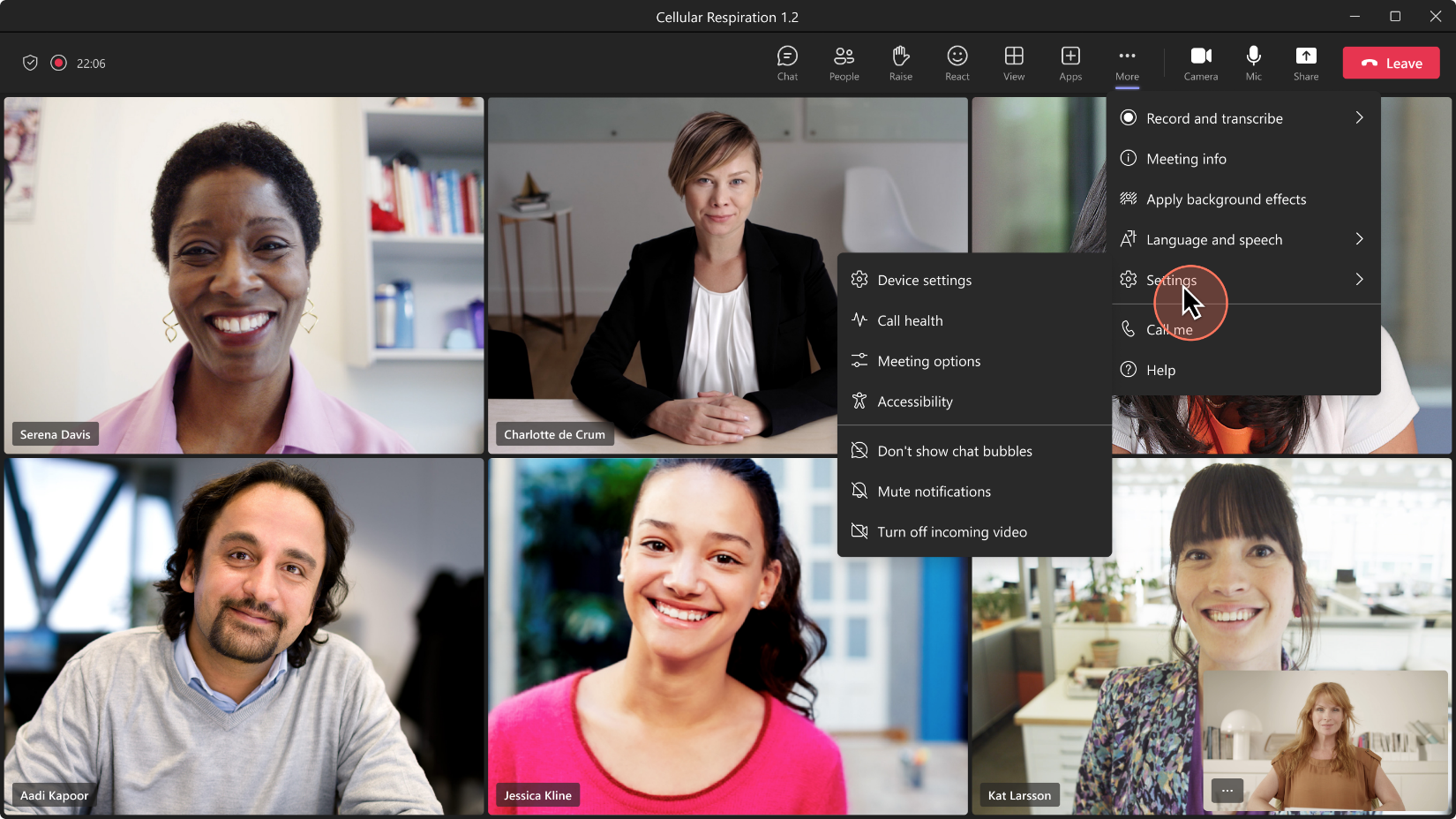
More menu

What's more, you can easily switch views during meetings by simply clicking on the View button and get to select the option that best suits you.
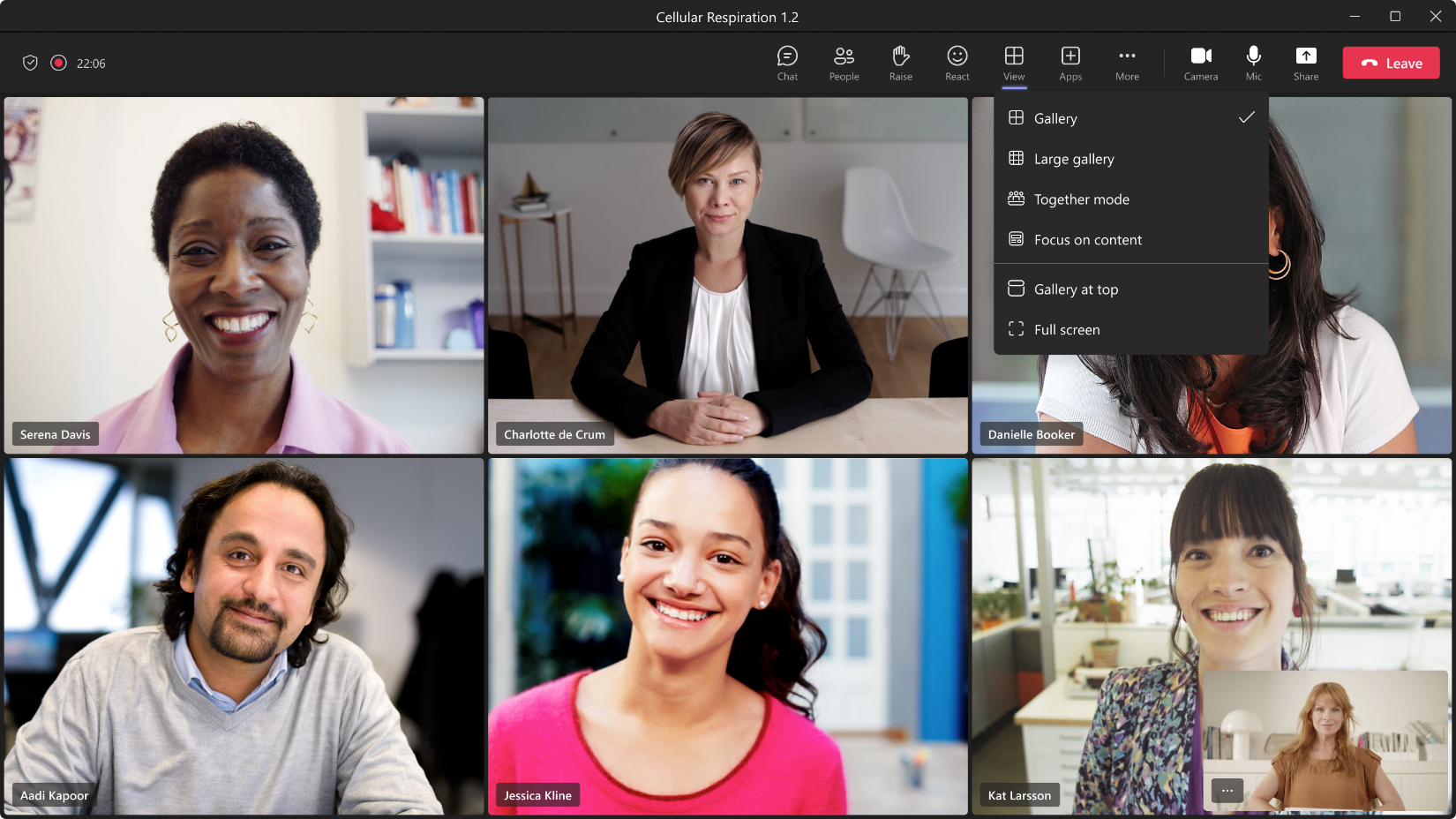
View button

That said, it is worth noting that these improvements have currently been rolled out exclusively to users in the Teams Public Preview channel running on either Windows or macOS. The improvements are likely to be rolled out to general availability in form of a future update.

In related news, we invite you to check out our post that highlights all the new features that made it to Teams in December last year. Share your thoughts with us in the comment section below.


Share this article:
Previous Article Microsoft’s chief product officer is building Windows with AI in mind Next Article Latest Microsoft PowerToys update ships with self-contained .NET 7

Related Articles

Chrome and Gemini icons representing Gemini Live voice assistant integration in Chrome

Chrome tests Gemini Live voice assistant in a floating overlay panel

March 14, 2026

Chrome’s Organizer feature may sync Gemini and AI conversations across devices

March 14, 2026

After Chrome, Edge tests launching the browser automatically when you sign into Windows

March 13, 2026

Leave a Comment Cancel reply

Your email address will not be published. Required fields are marked *

Recent Posts

  • Chrome tests Gemini Live voice assistant in a floating overlay panel
  • Chrome’s Organizer feature may sync Gemini and AI conversations across devices
  • After Chrome, Edge tests launching the browser automatically when you sign into Windows
  • iPhone Fold Latest Rumors: Display, Cameras, RAM and Price Details Revealed
  • Samsung fears first mobile operating loss due to memory price surge

Recent Comments

No comments to show.
OnMSFT.com

OnMSFT.com covers Microsoft news, reviews, and how-to guides. Formerly known as WinBeta, we have been your source for Microsoft news since 1998.

Categories

  • Windows
  • Surface
  • Xbox
  • How-To
  • OnPodcast
  • Gaming
  • Edge
  • Teams

Recent Posts

  • Chrome tests Gemini Live voice assistant in a floating overlay panel
  • Chrome’s Organizer feature may sync Gemini and AI conversations across devices
  • After Chrome, Edge tests launching the browser automatically when you sign into Windows
  • iPhone Fold Latest Rumors: Display, Cameras, RAM and Price Details Revealed
  • Samsung fears first mobile operating loss due to memory price surge

Quick Links

  • About OnMSFT.com
  • Contact OnMSFT
  • Join Our Team
  • Privacy Policy
© 2010–2026 OnMSFT.com LLC. All rights reserved.
About OnMSFT.comContact OnMSFTPrivacy Policy
