Skip to content
OnMSFT.com
  • Home
  • About
  • Contact
  • Windows
  • Surface
  • Xbox
  • How-To
  • OnPodcast
  • Edge
  • Teams
  • Gaming
Menu
  • Home
  • About
  • Contact
  • Windows
  • Surface
  • Xbox
  • How-To
  • OnPodcast
  • Edge
  • Teams
  • Gaming
  1. Home
  2. News
  3. Microsoft Word makes editing easier with Paste Text Only shortcut

Microsoft Word makes editing easier with Paste Text Only shortcut

Kevin Okemwa Kevin Okemwa
March 10, 2023
2 min read

If you often interact with Microsoft Word in your day-to-day activities, then you’ll be happy to learn that the platform is getting a neat tool that will make editing tasks easier.

Previously, when you copied and pasted text from a website, you’d be required to make extensive edits to get rid of the formats. A daunting task that negatively impacted productivity. Though this will now be a thing of the past.

Microsoft announced that it is debuting the Paste Text Only shortcut in Word for Windows and Mac users. With this new feature, you’ll now be able to just copy and paste text from a website into Word your document and not have to worry about making edits to get rid of the source formatting like font size, type, or background color.
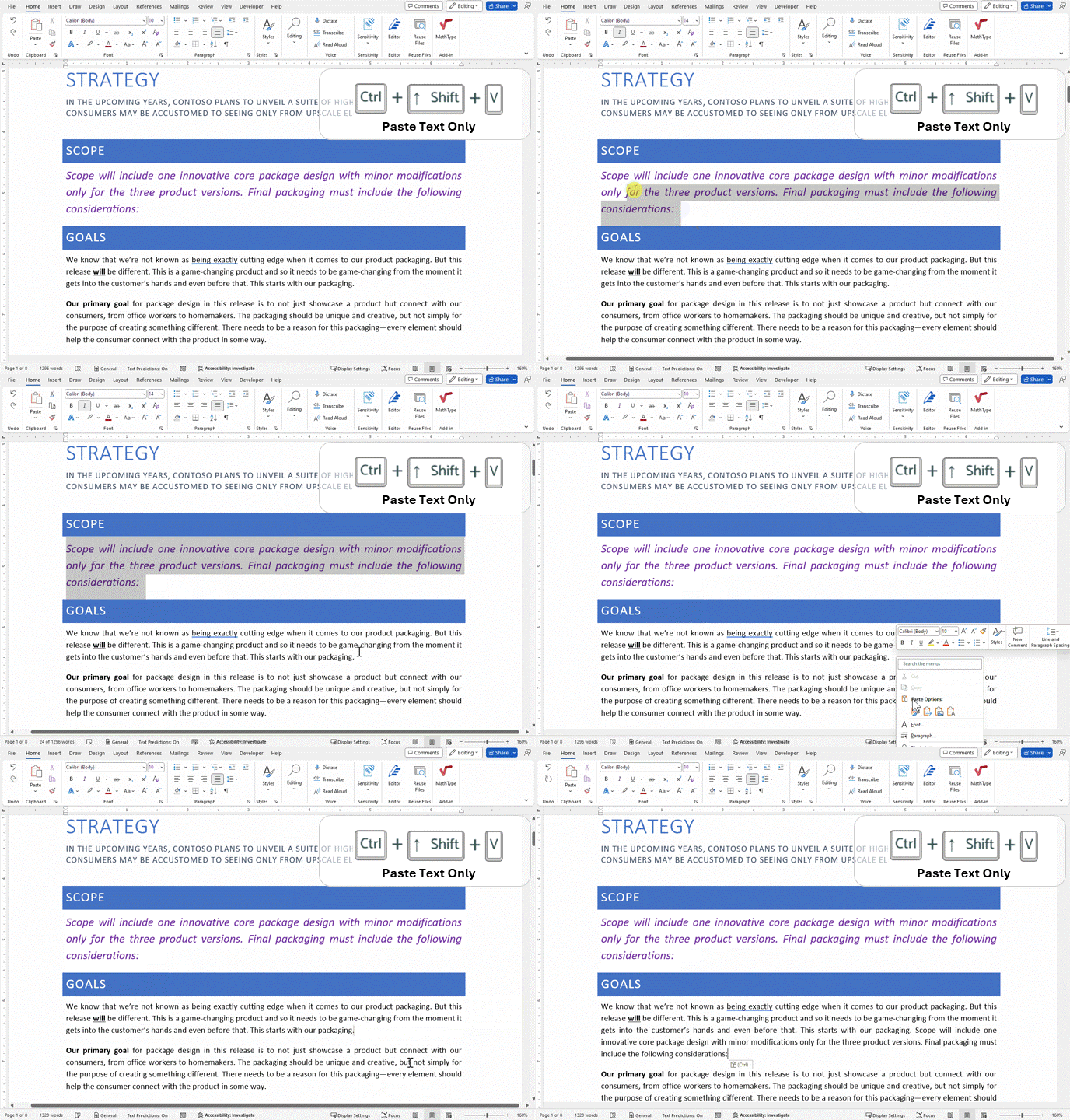
Animation of pasting text only using a shortcut

All you need to do is to source information from the web and select the segment that you want to incorporate into your Word document. Next, head back to your Word document and place the cursor when you want to add the selected content, and hit the Ctrl + Shift + V keyboard shortcut.

The new capability is shipping for M365 Home and M365 Business Standard Beta Channel users running on Windows: Version 16.0.15831.20174 or later or Mac: Version 16.67.1113.0 or later.

The new capability has also prompted some changes since other keyboard shortcuts have been affected. It is possible to restore previous shortcut settings if you’re not pleased with the new changes.

In related news, Microsoft PowerToys v0.68.0 recently shipped with a similar utility dubbed Paste as Plain Text. It is designed to let users paste content from the clipboard without formatting on Windows. Microsoft 365 is also set to get an accessibility assistant that’s designed to promote readability.


Share this article:
Previous Article Grammarly launches generative AI tool to expand its capabilities beyond proofreading Next Article Microsoft 365 Mobile for Android searches become more detailed

Related Articles

New Rowhammer Attacks Turn NVIDIA GPUs Into a System-Level Security Risk

April 4, 2026
Titan Army U275M could push gaming monitors to 1060Hz with dual-mode display

Titan Army U275M could push gaming monitors to 1060Hz with dual-mode display

April 4, 2026

New Intel Leak Shows Bigger Nova Lake Desktop CPU with 44 Cores

April 4, 2026

Leave a Comment Cancel reply

Your email address will not be published. Required fields are marked *

Recent Posts

  • New Rowhammer Attacks Turn NVIDIA GPUs Into a System-Level Security Risk
  • Titan Army U275M could push gaming monitors to 1060Hz with dual-mode display
  • New Intel Leak Shows Bigger Nova Lake Desktop CPU with 44 Cores
  • NVIDIA Neural Rendering Reduces VRAM From 6.5GB to 970MB Without Losing Detail
  • H.264 Licensing Fees Rise to $4.5 Million for Streaming Platforms in 2026

Recent Comments

  1. XxRIVTYxX on Intel Says It Tried to Help Before Crimson Desert Dropped Arc Support
  2. Gaurav Kumar on Chrome Prepares Nudge to ‘Move Tabs to the Side’ as Vertical Tabs Near Release
OnMSFT.com

The Tech News Site

Categories

  • Windows
  • Surface
  • Xbox
  • How-To
  • OnPodcast
  • Gaming
  • Edge
  • Teams

Recent Posts

  • New Rowhammer Attacks Turn NVIDIA GPUs Into a System-Level Security Risk
  • Titan Army U275M could push gaming monitors to 1060Hz with dual-mode display
  • New Intel Leak Shows Bigger Nova Lake Desktop CPU with 44 Cores
  • NVIDIA Neural Rendering Reduces VRAM From 6.5GB to 970MB Without Losing Detail
  • H.264 Licensing Fees Rise to $4.5 Million for Streaming Platforms in 2026

Quick Links

  • About OnMSFT.com
  • Contact OnMSFT
  • Join Our Team
  • Privacy Policy
© 2010–2026 OnMSFT.com LLC. All rights reserved.
About OnMSFT.comContact OnMSFTPrivacy Policy
