Skip to content
OnMSFT.com
  • Home
  • About
  • Contact
  • Windows
  • Surface
  • Xbox
  • How-To
  • OnPodcast
  • Edge
  • Teams
  • Gaming
Menu
  • Home
  • About
  • Contact
  • Windows
  • Surface
  • Xbox
  • How-To
  • OnPodcast
  • Edge
  • Teams
  • Gaming
  1. Home
  2. News
  3. Windows Blue features new Calculator, Audio Recorder, Movie Moments, and Alarm apps – onmsft.com

Windows Blue features new Calculator, Audio Recorder, Movie Moments, and Alarm apps – onmsft.com

Ron Ron
March 24, 2013
2 min read

Windows blue

If you are just joining us, earlier today the first build of Windows Blue was leaked. Windows Blue build 9364 was leaked and numerous screenshots, a video, and more were revealed about this upcoming update to Windows 8. It also appears that Windows Blue will feature four new apps.

In the leaked Windows Blue build 9364 video, we catch a glimpse of a new Calculator app, as well as an Audio Recorder app, a Movie Moments app, and an Alarm app. No word on if these apps will make it to the final build of Windows Blue, but they sure do look useful to use. (see screenshots below)

The new Calculator app is pretty straightforward and features Standard mode, Scientific mode, and Converter mode. The Audio Recorder app is great and utilizes your device’s microphone to work. The Movie Moments app is broken at the moment seems to be a “Windows Movie Maker” wannabe. And the Alarm app is, well, an alarm/timer app.

It is quite obvious by now that Windows Blue is better suited to bridge the gap between desktop and mobile PCs, and all it took was some tweaks and feature additions. We learned today that Windows Blue will feature changes to the core that allows for 3 or 4 apps to be snapped on screen at one time, as well as 2 or more metro apps running across multiple screens!

We will keep you posted on any breaking Windows Blue news. In the mean time, check out these screen grabs of the four new Windows Blue apps:

Windows blue alarm
Windows blue sound
Windows blue video
Windows blue calculator

Share This Post:

Share this article:
Tags:
Windows Blue
Previous Article Windows Blue improves Metro on the desktop, offers 4 way snap and better multi-monitor support – onmsft.com Next Article Watch this! Windows Blue build 9364 has new Start Screen tile interactions and resizing abilities (video) – onmsft.com

Related Articles

Nvidia introduces DLSS 5 to improve game realism with generative AI

NVIDIA DLSS 5 launch video blocked on YouTube after Italian broadcast claim

April 6, 2026

Intel Ends Support for XeSS Unity Plugin, Leaves Developers With Frozen Codebase

April 6, 2026
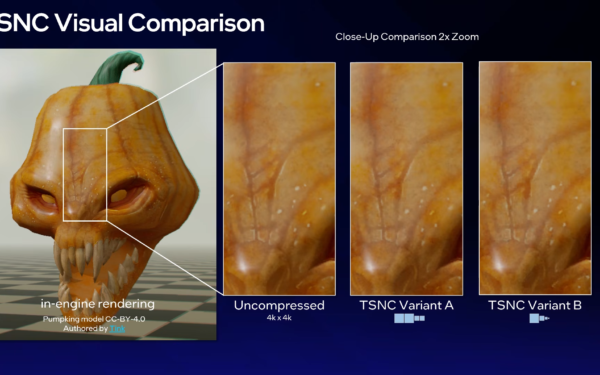
Intel TSNC Brings 18x Texture Compression With Trade-Offs in Image Quality

Intel TSNC Promises Up to 18x Texture Compression With Neural Tech

April 6, 2026

Leave a Comment Cancel reply

Your email address will not be published. Required fields are marked *

Recent Posts

  • NVIDIA DLSS 5 launch video blocked on YouTube after Italian broadcast claim
  • Intel Ends Support for XeSS Unity Plugin, Leaves Developers With Frozen Codebase
  • Intel TSNC Promises Up to 18x Texture Compression With Neural Tech
  • Intel Reveals Full BMG-G31 Specs Powering Arc Pro B70 and B65 GPUs
  • AI Companies Lock In DRAM Supply Through 2030, Prices Expected to Stay High

Recent Comments

  1. XxRIVTYxX on Intel Says It Tried to Help Before Crimson Desert Dropped Arc Support
  2. Gaurav Kumar on Chrome Prepares Nudge to ‘Move Tabs to the Side’ as Vertical Tabs Near Release
OnMSFT.com

The Tech News Site

Categories

  • Windows
  • Surface
  • Xbox
  • How-To
  • OnPodcast
  • Gaming
  • Edge
  • Teams

Recent Posts

  • NVIDIA DLSS 5 launch video blocked on YouTube after Italian broadcast claim
  • Intel Ends Support for XeSS Unity Plugin, Leaves Developers With Frozen Codebase
  • Intel TSNC Promises Up to 18x Texture Compression With Neural Tech
  • Intel Reveals Full BMG-G31 Specs Powering Arc Pro B70 and B65 GPUs
  • AI Companies Lock In DRAM Supply Through 2030, Prices Expected to Stay High

Quick Links

  • About OnMSFT.com
  • Contact OnMSFT
  • Join Our Team
  • Privacy Policy
© 2010–2026 OnMSFT.com LLC. All rights reserved.
About OnMSFT.comContact OnMSFTPrivacy Policy