Skip to content
OnMSFT.com
  • Home
  • About
  • Contact
  • News
  • How-to
  • Feature stories
  • Deals
  • Microsoft / office 365
  • Reviews
Menu
  • Home
  • About
  • Contact
  • News
  • How-to
  • Feature stories
  • Deals
  • Microsoft / office 365
  • Reviews
  1. Home
  2. News
  3. Microsoft Planner starts rolling out custom background images for plans

Microsoft Planner starts rolling out custom background images for plans

Rabia Noureen Rabia Noureen
January 12, 2021
1 min read

Microsoft Planner users can now try out a new Smart Backgrounds feature that brings the ability to personalize Planner boards. The company has announced that the feature is currently rolling out to all users in the Planner web experience, allowing users to add custom background images to their plans.

“Smart backgrounds is powered by the same Designer feature that suggests creatively designed templates in PowerPoint. Designer works in the background, trying to match the title of your plan with relevant and unique high-quality background images, like a coffee scene for your Coffee Store plan, a business backdrop for your Online Marketing plan, or a city skyline for your Town Hall Meeting plan,” the company explained.
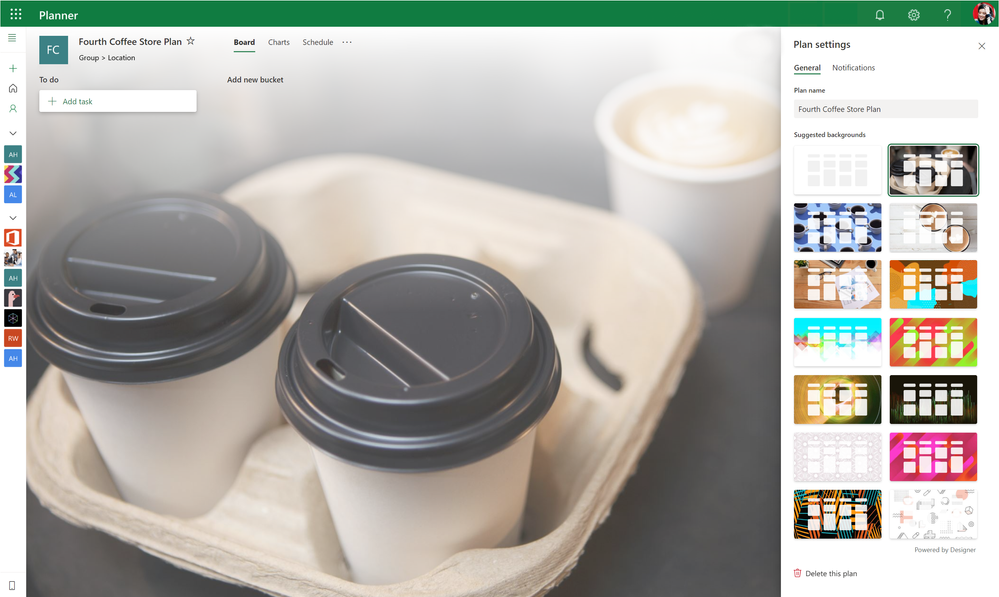
thumbnail image 1 of blog post titled Personalize your plans with smart backgrounds

To try smart backgrounds, you’ll need to click the ellipsis (…) menu and head to “Plan settings.” In Planner settings, select the General tab and choose one of the backgrounds available in the recommendation list. Currently, users can not upload their own images, but we hope that the company will add this capability soon.

Furthermore, the company has also introduced a new Settings UI for Microsoft Planner. The revamped Settings menu is now divided into three different groups, including General, Group, and Notifications. The change makes it easier for users will now be able to find relevant settings. Have you spotted this feature on your PCs? Sound off in the comments down below.

Share This Post:

Tags: Microsoft 365 | Microsoft Planner
Share this article:
Tags:
Microsoft 365 Microsoft Planner
Previous Article Bethesda is working on a new Indiana Jones game from Wolfenstein developer MachineGames Next Article CES 2021: AMD announces new Ryzen 5000 mobile CPUs

Related Articles

PlayStation’s PC Strategy Shift Came From Rising AAA Costs, Says Former Exec

PlayStation’s PC Strategy Shift Came From Rising AAA Costs, Says Former Exec

April 24, 2026

iPhone 18 Could Bring 12GB RAM, 2nm A20 Chip and Price Freeze

April 24, 2026

Discord Nitro May Add Xbox Game Pass Starter Edition With 50+ Games and Cloud Gaming Access

April 24, 2026

Leave a Comment Cancel reply

Your email address will not be published. Required fields are marked *

Recent Posts

  • PlayStation’s PC Strategy Shift Came From Rising AAA Costs, Says Former Exec
  • iPhone 18 Could Bring 12GB RAM, 2nm A20 Chip and Price Freeze
  • Discord Nitro May Add Xbox Game Pass Starter Edition With 50+ Games and Cloud Gaming Access
  • Microsoft Drops ‘Microsoft Gaming’ Name, Brings Back Xbox Identity
  • Intel 14A Wins Tesla Deal, More Customers Show Interest

Recent Comments

  1. William on NZXT Responds to RTX 5090 Leak Claim, Disputes Redditor’s Version of Events
  2. Jenny Jones on Microsoft Publisher Will Shut Down in October 2026 and Users Are Not Happy
  3. XxRIVTYxX on Intel Says It Tried to Help Before Crimson Desert Dropped Arc Support
  4. Gaurav Kumar on Chrome Prepares Nudge to ‘Move Tabs to the Side’ as Vertical Tabs Near Release
OnMSFT.com

The Tech News Site

Categories

  • Windows
  • Surface
  • Xbox
  • How-To
  • OnPodcast
  • Gaming
  • Edge
  • Teams

Recent Posts

  • PlayStation’s PC Strategy Shift Came From Rising AAA Costs, Says Former Exec
  • iPhone 18 Could Bring 12GB RAM, 2nm A20 Chip and Price Freeze
  • Discord Nitro May Add Xbox Game Pass Starter Edition With 50+ Games and Cloud Gaming Access
  • Microsoft Drops ‘Microsoft Gaming’ Name, Brings Back Xbox Identity
  • Intel 14A Wins Tesla Deal, More Customers Show Interest

Quick Links

  • About OnMSFT.com
  • Contact OnMSFT
  • Join Our Team
  • Privacy Policy
© 2010–2026 OnMSFT.com LLC. All rights reserved.
About OnMSFT.comContact OnMSFTPrivacy Policy
