Skip to content
OnMSFT.com
  • Home
  • About
  • Contact
  • Windows
  • Surface
  • Xbox
  • How-To
  • OnPodcast
  • Edge
  • Teams
  • Gaming
Menu
  • Home
  • About
  • Contact
  • Windows
  • Surface
  • Xbox
  • How-To
  • OnPodcast
  • Edge
  • Teams
  • Gaming
  1. Home
  2. News
  3. Microsoft Planner starts rolling out custom background images for plans

Microsoft Planner starts rolling out custom background images for plans

Rabia Noureen Rabia Noureen
January 12, 2021
1 min read

Microsoft Planner users can now try out a new Smart Backgrounds feature that brings the ability to personalize Planner boards. The company has announced that the feature is currently rolling out to all users in the Planner web experience, allowing users to add custom background images to their plans.

“Smart backgrounds is powered by the same Designer feature that suggests creatively designed templates in PowerPoint. Designer works in the background, trying to match the title of your plan with relevant and unique high-quality background images, like a coffee scene for your Coffee Store plan, a business backdrop for your Online Marketing plan, or a city skyline for your Town Hall Meeting plan,” the company explained.
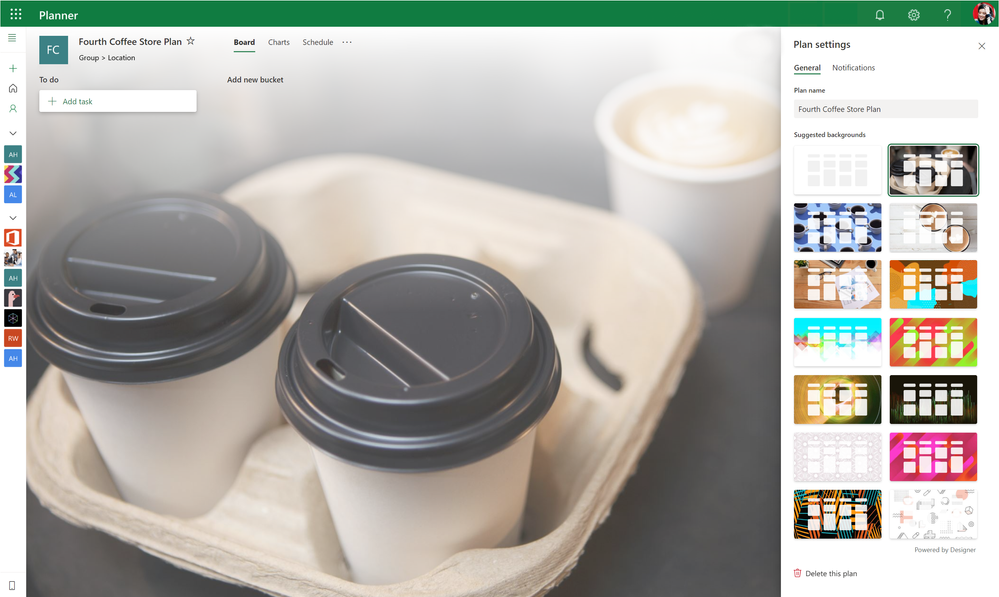
thumbnail image 1 of blog post titled Personalize your plans with smart backgrounds

To try smart backgrounds, you’ll need to click the ellipsis (…) menu and head to “Plan settings.” In Planner settings, select the General tab and choose one of the backgrounds available in the recommendation list. Currently, users can not upload their own images, but we hope that the company will add this capability soon.

Furthermore, the company has also introduced a new Settings UI for Microsoft Planner. The revamped Settings menu is now divided into three different groups, including General, Group, and Notifications. The change makes it easier for users will now be able to find relevant settings. Have you spotted this feature on your PCs? Sound off in the comments down below.


Share This Post:

Tags: Microsoft 365 | Microsoft Planner
Share this article:
Tags:
Microsoft 365 Microsoft Planner
Previous Article Bethesda is working on a new Indiana Jones game from Wolfenstein developer MachineGames Next Article CES 2021: AMD announces new Ryzen 5000 mobile CPUs

Related Articles

Chrome and Gemini icons representing Gemini Live voice assistant integration in Chrome

Chrome tests Gemini Live voice assistant in a floating overlay panel

March 14, 2026

Chrome’s Organizer feature may sync Gemini and AI conversations across devices

March 14, 2026

After Chrome, Edge tests launching the browser automatically when you sign into Windows

March 13, 2026

Leave a Comment Cancel reply

Your email address will not be published. Required fields are marked *

Recent Posts

  • Chrome tests Gemini Live voice assistant in a floating overlay panel
  • Chrome’s Organizer feature may sync Gemini and AI conversations across devices
  • After Chrome, Edge tests launching the browser automatically when you sign into Windows
  • iPhone Fold Latest Rumors: Display, Cameras, RAM and Price Details Revealed
  • Samsung fears first mobile operating loss due to memory price surge

Recent Comments

No comments to show.
OnMSFT.com

OnMSFT.com covers Microsoft news, reviews, and how-to guides. Formerly known as WinBeta, we have been your source for Microsoft news since 1998.

Categories

  • Windows
  • Surface
  • Xbox
  • How-To
  • OnPodcast
  • Gaming
  • Edge
  • Teams

Recent Posts

  • Chrome tests Gemini Live voice assistant in a floating overlay panel
  • Chrome’s Organizer feature may sync Gemini and AI conversations across devices
  • After Chrome, Edge tests launching the browser automatically when you sign into Windows
  • iPhone Fold Latest Rumors: Display, Cameras, RAM and Price Details Revealed
  • Samsung fears first mobile operating loss due to memory price surge

Quick Links

  • About OnMSFT.com
  • Contact OnMSFT
  • Join Our Team
  • Privacy Policy
© 2010–2026 OnMSFT.com LLC. All rights reserved.
About OnMSFT.comContact OnMSFTPrivacy Policy
