Skip to content
OnMSFT.com
  • Home
  • About
  • Contact
  • Windows
  • Surface
  • Xbox
  • How-To
  • OnPodcast
  • Edge
  • Teams
  • Gaming
Menu
  • Home
  • About
  • Contact
  • Windows
  • Surface
  • Xbox
  • How-To
  • OnPodcast
  • Edge
  • Teams
  • Gaming
  1. Home
  2. News
  3. Microsoft is adding transcription and voice commanding in Word

Microsoft is adding transcription and voice commanding in Word

Laurent Giret Laurent Giret
August 25, 2020
2 min read

Microsoft announced this morning that its popular Word app is getting new transcription and voice commanding capabilities this year. The first new feature, Transcribe in Word, will allow users to record conversations in the Word web app and have the word processor automatically transcribing it for them.

Transcribe in Word can also be used for recording discussions, as the feature is able to detect different speakers in a conversation. Transcripts will appear alongside the Word document users are working on, and adding a quote from a conversation can be done by clicking the plus icon on any line of the transcript. Even better, Transcribe in Word also works with pre-recorded audio and video files, though there’s a file size limit of 200MB.
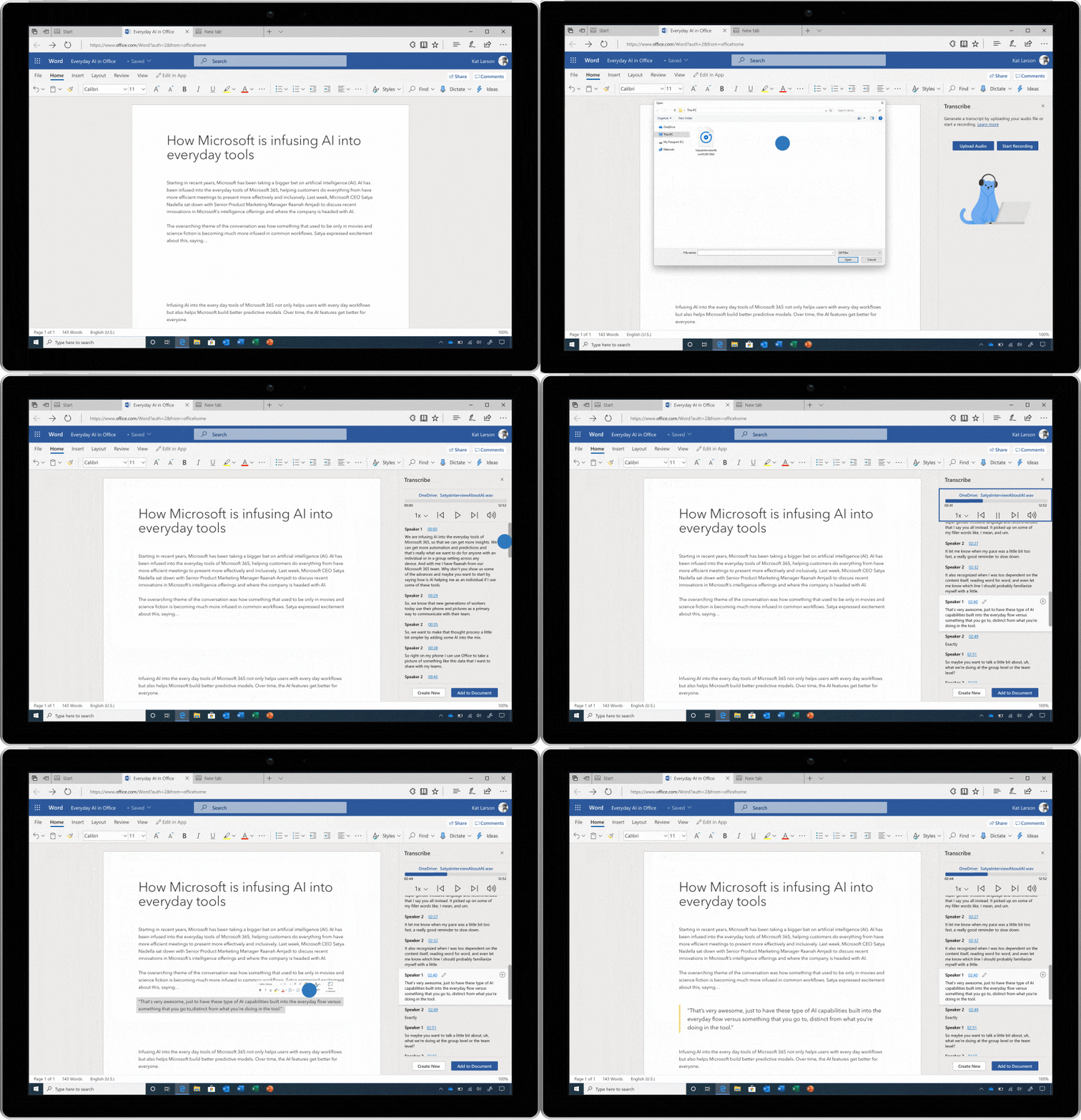
An animated image showing the functionality of dictation in Word.

The feature is launching first in the Word web app for Microsoft 365 subscribers, and there is a five hour limit of transcription time per month. For now, Transcribe in Word only works in the new Microsoft Edge or Google Chrome, and English (EN-US) is the only supported language at launch. Microsoft also said that the feature will be coming to mobile by the end of the year, though there’s no precise ETA for now.

The other new feature that Microsoft announced today is the ability to Dictate with voice commands in Word for the web and Office mobile. Dictation was already supported in Word as well as other Microsoft 365 apps, but voice commands will now allow users to easily add, format, edit, and organize their Word document.

“Voice commands understand a variety of symbols so you can add things like “ampersand” and “percent sign”, and you don’t have to sound like a robot! We’ve based commands on the way people naturally talk so that you can capture your ideas easily. So saying things like “dot dot dot” when you can’t remember “ellipses” works just as well,” Microsoft explained today. You can find a full list of voice commands on this page.

While Dictate with voice commands is now available on mobile and the Word web app, it will also be coming to Word for Windows and Mac before the end of the year. Microsoft is also adding support for new languages including Hindi, Korean, Russian, Polish, Thai, additional Spanish and Chinese locales.


Share This Post:

Tags: Microsoft 365 | Word
Share this article:
Tags:
Microsoft 365 Word
Previous Article Common Microsoft Excel error codes and how to fix them Next Article Xbox One August 2020 Update Is Rolling Out Soon With Revamped Xbox Guide And Party Chat Improvements – onmsft.com

Related Articles

Elon Musk’s xAI Sued After Grok Allegedly Created Sexual Images of Minors

March 16, 2026
Apple announces AirPods Max 2 with H2 chip, stronger noise cancellation, Adaptive Audio, lossless support, and new features. Preorders start March 25.

Apple Launches AirPods Max 2 With H2 Chip and Improved Sound Quality

March 16, 2026
Samsung ends Galaxy Z TriFold sales after three months as rising component costs cut profits, despite strong demand and repeated sellouts.

Samsung stops Galaxy Z TriFold sales just three months after launch

March 16, 2026

Leave a Comment Cancel reply

Your email address will not be published. Required fields are marked *

Recent Posts

  • Elon Musk’s xAI Sued After Grok Allegedly Created Sexual Images of Minors
  • Apple Launches AirPods Max 2 With H2 Chip and Improved Sound Quality
  • Samsung stops Galaxy Z TriFold sales just three months after launch
  • Lego Batman: Legacy of the Dark Knight Release Date Moves to May 22
  • Major tech companies launch joint effort to stop online fraud

Recent Comments

No comments to show.
OnMSFT.com

The Tech News Site

Categories

  • Windows
  • Surface
  • Xbox
  • How-To
  • OnPodcast
  • Gaming
  • Edge
  • Teams

Recent Posts

  • Elon Musk’s xAI Sued After Grok Allegedly Created Sexual Images of Minors
  • Apple Launches AirPods Max 2 With H2 Chip and Improved Sound Quality
  • Samsung stops Galaxy Z TriFold sales just three months after launch
  • Lego Batman: Legacy of the Dark Knight Release Date Moves to May 22
  • Major tech companies launch joint effort to stop online fraud

Quick Links

  • About OnMSFT.com
  • Contact OnMSFT
  • Join Our Team
  • Privacy Policy
© 2010–2026 OnMSFT.com LLC. All rights reserved.
About OnMSFT.comContact OnMSFTPrivacy Policy
