Skip to content
OnMSFT.com
  • Home
  • About
  • Contact
  • Windows
  • Surface
  • Xbox
  • How-To
  • OnPodcast
  • Edge
  • Teams
  • Gaming
Menu
  • Home
  • About
  • Contact
  • Windows
  • Surface
  • Xbox
  • How-To
  • OnPodcast
  • Edge
  • Teams
  • Gaming
  1. Home
  2. News
  3. Microsoft begins testing a new Xbox games library UI – onmsft.com

Microsoft begins testing a new Xbox games library UI – onmsft.com

Robert Collins Robert Collins
August 30, 2022
1 min read

Those in the Xbox Insider Alpha Ring are testing out some major new tweaks to the Games & Apps section of the dashboard. This is where users typically go to find their owned and installed games, under the “Full Library” subsection.

The new Insider build introduces a tabbed interface that categorizes your games into “Owned games,” “Xbox Game Pass,” “Game with Gold,” “EA Play,” and so on. This new layout is likely to be a big improvement to the Games Library when it releases to the public. It promises cleaner, more orderly navigation of your library, which in its current layout is somewhat cluttered.
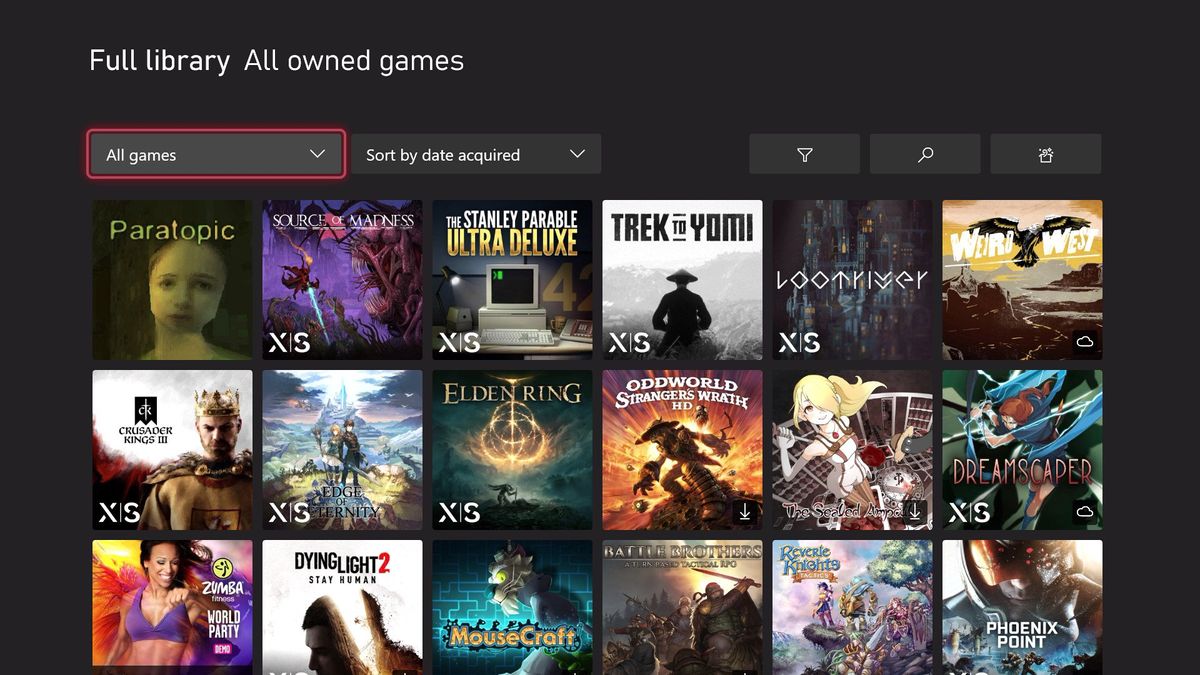
Xbox DRM explained: Setting a home console, console sharing, licenses, and more | Windows Central

Could it be that Microsoft is implementing this new streamlined UI to accommodate additional subscription pools? For instance, just days ago we reported on the rekindled rumor that Ubisoft+ could be landing on Xbox Game Pass alongside EA Play. This in addition to the forthcoming “Xbox Game Pass Family & Friends” tier, which was recently announced. Though this is just speculation, it seems likely enough. And it would lend further credence to the Ubisoft+ rumors. You can find out what else is in the latest build over at Xbox Wire.

Featured image courtesy of windowscentral.com. 

 

Share This Post:

Share this article:
Tags:
Xbox Game Pass Xbox OS
Previous Article Microsoft introduces Azure Blogathon, a contest to help bloggers around the world – onmsft.com Next Article Xiaomi Notebook Pro 120G with 12th Gen Intel processor launched in India – onmsft.com

Related Articles

Chrome and Gemini icons representing Gemini Live voice assistant integration in Chrome

Chrome tests Gemini Live voice assistant in a floating overlay panel

March 14, 2026

Chrome’s Organizer feature may sync Gemini and AI conversations across devices

March 14, 2026

After Chrome, Edge tests launching the browser automatically when you sign into Windows

March 13, 2026

Leave a Comment Cancel reply

Your email address will not be published. Required fields are marked *

Recent Posts

  • Chrome tests Gemini Live voice assistant in a floating overlay panel
  • Chrome’s Organizer feature may sync Gemini and AI conversations across devices
  • After Chrome, Edge tests launching the browser automatically when you sign into Windows
  • iPhone Fold Latest Rumors: Display, Cameras, RAM and Price Details Revealed
  • Samsung fears first mobile operating loss due to memory price surge

Recent Comments

No comments to show.
OnMSFT.com

OnMSFT.com covers Microsoft news, reviews, and how-to guides. Formerly known as WinBeta, we have been your source for Microsoft news since 1998.

Categories

  • Windows
  • Surface
  • Xbox
  • How-To
  • OnPodcast
  • Gaming
  • Edge
  • Teams

Recent Posts

  • Chrome tests Gemini Live voice assistant in a floating overlay panel
  • Chrome’s Organizer feature may sync Gemini and AI conversations across devices
  • After Chrome, Edge tests launching the browser automatically when you sign into Windows
  • iPhone Fold Latest Rumors: Display, Cameras, RAM and Price Details Revealed
  • Samsung fears first mobile operating loss due to memory price surge

Quick Links

  • About OnMSFT.com
  • Contact OnMSFT
  • Join Our Team
  • Privacy Policy
© 2010–2026 OnMSFT.com LLC. All rights reserved.
About OnMSFT.comContact OnMSFTPrivacy Policy

