Skip to content
OnMSFT.com
  • Home
  • About
  • Contact
  • Windows
  • Surface
  • Xbox
  • How-To
  • OnPodcast
  • Edge
  • Teams
  • Gaming
Menu
  • Home
  • About
  • Contact
  • Windows
  • Surface
  • Xbox
  • How-To
  • OnPodcast
  • Edge
  • Teams
  • Gaming
  1. Home
  2. News
  3. Meeting recap in Microsoft Teams will begin rolling out later this month

Meeting recap in Microsoft Teams will begin rolling out later this month

Rabia Noureen Rabia Noureen
January 12, 2021
2 min read

Microsoft is adding a new “Meeting recap” feature to its Teams collaboration platform later this month, according to the Microsoft 365 Admin Center. Indeed, the feature is currently set to begin rolling out by the end of January and will be available to all Microsoft Teams users in mid-February.

Originally announced in September 2020, this new meeting experience will allow participants or people unable to attend the meeting to access meeting content after it has ended. Microsoft Teams will automatically share the meeting recording, transcript, chat, shared files, and more in the meeting’s details tab.
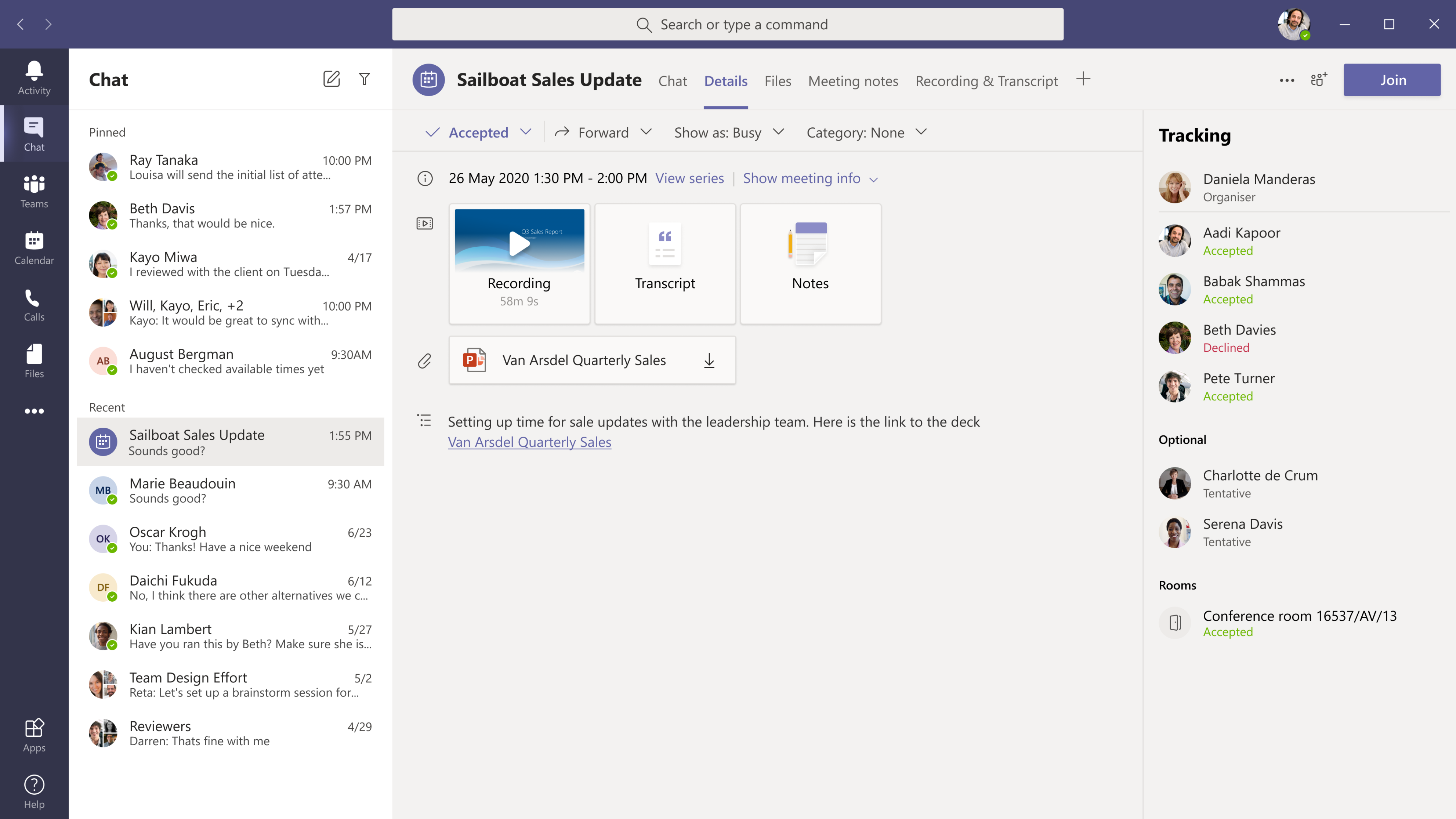
Meeting summary invitee view

The recap feature could prove extremely useful for Teams users in learning scenarios, making it easier to find everything they need to catch up instead of contacting the organizer of the meeting. The recaps will be accessible for users in Microsoft Teams and from the meeting event in their Outlook calendar.

In addition to this, Microsoft has also confirmed another important update that is in development for Teams. The company is introducing a new Teams meeting lobby setting to enable meeting organizers to ensure that only Calendar meeting invited users will be allowed to bypass the lobby after a new meeting is scheduled.
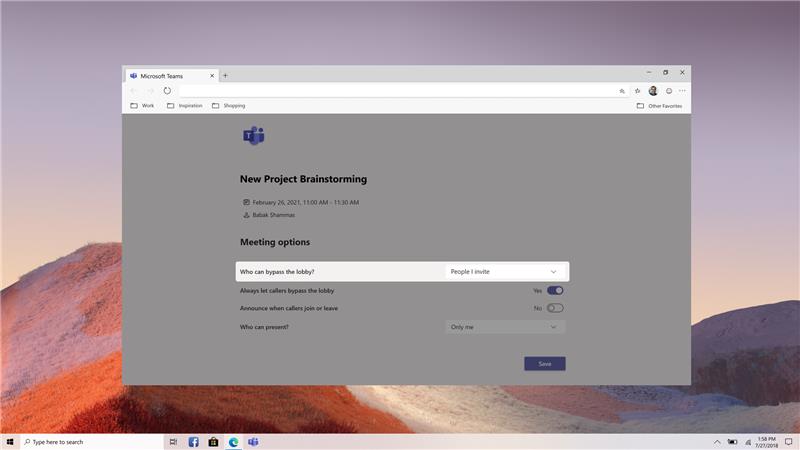
New Lobby settings in Teams

The Microsoft 365 roadmap listing for the feature indicates that it’s currently in development and is scheduled to release in February. At launch, the feature will be available for both Production and GCC environments. This is a minor update, but it should help Teams meeting organizers to have greater control over their meetings.


Share This Post:

Tags: Microsoft 365 | Microsoft Teams
Share this article:
Tags:
Microsoft 365 Microsoft Teams
Previous Article CES 2021: Killer Instinct, Battletoads, X-Men, and more video games get arcade cabinet re-releases Next Article CES 2021: Intel unveils four new processor families for business, education, gaming, and mobile PCs

Related Articles

Chrome and Gemini icons representing Gemini Live voice assistant integration in Chrome

Chrome tests Gemini Live voice assistant in a floating overlay panel

March 14, 2026

Chrome’s Organizer feature may sync Gemini and AI conversations across devices

March 14, 2026

After Chrome, Edge tests launching the browser automatically when you sign into Windows

March 13, 2026

Leave a Comment Cancel reply

Your email address will not be published. Required fields are marked *

Recent Posts

  • Chrome tests Gemini Live voice assistant in a floating overlay panel
  • Chrome’s Organizer feature may sync Gemini and AI conversations across devices
  • After Chrome, Edge tests launching the browser automatically when you sign into Windows
  • iPhone Fold Latest Rumors: Display, Cameras, RAM and Price Details Revealed
  • Samsung fears first mobile operating loss due to memory price surge

Recent Comments

No comments to show.
OnMSFT.com

OnMSFT.com covers Microsoft news, reviews, and how-to guides. Formerly known as WinBeta, we have been your source for Microsoft news since 1998.

Categories

  • Windows
  • Surface
  • Xbox
  • How-To
  • OnPodcast
  • Gaming
  • Edge
  • Teams

Recent Posts

  • Chrome tests Gemini Live voice assistant in a floating overlay panel
  • Chrome’s Organizer feature may sync Gemini and AI conversations across devices
  • After Chrome, Edge tests launching the browser automatically when you sign into Windows
  • iPhone Fold Latest Rumors: Display, Cameras, RAM and Price Details Revealed
  • Samsung fears first mobile operating loss due to memory price surge

Quick Links

  • About OnMSFT.com
  • Contact OnMSFT
  • Join Our Team
  • Privacy Policy
© 2010–2026 OnMSFT.com LLC. All rights reserved.
About OnMSFT.comContact OnMSFTPrivacy Policy
