
Google is working to make collapsed vertical tabs easier to use in Chrome. The sidebar can expand on hover, letting you read tab titles without clicking to open it.
When the vertical sidebar is collapsed, Chrome only shows a narrow strip of icons. You have to expand it to see tab titles, which adds an extra step when switching between tabs.
With the new behavior, moving the cursor over the vertical tabs sidebar expands it automatically. The full list of tabs becomes visible, making it easier to scan and switch between them. You don’t need to click to open the sidebar each time.
This kind of behavior is already part of vertical tabs in browsers like Microsoft Edge, Brave, and Vivaldi, where hover-based expansion is a core part of the experience. Chrome has also been working on vertical tabs. Chrome has started nudging users to try vertical tabs when many tabs are open in the Canary version, ahead of its release.
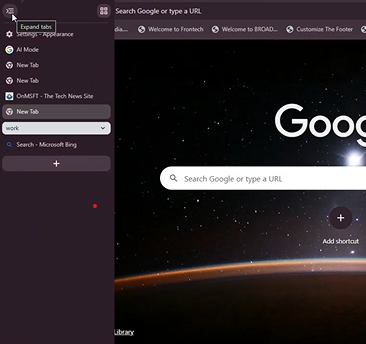
Chrome is now adding similar behavior, which makes its vertical tabs easier to use, especially for people who work with many tabs.
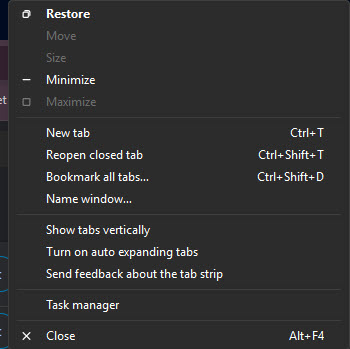
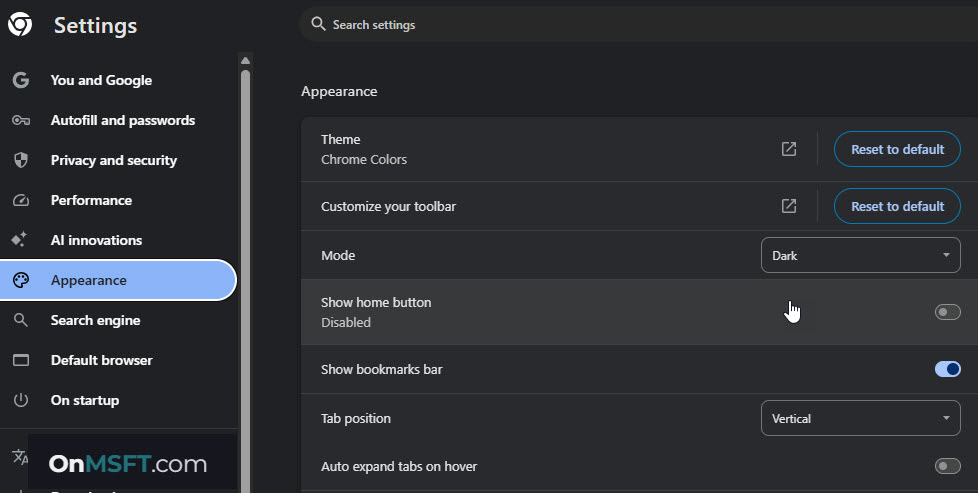
Recent changes in Chromium Gerrit add expand-on-hover controls to the tab strip context menu and Appearance settings. The “Auto expand tabs on hover” toggle in settings works as a persistent option, while the “Turn on auto expanding tabs” option in the menu lets users enable it on demand.
It is most useful when working with many tabs in a collapsed sidebar. The interface hides most of the context, and switching between tabs takes extra steps.
Hover expansion brings that context back without changing the layout. You can keep the sidebar compact and still move through tabs quickly.
The expand-on-hover behavior with animations is still being tested. Chrome Canary now has the “Vertical tabs expand on hover” flag, which allows the sidebar to expand on hover when the vertical tab is collapsed.



