

Three minutes into this new video from Microsoft’s Ignite conference and we already hear “Yes, we are committed to the Windows 10 Mobile operating system”. Sound’s promising, doesn’t it? But to many, these are just words. Where is that commitment Microsoft so fond of touting? Don’t worry. Microsoft is already teasing Windows 10 Mobile fans with exciting new features with this clip from Ignite 2016.
However, before fans get too excited, remember that this is a business conference. Microsoft continues to temper expectations by way of vague rhetoric, the company may or may not have some consumer-facing features prepared for users later on, but that is something we won’t hear over at Ignite. You can watch the whole video below, or scroll past it to see a breakdown of features and news revealed:
Breakdown
The video starts with some general chit-chat about Windows 10 Mobile and continues with showcasing all the brands that have embraced Windows 10 Mobile, like in the picture shown below. Microsoft continues to show some Windows phones, and then a shout out is made to the HP Elite x3, saying that it is a ‘truly great device’.

The Microsoft Employee narrating the video then proceeds to Continuum features. He starts with something interesting, saying that “if configured correctly”, Continuum may work over other people’s lock screens. If you don’t understand what that means, imagine your friend has a computer, and you have a Windows 10 phone that supports Continuum. You want to surf some web or write a document on a PC, but they don’t want you to use their personal login. You should be able to connect with your phone, over MiraCast, to that PC, and use all your files and apps from the phone on their screen.
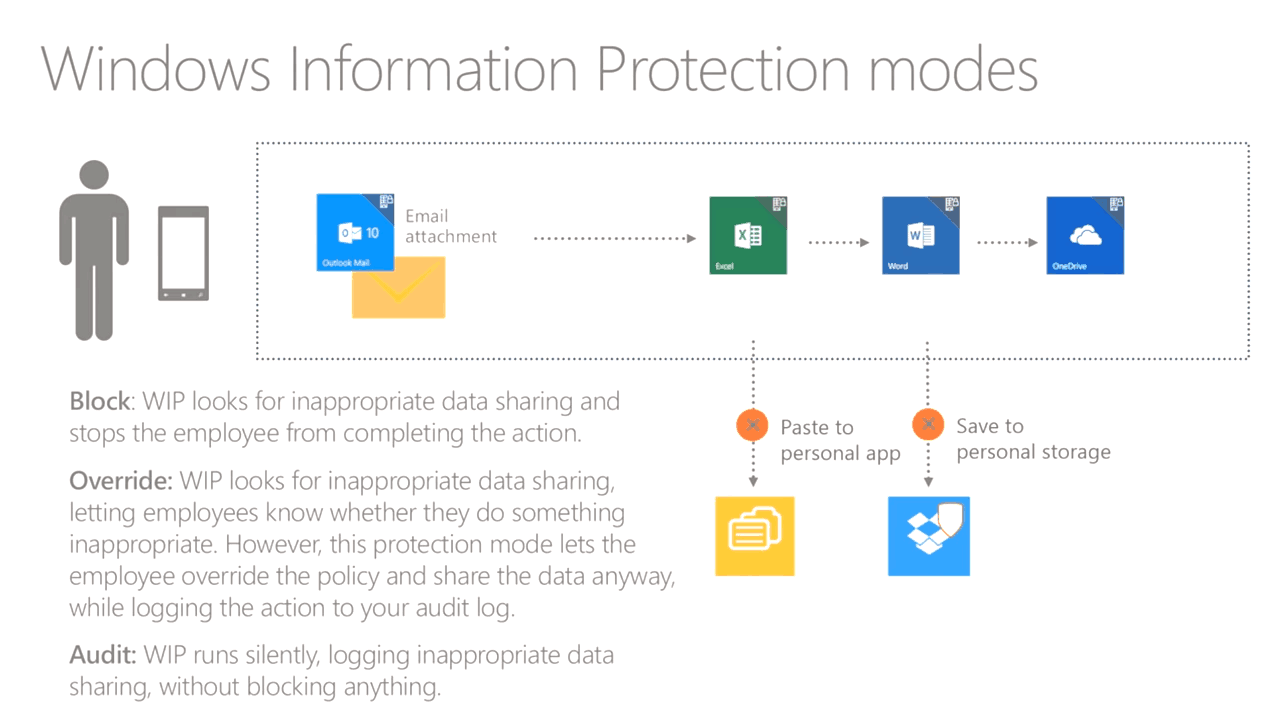
Next up is WIP (not to be confused with the Windows Insider Program). WIP is a shortcut for Windows Information Protection which is a security feature that protects business documents and files to be moved to personal storage services and the like. It will use containers and encryption to ensure that important and sensitive information doesn’t get into the wrong hands. This feature will be available on both mobile and PC too which is great to see.

The video then goes back to Continuum again, showing off all the sweet features like pinning apps to the taskbar, new redesigned, a more PC-like system tray & Action Centre and most importantly, the windowed applications. You can resize windows, snap them to the sides, have multiple apps open at once and more. The video shows these features in a very rough state, so don’t judge it on the performance and looks. It is not even released yet.
The video ends with a Q&A, which also reveals that Microsoft is aware that people want non-Continuum apps on the big screen too and old Windows Phone 8 & 7 apps like WhatsApp or Slack may be able to be run in fixed-size windows in the future. Nothing has been officially confirmed and the team just responded that they don’t have anything to show off for “now” but they are always working on maximising the experience.
Further reading: Continuum, HP, Ignite 2016, Microsoft, Windows 10 Mobile, Windows Information Protection


