Skip to content
OnMSFT.com
  • Home
  • About
  • Contact
  • Windows
  • Surface
  • Xbox
  • How-To
  • OnPodcast
  • Edge
  • Teams
  • Gaming
Menu
  • Home
  • About
  • Contact
  • Windows
  • Surface
  • Xbox
  • How-To
  • OnPodcast
  • Edge
  • Teams
  • Gaming
  1. Home
  2. How-to
  3. How to view Activity History on Windows PC – OnMSFT.com

How to view Activity History on Windows PC – OnMSFT.com

kip@onmsft.com kip@onmsft.com
July 14, 2022
1 min read

The Activity History can come in handy when you want to monitor or limit the ways someone uses your PC. This is especially true if the computer is publicly accessible.

\

Thankfully, Windows has made it super easy to view and manage your Activity history. Let’s learn how.

\

How to view Activity History on Windows

\

The Windows PC collects a host of things on your PC. The data collected includes your search history, browser activity, voice commands, and location information, etc., among other things. Luckily, you can always access this information from Windows Settings later on.

\

Here’s how.

\

    \

  1. Press the Windows key + I to launch the Windows Settings.
  2. \

  3. Head to the Privacy & security section.
  4. \

  5. Now click on the Activity history.
  6. \

  7. Under the Clear activity history tab, click on the Manage my Microsoft account activity data.
  8. \

\

Follow the above steps and your default browser will be launched, taking you to the Microsoft Account login page. Now all you’ve to do is log in with your email account again.

\

When you’re logged in, click on the Activity History tab; you can finally make any changes to the Activity History from here.

\

Alternatively, if you’d like, you can also clear your Activity History from here straight away. In the Activity history tab from above, simply click on Clear and your Activity history will be wiped out.

\

clearing activity history

\

Download your Activity History for offline use

\

Need your Activity History for offline use? No problem. You can also grab it for later offline use from your browser. Just log into your account following the above method, navigate to the Manage your activity data section, and click on the category of your data you want to download.

\

For example, if you would like to download the record of all your searches until now, click on the Search history tab and select Download your data.

\
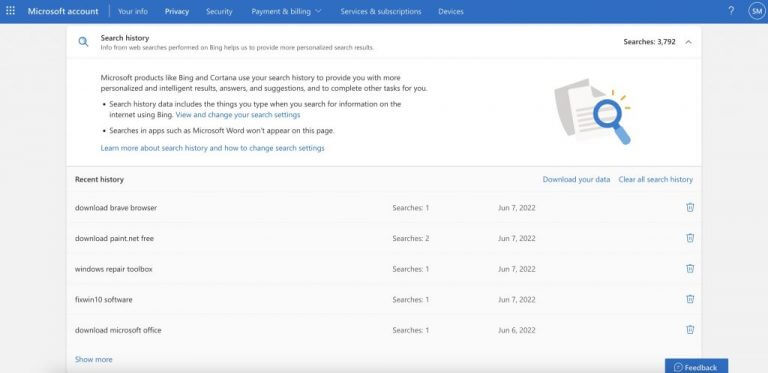
activity history

\

Viewing and managing Activity History on your Windows

\

We hope this article helped you get a handle on all the tracked information on your Windows PC. Purely from the point of view of privacy, this is nothing short of a nightmare. Interestingly, however, you can always get out this data collection by checking the Store my activity history on this device option. If you’re managing a normal public computer, though, information like this can be useful later on.

\

Share This Post:

Share this article:
Previous Article How to disable transparency effects on Windows 11 – OnMSFT.com Next Article What to play on Game Pass: Fighting Games – OnMSFT.com

Related Articles

How to Fix the Phone Link App Not Working on Windows 11 – OnMSFT.com

December 29, 2022

5 easy ways to make desktop shortcuts on Windows 11 – OnMSFT.com

December 29, 2022

How to customize precision touchpads on Windows – OnMSFT.com

December 22, 2022

Leave a Comment Cancel reply

Your email address will not be published. Required fields are marked *

Recent Posts

  • OpenAI says ChatGPT ‘Adult Mode’ Needs More Time
  • Claude Opus 4.6 Discovers 22 Firefox Vulnerabilities in Just Two Weeks
  • OpenClaw can now connect with Gmail, Drive, and Docs using Google’s new CLI
  • Chrome Prepares Nudge to ‘Move Tabs to the Side’ as Vertical Tabs Near Release
  • How Apple Made the $599 MacBook Neo Without Using Plastic

Recent Comments

No comments to show.
OnMSFT.com

OnMSFT.com covers Microsoft news, reviews, and how-to guides. Formerly known as WinBeta, we have been your source for Microsoft news since 1998.

Categories

  • Windows
  • Surface
  • Xbox
  • How-To
  • OnPodcast
  • Gaming
  • Edge
  • Teams

Recent Posts

  • OpenAI says ChatGPT 'Adult Mode' Needs More Time
  • Claude Opus 4.6 Discovers 22 Firefox Vulnerabilities in Just Two Weeks
  • OpenClaw can now connect with Gmail, Drive, and Docs using Google’s new CLI
  • Chrome Prepares Nudge to 'Move Tabs to the Side' as Vertical Tabs Near Release
  • How Apple Made the $599 MacBook Neo Without Using Plastic

Quick Links

  • About OnMSFT.com
  • Contact OnMSFT
  • Join Our Team
  • Privacy Policy
© 2010–2026 OnMSFT.com LLC. All rights reserved.
About OnMSFT.comContact OnMSFTPrivacy Policy
