Skip to content
OnMSFT.com
  • Home
  • About
  • Contact
  • Windows
  • Surface
  • Xbox
  • How-To
  • OnPodcast
  • Edge
  • Teams
  • Gaming
Menu
  • Home
  • About
  • Contact
  • Windows
  • Surface
  • Xbox
  • How-To
  • OnPodcast
  • Edge
  • Teams
  • Gaming
  1. Home
  2. How-to
  3. How Microsoft 365 educators can utilize Speaker Coach to foster confident public speakers in PowerPoint

How Microsoft 365 educators can utilize Speaker Coach to foster confident public speakers in PowerPoint

admin admin
August 11, 2023
3 min read

\n

\n

\n

In this article

\n

\n

  • Mastering Public Speaking with Microsoft Learning Accelerators
  • Speaker Coach Your virtual speaking companion
  • Embrace Speaker Coach in PowerPoint for Enhanced Confidence
  • How to get started
  • Comprehensive feedback with real-time insights
  • Rehearse, Improve, Excel

\n

Whether you’re a student, an educator, or anyone seeking personal growth, mastering the art of public speaking can significantly impact your life. Educators play a vital role in nurturing these skills in students, equipping them with the tools to become confident public speakers. One innovative tool that has gained prominence in this domain is Speaker Coach, already included in the Microsoft 365 suite of products. Public speaking not only enhances self-confidence but also prepares individuals for success in various aspects of life.

\n

Mastering Public Speaking with Microsoft Learning Accelerators

\n

Public speaking can be a daunting task for many students, but Microsoft Learning Accelerators provide a solution that empowers students to become confident and effective communicators. These accelerators are an integral part of well-known tools like Microsoft Teams, OneNote, PowerPoint, and Word, offering a range of foundational and future-ready skills to help students excel in their academic and professional journeys.

\n

\n

\n

\n

\n

\n

\n

\n

\n

\n

\n

\n

\n

\n

Speaker Coach: Your virtual speaking companion

\n
speaker coach

\n

One standout Learning Accelerator is Speaker Coach, a free and readily available tool designed to assist students in honing their public speaking prowess. Whether presenting a classroom report, discussing financials at work, or sharing ideas from a podium, effective public speaking is crucial. Speaker Coach, available in PowerPoint and Clipchamp, serves as a virtual assistant, providing personalized insights and guidance to help students improve their public speaking abilities.

\n

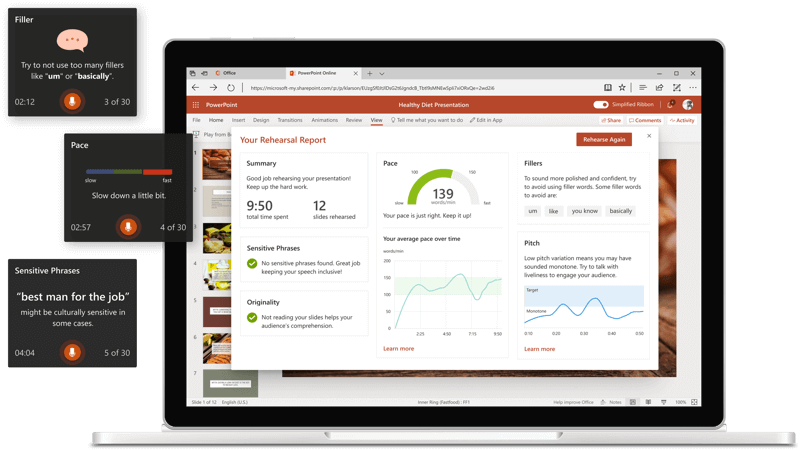
Speaker Coach goes beyond traditional methods by utilizing advanced technology to provide tailored feedback to students. Through audio analysis, it assesses pace, pitch, filler words, and pronunciation. With its expert-like capabilities, Speaker Coach replicates the experience of having a public speaking trainer, ensuring that students receive valuable insights without external critiques. This approach fosters a comfortable environment for even the most apprehensive students to practice and enhance their public speaking skills.

\n

Embrace Speaker Coach in PowerPoint for Enhanced Confidence

\n

Empower your students to conquer public speaking anxiety with Speaker Coach in PowerPoint. This versatile tool is accessible for practice whenever students desire. To begin, open PowerPoint and log in with a Microsoft account. Speaker Coach is available on PowerPoint desktop app and PowerPoint for the web across Windows, Mac, and iOS platforms. For optimal performance, ensure that the Office user interface language aligns with the desired language for Speaker Coach.

\n

How to get started

\n

Using Speaker Coach is simple and user-friendly. Here’s how:

\n

\n

\n

\n

\n

\n

\n

\n

\n

\n

\n

\n

\n

\n

    \n

  1. Open your presentation in PowerPoint on the web or within the app.
  2. \n

  3. Sign in with your Microsoft account (hotmail.com, outlook.com, live.com, msn.com), or your Microsoft 365 work or school account.
  4. \n

  5. Navigate to the Slide Show tab and select Rehearse with Coach. speaker coach
  6. \n

  7. If you’ve disabled the Simplified Ribbon, access Speaker Coach through the View tab.
  8. \n

  9. Your presentation will open in full-screen mode, like a Slide Show, press Esc to exit out of full-screen mode.
  10. \n

  11. Click Start rehearsing when you’re ready to begin rehearsing.speaker coach
  12. \n

  13. As you speak, Speaker Coach provides on-screen guidance, offering insights on pacing, language, and more.speaker coach
  14. \n

  15. Once you’ve completed your rehearsal, exit the full-screen view. You’ll receive a Rehearsal Report summarizing your performance and recommendations. speaker coach
  16. \n

\n

Comprehensive feedback with real-time insights

\n

Speaker Coach generates a personalized rehearsal report at the end of each practice session. This comprehensive report is tailored to the specific practice session, featuring interactive feedback and analysis. The report covers various metrics that influence audience perception, including:

\n

    \n

  • Elapsed Time and Slide Count
  • \n

  • Filler Word Usage
  • \n

  • Repetitive Language
  • \n

  • Inclusiveness in Language
  • \n

  • Speaking Pace and Suggestions
  • \n

  • Pitch Variation
  • \n

  • Originality in Delivery
  • \n

  • Pronunciation Accuracy
  • \n

  • Speech Refinements
  • \n

  • Optional Body Language Analysis
  • \n

\n

Rehearse, Improve, Excel

\n

Experience the transformative power of Speaker Coach for yourself and your students. This invaluable tool is available for free in PowerPoint and Clipchamp, with integration into Microsoft Teams on the horizon. Amplify your public speaking skills and support your students in their journey to becoming confident communicators.

\n

To delve deeper into the art of public speaking, explore the wealth of Microsoft resources available. Equip yourself and your students with the skills needed to captivate audiences and convey ideas effectively.

\n

\n

Related

\n

\n

Share this article:
Previous Article Windows 11 Insider Release Preview Channels get new builds Next Article New Windows 10 22H2 Build 19045.3391 update in Release Preview Channel: enhancements and fixes

Related Articles

43 Microsoft Edge keyboard shortcuts to remember for stylish and speedy web surfing

October 31, 2023

How to use accessibility features in Microsoft 365 like Narrator, Read aloud and Voice Search easily

October 30, 2023

How to use Windows Backup on Windows 11 for efficient data protection

October 26, 2023

Leave a Comment Cancel reply

Your email address will not be published. Required fields are marked *

Recent Posts

  • PowerToys 0.75 released; Environment Variables editor is here
  • Former Halo developer Bungie announces layoffs in wake of game delays
  • Siemens and Microsoft partner to bring GenAI to industries worldwide
  • 43 Microsoft Edge keyboard shortcuts to remember for stylish and speedy web surfing
  • Here is what’s coming to (and leaving) Xbox Game Pass soon

Recent Comments

No comments to show.

Archives

  • October 2023
  • September 2023
  • August 2023
  • July 2023
  • June 2023
  • May 2023
  • April 2023
  • March 2023
  • February 2023
  • January 2023
  • December 2022
  • November 2022
  • October 2022
  • September 2022
  • August 2022
  • July 2022
  • June 2022
  • May 2022
  • April 2022
  • March 2022
  • February 2022
  • January 2022
  • December 2021
  • November 2021
  • October 2021
  • September 2021
  • August 2021
  • July 2021
  • June 2021
  • May 2021
  • April 2021
  • March 2021
  • February 2021
  • January 2021
  • December 2020
  • November 2020
  • October 2020
  • September 2020
  • August 2020
  • July 2020
  • June 2020
  • May 2020
  • April 2020
  • March 2020
  • February 2020
  • January 2020
  • December 2019
  • November 2019
  • October 2019
  • September 2019
  • August 2019
  • July 2019
  • June 2019
  • May 2019
  • April 2019
  • March 2019
  • February 2019
  • January 2019
  • December 2018
  • November 2018
  • October 2018
  • September 2018
  • August 2018
  • July 2018
  • June 2018
  • May 2018
  • April 2018
  • March 2018
  • February 2018
  • January 2018
  • December 2017
  • November 2017
  • October 2017
  • September 2017
  • August 2017
  • July 2017
  • June 2017
  • May 2017
  • April 2017
  • March 2017
  • February 2017
  • January 2017
  • December 2016
  • November 2016
  • October 2016
  • September 2016
  • August 2016
  • July 2016
  • June 2016
  • May 2016
  • April 2016
  • March 2016
  • February 2016
  • January 2016
  • December 2015
  • November 2015
  • October 2015
  • September 2015
  • August 2015
  • July 2015
  • June 2015
  • May 2015
  • April 2015
  • March 2015
  • February 2015
  • January 2015
  • December 2014
  • November 2014
  • October 2014
  • September 2014
  • August 2014
  • July 2014
  • June 2014
  • May 2014
  • April 2014
  • March 2014
  • February 2014
  • January 2014
  • December 2013
  • November 2013
  • October 2013
  • September 2013
  • August 2013
  • July 2013
  • June 2013
  • May 2013
  • April 2013
  • March 2013
  • February 2013
  • January 2013
  • December 2012
  • November 2012
  • October 2012
  • September 2012
  • August 2012
  • July 2012
  • June 2012
  • May 2012
  • April 2012
  • March 2012
  • February 2012
  • January 2012
  • December 2011
  • November 2011
  • October 2011
  • September 2011
  • August 2011
  • July 2011
  • June 2011
  • May 2011
  • April 2011
  • March 2011
  • February 2011
  • January 2011
  • December 2010
  • November 2010
  • October 2010
  • September 2010

Categories

  • Announcements
  • Deals
  • Developer
  • Editorial
  • Feature
  • Feature stories
  • Hero-post
  • Hotdeals
  • How-to
  • Latest news
  • Microsoft / office 365
  • News
  • Office 365
  • Onpodcast
  • Opinion
  • Our featured post
  • Polls
  • Review
  • Reviews
  • Videos
OnMSFT.com

OnMSFT.com covers Microsoft news, reviews, and how-to guides. Formerly known as WinBeta, we have been your source for Microsoft news since 1998.

Categories

  • Windows
  • Surface
  • Xbox
  • How-To
  • OnPodcast
  • Gaming
  • Edge
  • Teams

Recent Posts

  • PowerToys 0.75 released; Environment Variables editor is here
  • Former Halo developer Bungie announces layoffs in wake of game delays
  • Siemens and Microsoft partner to bring GenAI to industries worldwide
  • 43 Microsoft Edge keyboard shortcuts to remember for stylish and speedy web surfing
  • Here is what’s coming to (and leaving) Xbox Game Pass soon

Quick Links

  • About OnMSFT.com
  • Contact OnMSFT
  • Join Our Team
© 2010–2026 OnMSFT.com LLC. All rights reserved.
About OnMSFT.comContact OnMSFT