Skip to content
OnMSFT.com
  • Home
  • About
  • Contact
  • Windows
  • Surface
  • Xbox
  • How-To
  • OnPodcast
  • Edge
  • Teams
  • Gaming
Menu
  • Home
  • About
  • Contact
  • Windows
  • Surface
  • Xbox
  • How-To
  • OnPodcast
  • Edge
  • Teams
  • Gaming
  1. Home
  2. How-to
  3. 7 ways to use LinkedIn to expand your business and work opportunities

7 ways to use LinkedIn to expand your business and work opportunities

admin admin
January 30, 2023
4 min read

Although LinkedIn has over 830 million users across 200 countries, many users do not use the platform properly. People randomly connect with you because you vaguely know one of their distant connections – or they try to connect with you to harvest your carefully curated LinkedIn connections.

But used wisely, LinkedIn is a very powerful tool – especially for small businesses who want to use LinkedIn’s features – many of them free – to secure more work. And with the upheaval across the technology and crypto industries, there are far more people out there looking for work. So how do you make your own profile stand out to potential employers and attract new business?

LinkedIn profile tips

There are several tweaks you can make to your personal profile on LinkedIn to make it stand out online and get you discovered. Let’s start here.

1: Get your name right

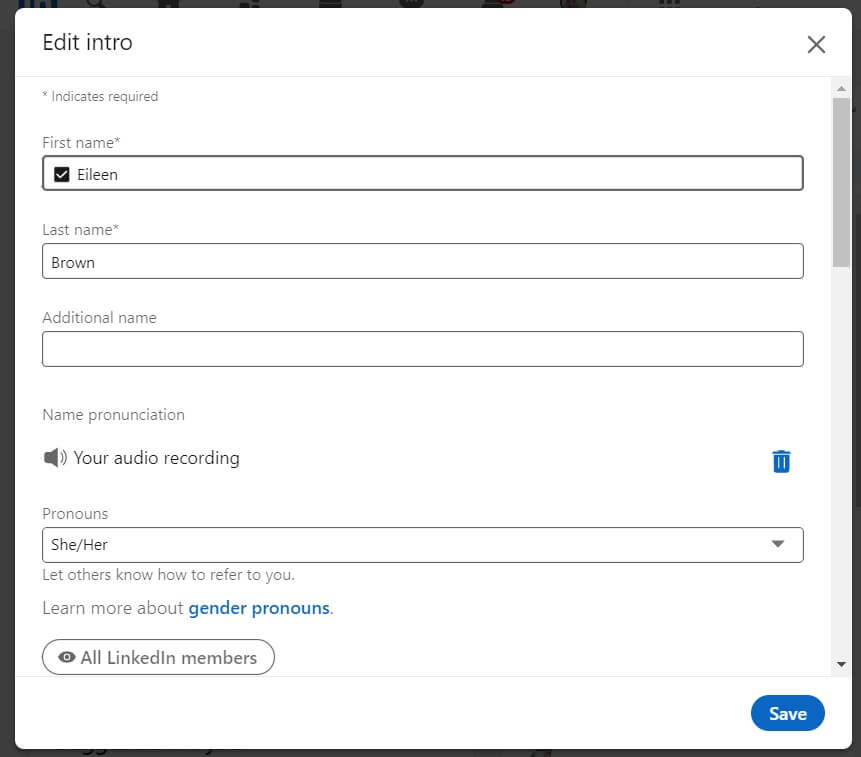
Name Pronunciation Linkedin eileen brown onmsft

LinkedIn has a name pronunciation feature that helps people to correctly say your name. On the desktop click on the icon for your name and click ‘Edit’. You will see the option for you to record your name. Click on Name Pronunciation, say your name and save it on your profile.

On mobile, click your profile image and the edit icon on the right-hand side of the screen. Add or edit your pronunciation

2: Get your image right

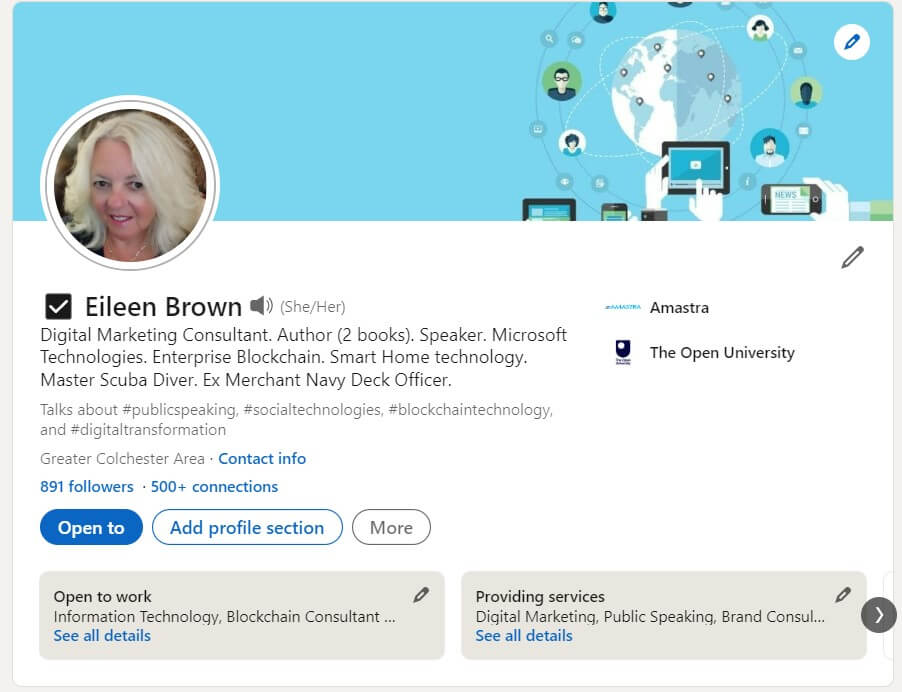
Linkedin profile image and background banner eileen brown onmsft

Your photo shows potential hirers what you look like and gives them an impression of you before they get in touch with you. Some types of images are not acceptable, however.

  • Images that were taken from too far away
  • Images that are so close that they do not show your whole head
  • Images with bare shoulders
  • Images were taken with pets, partners, cars, or other distractions

Also, make sure that your photo looks into the camera and not to the right. Readers will follow the eyes of the person in the image and if you are looking to the right of the camera, then viewers of your profile will also look right – which is away from the main content in your profile

3: Find a banner image

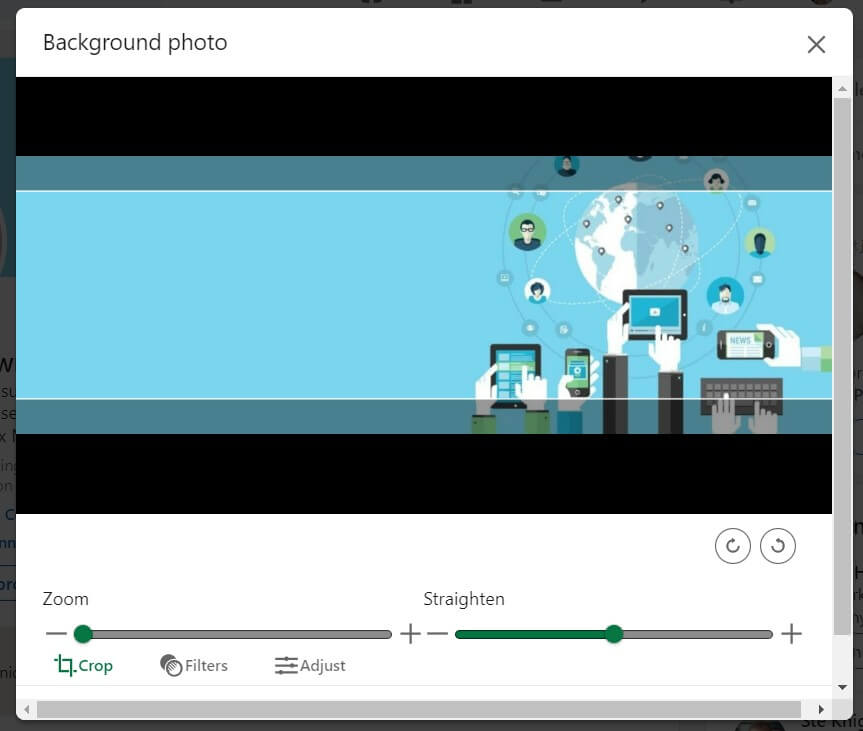
Linkedin banner image

Banner images can showcase your brand if you are a small business, or give clients and recruiters an idea of what drives you. Banner images must be smaller in size than 8Mb and have a resolution of 1584 pixels wide by 396 high. you can save them in either JPG, GIF, and PNG formats. To add or edit a banner image, click the edit icon on the right of your profile and add your image.

4: Get a powerful headline

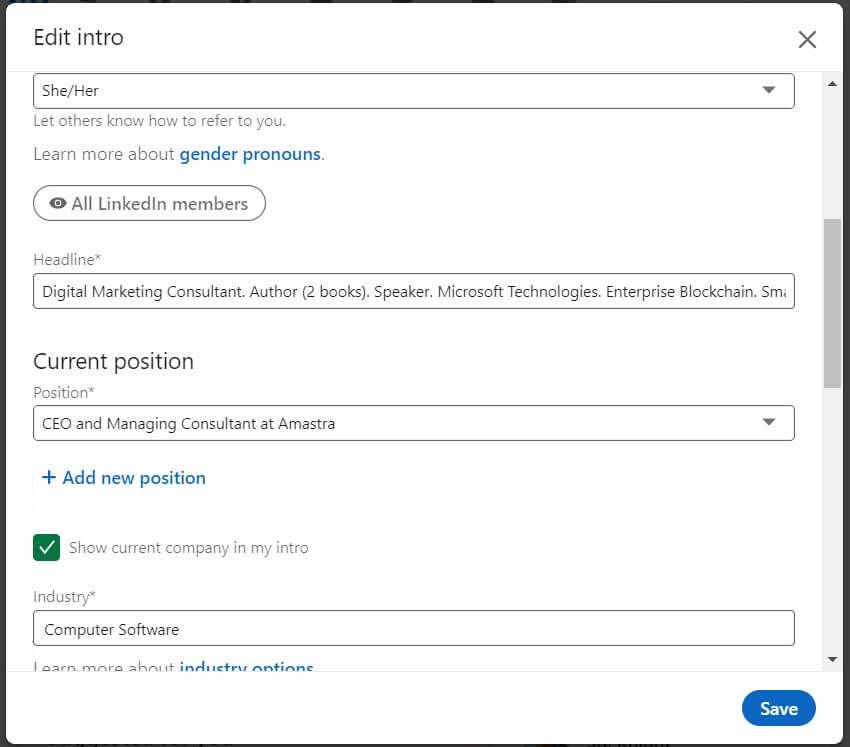
Linkedin headline eileen brown onmsft

You have loads of work experience and a heck of a lot of skills. Cram them all succinctly into your headline so that people can get a memorable overview of just how much you can do. Don’t bother to use the word ‘Professional’ however. We’re all professionals and expect to be paid for our skills. adding the word to our profiles does not add value, rather, it detracts from the main purpose of what we do. Click on the edit icon to the right of your name, scroll down to the headline section, and tell the world what you can do.

5: Tell the world what you can do

You may not have noticed it, but you can add a video clip to your profile with up to 30 seconds of your cover story. It is simple to do, but you need to record the video using your LinkedIn app on your mobile device. If you’d like to know more about cover stories, check out this post I did recently which goes into detail about how you can record your own cover story

6: Customise your profile URL

This is a really simple way to modify the default URL allocated by LinkedIn and create your own personalised URL – yet so many people do not do this. Work through these steps to create your own meaningful LinkedIn URL for your marketing materials

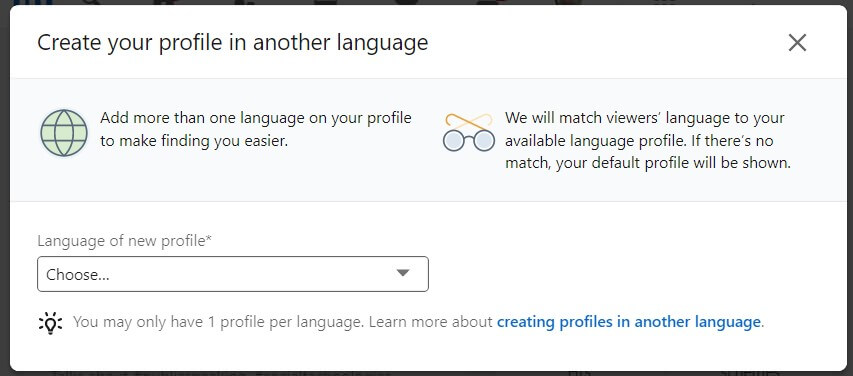
7: Use your bilingual skills to your advantage

other languages profile eileen brown onmsft

If you can speak more than one language, then add a LinkedIn profile for each language your speak. LinkedIn viewers will see your profile in their native language if you have configured the profile for their language. To do this, look to the right-hand side of your LinkedIn page and chose the ‘Add profile in another language link.

There are many other ways you can enhance your LinkedIn profile which I’ll be covering over the next few months. LinkedIn is a really powerful tool for business networking, finding connections, and securing clients. Make sure you use it to your advantage.

Share this article:
Previous Article How to Setup Phone Link app on PC and Phone [Updated] Next Article Sony continues to claim Microsoft is unwilling to offer “parity” with COD to Brussels regulators

Related Articles

43 Microsoft Edge keyboard shortcuts to remember for stylish and speedy web surfing

October 31, 2023

How to use accessibility features in Microsoft 365 like Narrator, Read aloud and Voice Search easily

October 30, 2023

How to use Windows Backup on Windows 11 for efficient data protection

October 26, 2023

Leave a Comment Cancel reply

Your email address will not be published. Required fields are marked *

Recent Posts

  • PowerToys 0.75 released; Environment Variables editor is here
  • Former Halo developer Bungie announces layoffs in wake of game delays
  • Siemens and Microsoft partner to bring GenAI to industries worldwide
  • 43 Microsoft Edge keyboard shortcuts to remember for stylish and speedy web surfing
  • Here is what’s coming to (and leaving) Xbox Game Pass soon

Recent Comments

No comments to show.

Archives

  • October 2023
  • September 2023
  • August 2023
  • July 2023
  • June 2023
  • May 2023
  • April 2023
  • March 2023
  • February 2023
  • January 2023
  • December 2022
  • November 2022
  • October 2022
  • September 2022
  • August 2022
  • July 2022
  • June 2022
  • May 2022
  • April 2022
  • March 2022
  • February 2022
  • January 2022
  • December 2021
  • November 2021
  • October 2021
  • September 2021
  • August 2021
  • July 2021
  • June 2021
  • May 2021
  • April 2021
  • March 2021
  • February 2021
  • January 2021
  • December 2020
  • November 2020
  • October 2020
  • September 2020
  • August 2020
  • July 2020
  • June 2020
  • May 2020
  • April 2020
  • March 2020
  • February 2020
  • January 2020
  • December 2019
  • November 2019
  • October 2019
  • September 2019
  • August 2019
  • July 2019
  • June 2019
  • May 2019
  • April 2019
  • March 2019
  • February 2019
  • January 2019
  • December 2018
  • November 2018
  • October 2018
  • September 2018
  • August 2018
  • July 2018
  • June 2018
  • May 2018
  • April 2018
  • March 2018
  • February 2018
  • January 2018
  • December 2017
  • November 2017
  • October 2017
  • September 2017
  • August 2017
  • July 2017
  • June 2017
  • May 2017
  • April 2017
  • March 2017
  • February 2017
  • January 2017
  • December 2016
  • November 2016
  • October 2016
  • September 2016
  • August 2016
  • July 2016
  • June 2016
  • May 2016
  • April 2016
  • March 2016
  • February 2016
  • January 2016
  • December 2015
  • November 2015
  • October 2015
  • September 2015
  • August 2015
  • July 2015
  • June 2015
  • May 2015
  • April 2015
  • March 2015
  • February 2015
  • January 2015
  • December 2014
  • November 2014
  • October 2014
  • September 2014
  • August 2014
  • July 2014
  • June 2014
  • May 2014
  • April 2014
  • March 2014
  • February 2014
  • January 2014
  • December 2013
  • November 2013
  • October 2013
  • September 2013
  • August 2013
  • July 2013
  • June 2013
  • May 2013
  • April 2013
  • March 2013
  • February 2013
  • January 2013
  • December 2012
  • November 2012
  • October 2012
  • September 2012
  • August 2012
  • July 2012
  • June 2012
  • May 2012
  • April 2012
  • March 2012
  • February 2012
  • January 2012
  • December 2011
  • November 2011
  • October 2011
  • September 2011
  • August 2011
  • July 2011
  • June 2011
  • May 2011
  • April 2011
  • March 2011
  • February 2011
  • January 2011
  • December 2010
  • November 2010
  • October 2010
  • September 2010

Categories

  • Announcements
  • Deals
  • Developer
  • Editorial
  • Feature
  • Feature stories
  • Hero-post
  • Hotdeals
  • How-to
  • Latest news
  • Microsoft / office 365
  • News
  • Office 365
  • Onpodcast
  • Opinion
  • Our featured post
  • Polls
  • Review
  • Reviews
  • Videos
OnMSFT.com

OnMSFT.com covers Microsoft news, reviews, and how-to guides. Formerly known as WinBeta, we have been your source for Microsoft news since 1998.

Categories

  • Windows
  • Surface
  • Xbox
  • How-To
  • OnPodcast
  • Gaming
  • Edge
  • Teams

Recent Posts

  • PowerToys 0.75 released; Environment Variables editor is here
  • Former Halo developer Bungie announces layoffs in wake of game delays
  • Siemens and Microsoft partner to bring GenAI to industries worldwide
  • 43 Microsoft Edge keyboard shortcuts to remember for stylish and speedy web surfing
  • Here is what’s coming to (and leaving) Xbox Game Pass soon

Quick Links

  • About OnMSFT.com
  • Contact OnMSFT
  • Join Our Team
© 2010–2026 OnMSFT.com LLC. All rights reserved.
About OnMSFT.comContact OnMSFT