Skip to content
OnMSFT.com
  • Home
  • About
  • Contact
  • Windows
  • Surface
  • Xbox
  • How-To
  • OnPodcast
  • Edge
  • Teams
  • Gaming
Menu
  • Home
  • About
  • Contact
  • Windows
  • Surface
  • Xbox
  • How-To
  • OnPodcast
  • Edge
  • Teams
  • Gaming
  1. Home
  2. How-to
  3. Unlocking How Microsoft 365 Copilot Works: A Comprehensive Guide to Data, Privacy, and Security

Unlocking How Microsoft 365 Copilot Works: A Comprehensive Guide to Data, Privacy, and Security

admin admin
July 24, 2023
4 min read

\n

\n

\n

In this article

\n

\n

  • How Microsoft 365 Copilot works
  • Leveraging Business Proprietary Data with Copilot
  • Protecting Sensitive Information Copilot’s Security Approach
  • Copilot’s commitment to data residency and sovereignty
  • Additional Insights into Microsoft 365 Copilot
  • Microsoft 365 Copilot Advancing AI-Powered Productivity

\n

Microsoft 365 Copilot is a sophisticated processing and orchestration engine that empowers users with AI-powered productivity capabilities. This seamless integration incorporates various components to deliver a comprehensive and efficient user experience. Let’s dive deeper into how Microsoft 365 Copilot works and the key components driving its powerful functionality. Here are the three key components to Microsoft 365 Copilot:

\n

    \n

  1. Large Language Models (LLMs)
  2. \n

  3. Your Content in Microsoft Graph
  4. \n

  5. Microsoft 365 Apps
  6. \n

\n

Here, we’ll explore how these three components work together to provide a powerful and secure user experience. Officially, Microsoft 365 Copilot is designed for the Early Access Program, an invite-only paid preview program for commercial customers, but will be generally available to all Microsoft 365 subscribers soon. Keep in mind that these details are subject to change and likely will as Microsoft learns how to implement how Microsoft 365 Copilot works.

\n

\n

\n

\n

\n

\n

\n

\n

\n

\n

\n

\n

\n

\n

How Microsoft 365 Copilot works

\n

Microsoft 365 Copilot offers intelligent features, functionality, and prompt capabilities to users within Microsoft 365 apps and other surfaces. Underlying this functionality, we find foundation models and proprietary Microsoft technologies that facilitate secure access, usage, and management of your business data.

\n
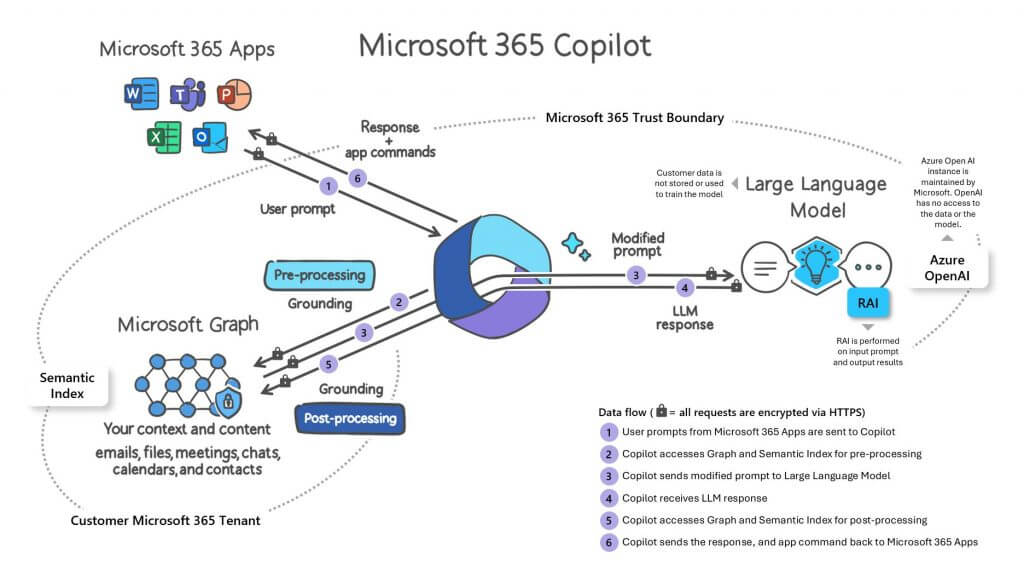
Microsoft 365 Copilot flow chart
A visual representation of how Microsoft 365 Copilot works (Microsoft)

\n

The Microsoft 365 apps, such as Word, Excel, PowerPoint, Outlook, Teams, and Loop, collaborate seamlessly with Copilot to assist users in their specific tasks. For instance, in Word, Copilot aids users in creating, comprehending, and editing documents, while in other apps, it supports users within their unique contexts. Watch the video below for an overview of how Microsoft 365 Copilot works.

\n

\n

Chat functionality enables users to leverage cross-app intelligence, allowing for efficient work with multiple apps. These cross-app prompts access core training data from LLM, as well as the user’s business data and apps, to provide valuable information and insights. Copilot’s reach extends to various experiences, including Teams (chat), Bing, Microsoft Edge, and the Microsoft 365 app.

\n

Leveraging Business Proprietary Data with Copilot

\n

Copilot connects LLMs to customer business data, ensuring privacy and security at all stages. It accesses content and context through Microsoft Graph, generating responses anchored in the customer’s business content. This includes documents, emails, calendar events, chats, meetings, contacts, and other business data. By combining this content with the user’s working context, such as ongoing meetings or recent chat conversations, Copilot delivers accurate, relevant, and contextual responses.

\n

\n

\n

\n

\n

\n

\n

\n

\n

\n

\n

\n

\n

\n

Important: Customer data, including prompts, responses, and data accessed through Microsoft Graph, is not used to train the foundation LLMs that Copilot employs. Additionally, Copilot only uses organizational data accessible to individual users based on their permissions. Check out the major services and features in Microsoft Graph.

\n

Protecting Sensitive Information: Copilot’s Security Approach

\n

Microsoft 365 Copilot is committed to maintaining strict data security and privacy. The permissions model within your Microsoft 365 tenant ensures that data remains secure and does not inadvertently leak between users, groups, and tenants. The Semantic Index honors user identity-based access boundaries, guaranteeing that the grounding process only accesses content authorized for the current user.

\n

Additionally, Microsoft implements multiple layers of protection to safeguard customer content, including rigorous physical security, background screening, and encryption strategies. Azure Active Directory authorization and role-based access control ensure logical isolation of customer content within each tenant.

\n

Copilot’s commitment to data residency and sovereignty

\n

Microsoft 365 Copilot ensures that LLM calls are routed to the closest data centers in the region to minimize latency. For European Union (EU) users, traffic stays within the EU Data Boundary to comply with regulations. Microsoft remains committed to fulfilling regulatory requirements as they evolve, with Copilot adhering to existing privacy and compliance obligations.

\n

Additional Insights into Microsoft 365 Copilot

\n

Microsoft 365 Copilot uses Azure OpenAI services for processing and GPT models, including GPT 4, to provide large language model capabilities. The privacy controls for connected experiences available with Microsoft 365 Apps do not apply to Microsoft 365 Copilot.

\n

To access and use Copilot in Microsoft 365, certain prerequisites need to be met, including a Microsoft E3/E5 subscription plan and Azure Active Directory-based accounts. Preparing your organization with the right information for access controls and policies in place will optimize your experience with Copilot in Microsoft 365.

\n

\n

\n

\n

\n

\n

\n

\n

\n

\n

\n

\n

\n

\n

Microsoft 365 Copilot: Advancing AI-Powered Productivity

\n

Microsoft 365 Copilot represents a groundbreaking advancement in AI-powered productivity, elevating businesses with robust data protection and security, all while upholding transparency and responsibility. Leveraging its powerful capabilities and strict adherence to compliance standards, Microsoft 365 Copilot is poised to revolutionize how organizations harness AI technologies, leading to unparalleled success and efficiency in their operations. Experience a new era of productivity with Microsoft 365 Copilot and witness firsthand how Microsoft 365 works seamlessly to transform your business landscape.

\n

\n

Related

\n

\n

Share this article:
Previous Article Twitter goes from the “bird app” to X with rebrand Next Article Bing Chat rolls out to Chrome, tests dark theme

Related Articles

43 Microsoft Edge keyboard shortcuts to remember for stylish and speedy web surfing

October 31, 2023

How to use accessibility features in Microsoft 365 like Narrator, Read aloud and Voice Search easily

October 30, 2023

How to use Windows Backup on Windows 11 for efficient data protection

October 26, 2023

Leave a Comment Cancel reply

Your email address will not be published. Required fields are marked *

Recent Posts

  • PowerToys 0.75 released; Environment Variables editor is here
  • Former Halo developer Bungie announces layoffs in wake of game delays
  • Siemens and Microsoft partner to bring GenAI to industries worldwide
  • 43 Microsoft Edge keyboard shortcuts to remember for stylish and speedy web surfing
  • Here is what’s coming to (and leaving) Xbox Game Pass soon

Recent Comments

No comments to show.

Archives

  • October 2023
  • September 2023
  • August 2023
  • July 2023
  • June 2023
  • May 2023
  • April 2023
  • March 2023
  • February 2023
  • January 2023
  • December 2022
  • November 2022
  • October 2022
  • September 2022
  • August 2022
  • July 2022
  • June 2022
  • May 2022
  • April 2022
  • March 2022
  • February 2022
  • January 2022
  • December 2021
  • November 2021
  • October 2021
  • September 2021
  • August 2021
  • July 2021
  • June 2021
  • May 2021
  • April 2021
  • March 2021
  • February 2021
  • January 2021
  • December 2020
  • November 2020
  • October 2020
  • September 2020
  • August 2020
  • July 2020
  • June 2020
  • May 2020
  • April 2020
  • March 2020
  • February 2020
  • January 2020
  • December 2019
  • November 2019
  • October 2019
  • September 2019
  • August 2019
  • July 2019
  • June 2019
  • May 2019
  • April 2019
  • March 2019
  • February 2019
  • January 2019
  • December 2018
  • November 2018
  • October 2018
  • September 2018
  • August 2018
  • July 2018
  • June 2018
  • May 2018
  • April 2018
  • March 2018
  • February 2018
  • January 2018
  • December 2017
  • November 2017
  • October 2017
  • September 2017
  • August 2017
  • July 2017
  • June 2017
  • May 2017
  • April 2017
  • March 2017
  • February 2017
  • January 2017
  • December 2016
  • November 2016
  • October 2016
  • September 2016
  • August 2016
  • July 2016
  • June 2016
  • May 2016
  • April 2016
  • March 2016
  • February 2016
  • January 2016
  • December 2015
  • November 2015
  • October 2015
  • September 2015
  • August 2015
  • July 2015
  • June 2015
  • May 2015
  • April 2015
  • March 2015
  • February 2015
  • January 2015
  • December 2014
  • November 2014
  • October 2014
  • September 2014
  • August 2014
  • July 2014
  • June 2014
  • May 2014
  • April 2014
  • March 2014
  • February 2014
  • January 2014
  • December 2013
  • November 2013
  • October 2013
  • September 2013
  • August 2013
  • July 2013
  • June 2013
  • May 2013
  • April 2013
  • March 2013
  • February 2013
  • January 2013
  • December 2012
  • November 2012
  • October 2012
  • September 2012
  • August 2012
  • July 2012
  • June 2012
  • May 2012
  • April 2012
  • March 2012
  • February 2012
  • January 2012
  • December 2011
  • November 2011
  • October 2011
  • September 2011
  • August 2011
  • July 2011
  • June 2011
  • May 2011
  • April 2011
  • March 2011
  • February 2011
  • January 2011
  • December 2010
  • November 2010
  • October 2010
  • September 2010

Categories

  • Announcements
  • Deals
  • Developer
  • Editorial
  • Feature
  • Feature stories
  • Hero-post
  • Hotdeals
  • How-to
  • Latest news
  • Microsoft / office 365
  • News
  • Office 365
  • Onpodcast
  • Opinion
  • Our featured post
  • Polls
  • Review
  • Reviews
  • Videos
OnMSFT.com

OnMSFT.com covers Microsoft news, reviews, and how-to guides. Formerly known as WinBeta, we have been your source for Microsoft news since 1998.

Categories

  • Windows
  • Surface
  • Xbox
  • How-To
  • OnPodcast
  • Gaming
  • Edge
  • Teams

Recent Posts

  • PowerToys 0.75 released; Environment Variables editor is here
  • Former Halo developer Bungie announces layoffs in wake of game delays
  • Siemens and Microsoft partner to bring GenAI to industries worldwide
  • 43 Microsoft Edge keyboard shortcuts to remember for stylish and speedy web surfing
  • Here is what’s coming to (and leaving) Xbox Game Pass soon

Quick Links

  • About OnMSFT.com
  • Contact OnMSFT
  • Join Our Team
© 2010–2026 OnMSFT.com LLC. All rights reserved.
About OnMSFT.comContact OnMSFT