Skip to content
OnMSFT.com
  • Home
  • About
  • Contact
  • Windows
  • Surface
  • Xbox
  • How-To
  • OnPodcast
  • Edge
  • Teams
  • Gaming
Menu
  • Home
  • About
  • Contact
  • Windows
  • Surface
  • Xbox
  • How-To
  • OnPodcast
  • Edge
  • Teams
  • Gaming
  1. Home
  2. How-to
  3. How to create images with word prompts on Bing Image Creator

How to create images with word prompts on Bing Image Creator

admin admin
July 31, 2023
3 min read

\n

\n

\n

In this article

\n

\n

  • Decoding Bing Image Creator
  • How to create images with Bing Image Creator?
  • Crafting Art on Microsoft Edge and Bing Chat
  • Conclusion

\n

In a world overrun with technology, software innovations have begun stretching the boundaries of human imagination. Bing Image Creator, a product of Microsoft, is a testimony to this trend. Powered by the coveted DALL-E by Open AI, Bing Image Creator is an AI image generator that works more like a magical inkpot. Just give it a text prompt, and voila you’ll get stunningly creative images.

\n

Decoding Bing Image Creator

\n

Bing Image Creator can be best thought of as a combination of an AI artist and a genie. You give it a command in words, and it churns out fabulous artwork. This AI image generator can create oil paintings, digital art, pop art, illustrations, logos, and even scenes from movies. However, the creator is also equipped with an ethical conscience. So, it will block prompts deemed harmful or inappropriate.

\n

\n

\n

\n

\n

\n

\n

\n

\n

\n

\n

\n

\n

\n

What’s best about Bing Image Creator is its accessibility. One can use it on a Windows PC via Microsoft Edge or access it through Bing Chat. And if you are not a Windows user, fear not. You can hunt Edge on your browser and download it to be part of the Bing Image Creator.

\n

Once inside Microsoft Edge, you will find the Bing Image Creator icon on the vertical sidebar to your right. If it’s not there, fret not. You need to click on the plus icon on the sidebar, open the menu, and toggle on the option for Image Creator. Voila, the icon will now appear on the sidebar.

\n

How to create images with Bing Image Creator?

\n

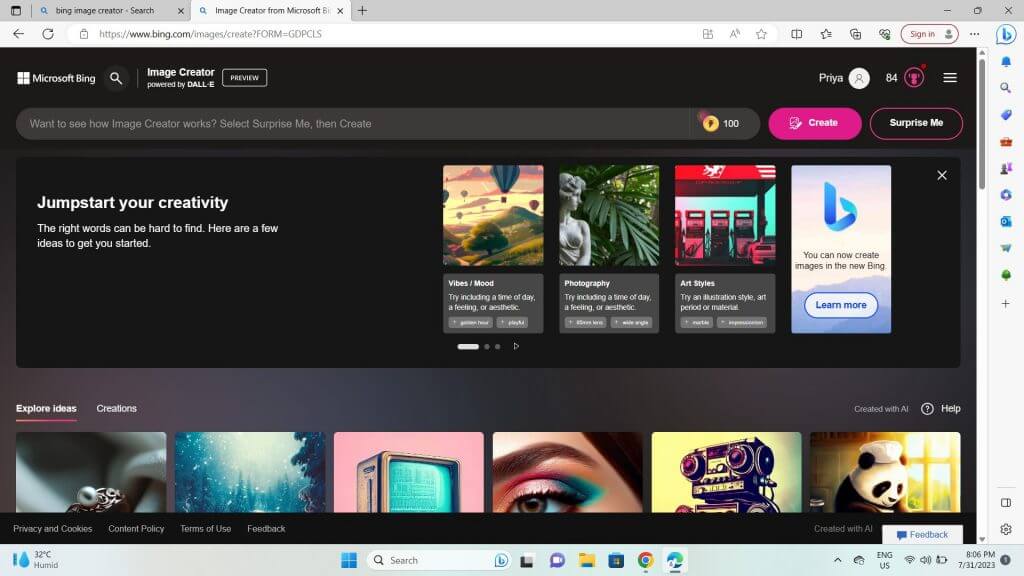
Now, let’s see how to turn your words into breathtaking images. Making AI art on Bing Image Creator is a two-step process.

\n

    \n

  1. First, you sign in using your Microsoft account.
  2. \n

  3. Second, you feed it a text prompt and hit Create.
  4. \n

  5. If you find yourself stuck with finding a suitable prompt, you can use the ‘Surprise Me’ button. This feature recommends an apt and descriptive prompt to set you on the path of image creation.
  6. \n

\n

Screenshot 91

\n

But that’s not all! Bing Image Creator comes with a prompt template that helps you give it well-structured and detailed commands. You start your prompt with an adjective, follow it up with a noun, then a verb, and conclude with a style of art.

\n

\n

\n

\n

\n

\n

\n

\n

\n

\n

\n

\n

\n

\n

The images tab lets you preview your creations. Click on the images for a full view, and from there, you can download or share your creations. On every command, Bing Image Creator provides four images of 1024 x 1024 resolution.

\n

However, be prepared for surprises. Bing Image Creator might vest artistic liberties and interpret your commands differently. For instance, faces and hands might appear distorted.

\n

Crafting Art on Microsoft Edge and Bing Chat

\n

In Microsoft Edge, the image creator panel opens when you click the Image Creator icon on the sidebar. Like its website, it generates four images on every command. Similarly, Bing Chat allows you to create images.

\n

You need to switch the Conversation Style from ‘More Balanced’ to ‘More Creative’, and then input your prompt in the ‘Ask me anything’ chat box. But in a chat, your command should start with the word ‘Create’.

\n

Conclusion

\n

With Bing Image Creator at your disposal, you are empowered to become an AI artist, turning your words into stunning works of art. The only boundary is your imagination. So, dive into this exciting universe of image creation and let the world witness your creations.

\n

\n

Related

\n

\n

Share this article:
Previous Article Final Fantasy XIV Online to hit Xbox Series X|S in Spring 2024 Next Article How to enable Microsoft Copilot for Microsoft 365

Related Articles

43 Microsoft Edge keyboard shortcuts to remember for stylish and speedy web surfing

October 31, 2023

How to use accessibility features in Microsoft 365 like Narrator, Read aloud and Voice Search easily

October 30, 2023

How to use Windows Backup on Windows 11 for efficient data protection

October 26, 2023

Leave a Comment Cancel reply

Your email address will not be published. Required fields are marked *

Recent Posts

  • PowerToys 0.75 released; Environment Variables editor is here
  • Former Halo developer Bungie announces layoffs in wake of game delays
  • Siemens and Microsoft partner to bring GenAI to industries worldwide
  • 43 Microsoft Edge keyboard shortcuts to remember for stylish and speedy web surfing
  • Here is what’s coming to (and leaving) Xbox Game Pass soon

Recent Comments

No comments to show.

Archives

  • October 2023
  • September 2023
  • August 2023
  • July 2023
  • June 2023
  • May 2023
  • April 2023
  • March 2023
  • February 2023
  • January 2023
  • December 2022
  • November 2022
  • October 2022
  • September 2022
  • August 2022
  • July 2022
  • June 2022
  • May 2022
  • April 2022
  • March 2022
  • February 2022
  • January 2022
  • December 2021
  • November 2021
  • October 2021
  • September 2021
  • August 2021
  • July 2021
  • June 2021
  • May 2021
  • April 2021
  • March 2021
  • February 2021
  • January 2021
  • December 2020
  • November 2020
  • October 2020
  • September 2020
  • August 2020
  • July 2020
  • June 2020
  • May 2020
  • April 2020
  • March 2020
  • February 2020
  • January 2020
  • December 2019
  • November 2019
  • October 2019
  • September 2019
  • August 2019
  • July 2019
  • June 2019
  • May 2019
  • April 2019
  • March 2019
  • February 2019
  • January 2019
  • December 2018
  • November 2018
  • October 2018
  • September 2018
  • August 2018
  • July 2018
  • June 2018
  • May 2018
  • April 2018
  • March 2018
  • February 2018
  • January 2018
  • December 2017
  • November 2017
  • October 2017
  • September 2017
  • August 2017
  • July 2017
  • June 2017
  • May 2017
  • April 2017
  • March 2017
  • February 2017
  • January 2017
  • December 2016
  • November 2016
  • October 2016
  • September 2016
  • August 2016
  • July 2016
  • June 2016
  • May 2016
  • April 2016
  • March 2016
  • February 2016
  • January 2016
  • December 2015
  • November 2015
  • October 2015
  • September 2015
  • August 2015
  • July 2015
  • June 2015
  • May 2015
  • April 2015
  • March 2015
  • February 2015
  • January 2015
  • December 2014
  • November 2014
  • October 2014
  • September 2014
  • August 2014
  • July 2014
  • June 2014
  • May 2014
  • April 2014
  • March 2014
  • February 2014
  • January 2014
  • December 2013
  • November 2013
  • October 2013
  • September 2013
  • August 2013
  • July 2013
  • June 2013
  • May 2013
  • April 2013
  • March 2013
  • February 2013
  • January 2013
  • December 2012
  • November 2012
  • October 2012
  • September 2012
  • August 2012
  • July 2012
  • June 2012
  • May 2012
  • April 2012
  • March 2012
  • February 2012
  • January 2012
  • December 2011
  • November 2011
  • October 2011
  • September 2011
  • August 2011
  • July 2011
  • June 2011
  • May 2011
  • April 2011
  • March 2011
  • February 2011
  • January 2011
  • December 2010
  • November 2010
  • October 2010
  • September 2010

Categories

  • Announcements
  • Deals
  • Developer
  • Editorial
  • Feature
  • Feature stories
  • Hero-post
  • Hotdeals
  • How-to
  • Latest news
  • Microsoft / office 365
  • News
  • Office 365
  • Onpodcast
  • Opinion
  • Our featured post
  • Polls
  • Review
  • Reviews
  • Videos
OnMSFT.com

OnMSFT.com covers Microsoft news, reviews, and how-to guides. Formerly known as WinBeta, we have been your source for Microsoft news since 1998.

Categories

  • Windows
  • Surface
  • Xbox
  • How-To
  • OnPodcast
  • Gaming
  • Edge
  • Teams

Recent Posts

  • PowerToys 0.75 released; Environment Variables editor is here
  • Former Halo developer Bungie announces layoffs in wake of game delays
  • Siemens and Microsoft partner to bring GenAI to industries worldwide
  • 43 Microsoft Edge keyboard shortcuts to remember for stylish and speedy web surfing
  • Here is what’s coming to (and leaving) Xbox Game Pass soon

Quick Links

  • About OnMSFT.com
  • Contact OnMSFT
  • Join Our Team
© 2010–2026 OnMSFT.com LLC. All rights reserved.
About OnMSFT.comContact OnMSFT