Skip to content
OnMSFT.com
  • Home
  • About
  • Contact
  • Windows
  • Surface
  • Xbox
  • How-To
  • OnPodcast
  • Edge
  • Teams
  • Gaming
Menu
  • Home
  • About
  • Contact
  • Windows
  • Surface
  • Xbox
  • How-To
  • OnPodcast
  • Edge
  • Teams
  • Gaming
  1. Home
  2. News
  3. Here’s why Together mode in Teams is better now

Here’s why Together mode in Teams is better now

Kevin Okemwa Kevin Okemwa
May 14, 2023
2 min read

Microsoft first introduced the Together mode feature in Teams back in 2020 at the height of the pandemic. At the time, a lot of organizations were transitioning to hybrid work and needed a collaboration tool that would help maintain the flow of communication.

The feature is designed to help reduce fatigue during remote collaboration. It virtually places participants in a shared background to make it feel like they are sitting in the same room as all other meeting participants.

And now, to build on the feature’s capabilities, Microsoft is introducing a set of new improvements designed to make the Together mode experience “more inclusive and easier-to-understand.” Here’s everything you need to know:

First up, users will now be able to see the name labels that support status icons, such as a microphone, active speaker, spotlight, or pin within the meeting as long as the feature is enabled.
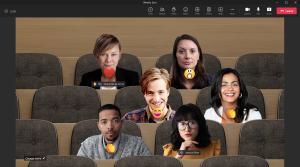
Together mode with visible reactions

Next up, it will also be easier for users to spot raised hands and reactions within the meeting view. Additionally, Microsoft will be doing away with your own video in the gallery in a bid to avoid duplication of the self-preview.

However, it is worth noting that these improvements are not available in general availability yet. You’ll need to be part of the Teams Public Preview program to access them on the Windows or macOS Teams client.

To be able to use this feature, users need to be members of the Teams Public Preview and use the Windows or macOS Teams client. Other users are not required to be members of the Teams Public Preview.

To enable Together mode, you’ll need to first join a Teams meeting and head to the View section, and select Together mode.

Do you use Together mode during a Teams meeting? Share your experience with us in the comments.

Check out more from onmsft.com!

Share this article:
Previous Article Microsoft news recap: ads coming to Bing Chat apps, base salaries frozen for 2023, and more Next Article Microsoft’s latest Bing Chat update adds images in chat answers and more

Related Articles

Chrome and Gemini icons representing Gemini Live voice assistant integration in Chrome

Chrome tests Gemini Live voice assistant in a floating overlay panel

March 14, 2026

Chrome’s Organizer feature may sync Gemini and AI conversations across devices

March 14, 2026

After Chrome, Edge tests launching the browser automatically when you sign into Windows

March 13, 2026

Leave a Comment Cancel reply

Your email address will not be published. Required fields are marked *

Recent Posts

  • Chrome tests Gemini Live voice assistant in a floating overlay panel
  • Chrome’s Organizer feature may sync Gemini and AI conversations across devices
  • After Chrome, Edge tests launching the browser automatically when you sign into Windows
  • iPhone Fold Latest Rumors: Display, Cameras, RAM and Price Details Revealed
  • Samsung fears first mobile operating loss due to memory price surge

Recent Comments

No comments to show.
OnMSFT.com

OnMSFT.com covers Microsoft news, reviews, and how-to guides. Formerly known as WinBeta, we have been your source for Microsoft news since 1998.

Categories

  • Windows
  • Surface
  • Xbox
  • How-To
  • OnPodcast
  • Gaming
  • Edge
  • Teams

Recent Posts

  • Chrome tests Gemini Live voice assistant in a floating overlay panel
  • Chrome’s Organizer feature may sync Gemini and AI conversations across devices
  • After Chrome, Edge tests launching the browser automatically when you sign into Windows
  • iPhone Fold Latest Rumors: Display, Cameras, RAM and Price Details Revealed
  • Samsung fears first mobile operating loss due to memory price surge

Quick Links

  • About OnMSFT.com
  • Contact OnMSFT
  • Join Our Team
  • Privacy Policy
© 2010–2026 OnMSFT.com LLC. All rights reserved.
About OnMSFT.comContact OnMSFTPrivacy Policy

