Skip to content
OnMSFT.com
  • Home
  • About
  • Contact
  • Windows
  • Surface
  • Xbox
  • How-To
  • OnPodcast
  • Edge
  • Teams
  • Gaming
Menu
  • Home
  • About
  • Contact
  • Windows
  • Surface
  • Xbox
  • How-To
  • OnPodcast
  • Edge
  • Teams
  • Gaming
  1. Home
  2. News
  3. Microsoft Authenticator’s number matching feature ships to all users

Microsoft Authenticator’s number matching feature ships to all users

Kevin Okemwa Kevin Okemwa
May 8, 2023
2 min read

Towards the end of last year, Microsoft announced a couple of security changes coming to its Microsoft Authenticator app. This move was prompted after attackers started leveraging push-based MFA to spam users to bypass Microsoft’s multi-factor authentication.

While the company provided a handful of tips and recommendations that users can use to avoid falling victim to such cons. There was still a need to add an extra layer of protection, that is, the announced number matching feature that’s designed to assist users from making accidental approvals while simultaneously protecting them from MFA attacks by hackers.

Microsoft has announced that the number matching feature is shipping to all Microsoft Authenticator app users starting today. This means users will now need to enter the number displayed on the sign-in screen when approving an MFA request in Authenticator as illustrated below.
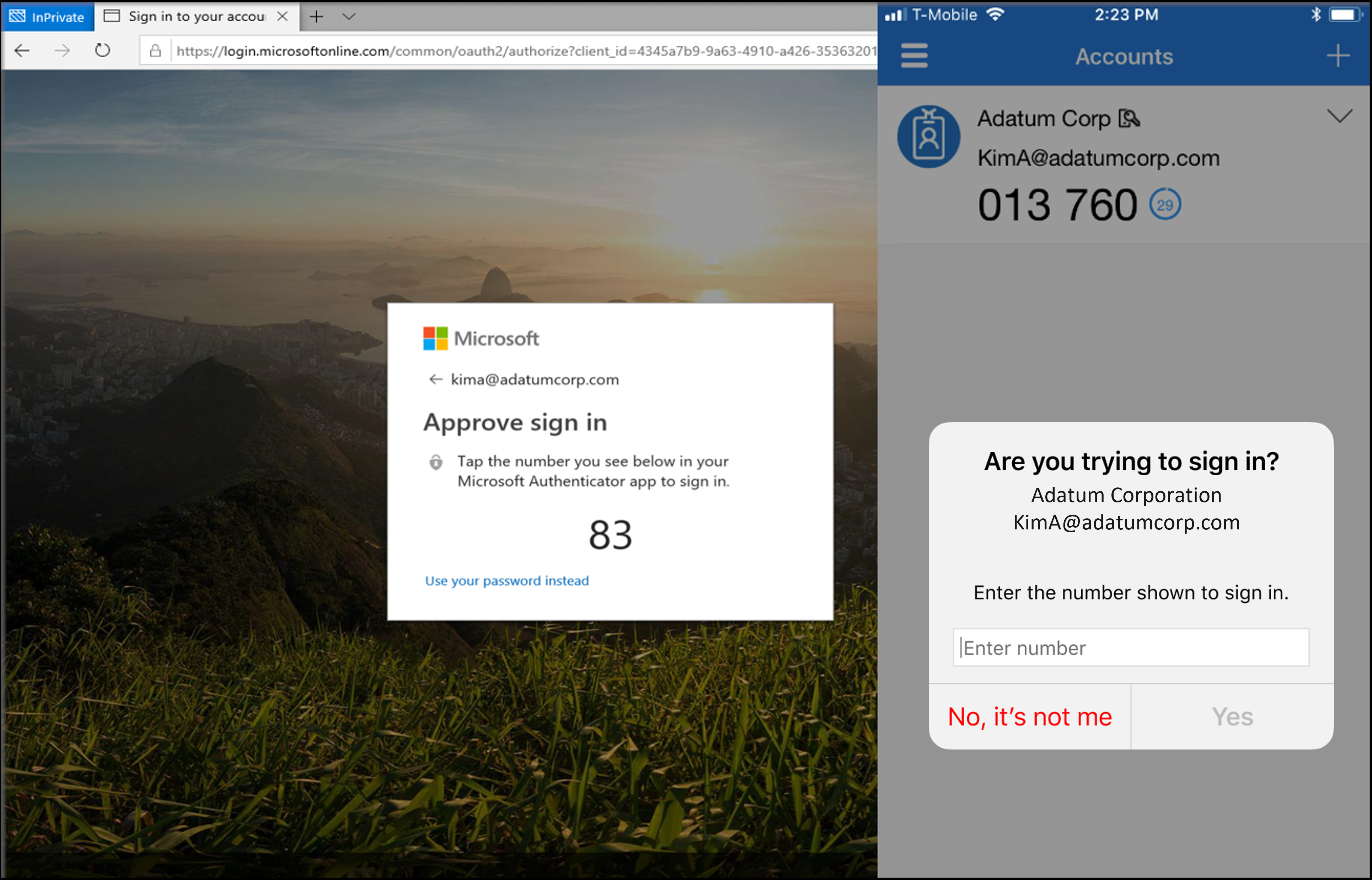
Screenshot of user entering a number match.

Microsoft further added that:

We highly recommend enabling number matching in the near term for improved sign-in security. Relevant services will begin deploying these changes after May 8, 2023 and users will start to see number match in approval requests. As services deploy, some may see number match while others don’t. To ensure consistent behavior for all users, we highly recommend you enable number match for Microsoft Authenticator push notifications in advance.

The company also highlighted its plans to do away with admin controls and enforce the number match experience tenant-wide for all users of Microsoft Authenticator push notifications to further enhance security.

We’d also like to invite you to check out our expert guide on how to move Microsoft Authenticator App to a new phone as well as our feature post comparing the Microsoft Authenticator app to LastPass.

Do you use the Microsoft Authenticator app? Share your experience with us in the comments.

via Neowin

‎Microsoft Authenticator
Download
QR-Code
‎Microsoft Authenticator
Developer:
Microsoft Corporation
Price:
Free

Check out more from onmsft.com!

Share this article:
Previous Article Microsoft refreshes Teams meeting experience with new animated backgrounds Next Article Starfield will apparently get a “Mature” rating from the ESRB

Related Articles

Chrome and Gemini icons representing Gemini Live voice assistant integration in Chrome

Chrome tests Gemini Live voice assistant in a floating overlay panel

March 14, 2026

Chrome’s Organizer feature may sync Gemini and AI conversations across devices

March 14, 2026

After Chrome, Edge tests launching the browser automatically when you sign into Windows

March 13, 2026

Leave a Comment Cancel reply

Your email address will not be published. Required fields are marked *

Recent Posts

  • Chrome tests Gemini Live voice assistant in a floating overlay panel
  • Chrome’s Organizer feature may sync Gemini and AI conversations across devices
  • After Chrome, Edge tests launching the browser automatically when you sign into Windows
  • iPhone Fold Latest Rumors: Display, Cameras, RAM and Price Details Revealed
  • Samsung fears first mobile operating loss due to memory price surge

Recent Comments

No comments to show.
OnMSFT.com

OnMSFT.com covers Microsoft news, reviews, and how-to guides. Formerly known as WinBeta, we have been your source for Microsoft news since 1998.

Categories

  • Windows
  • Surface
  • Xbox
  • How-To
  • OnPodcast
  • Gaming
  • Edge
  • Teams

Recent Posts

  • Chrome tests Gemini Live voice assistant in a floating overlay panel
  • Chrome’s Organizer feature may sync Gemini and AI conversations across devices
  • After Chrome, Edge tests launching the browser automatically when you sign into Windows
  • iPhone Fold Latest Rumors: Display, Cameras, RAM and Price Details Revealed
  • Samsung fears first mobile operating loss due to memory price surge

Quick Links

  • About OnMSFT.com
  • Contact OnMSFT
  • Join Our Team
  • Privacy Policy
© 2010–2026 OnMSFT.com LLC. All rights reserved.
About OnMSFT.comContact OnMSFTPrivacy Policy


