Skip to content
OnMSFT.com
  • Home
  • About
  • Contact
  • Windows
  • Surface
  • Xbox
  • How-To
  • OnPodcast
  • Edge
  • Teams
  • Gaming
Menu
  • Home
  • About
  • Contact
  • Windows
  • Surface
  • Xbox
  • How-To
  • OnPodcast
  • Edge
  • Teams
  • Gaming
  1. Home
  2. News
  3. Polls in Microsoft Teams now make it easier to manage meetings

Polls in Microsoft Teams now make it easier to manage meetings

Rabia Noureen Rabia Noureen
November 11, 2020
2 min read

Microsoft is rolling out an improved experience for meeting presenters to poll attendees before, during, and after Teams meetings. The update (version 1.3.00.30829) is rolling out gradually now to Windows or Mac Teams clients and the web app, according to the company’s roadmap.

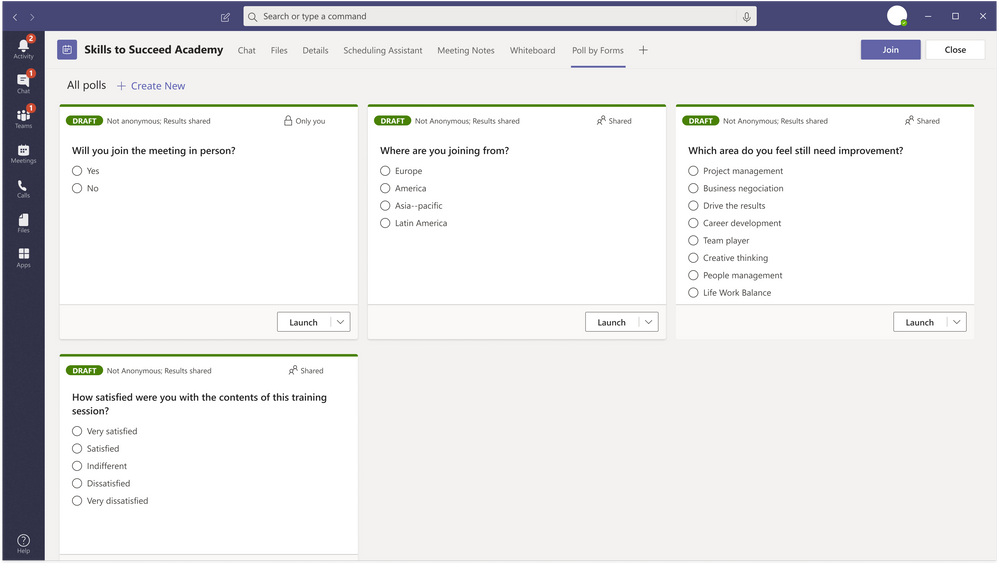
Thanks to its existing integration with Microsoft Forms, the ability to create polls within Microsoft Teams has existed for a while now. With this new experience, meeting presenters will now be able to add the Forms app as a tab in the Teams meeting. The latest update should make it easier for the presenters to create draft polls before a meeting quickly.
Poll_Multiple.png

Additionally, the feature also enables them to create/launch polls that attendees can view and answer during the meeting. Once the presenter publishes the poll, the attendees will be notified via a pop-up and in the meeting chat. They will be able to vote and see the poll outcomes in real-time. If the poll isn’t closed, the respondents can also choose to participate in it after the meeting has ended.

Finally, the presenter of a Teams meeting will be able to directly review the results in the meeting tab. There is also an option to evaluate responses in the Microsoft Forms web app and export them to an Excel workbook if required.

Again, the option is only for the presenters, and the organizer of the meeting will need to manually set the correct presenters before the meeting. You can read more about how to create a Poll in Microsoft Teams in this support document.


Share This Post:

Tags: Microsoft | Microsoft 365 | Microsoft Teams | Office 365
Share this article:
Tags:
Microsoft Microsoft 365 Microsoft Teams Office 365
Previous Article How to get started with Microsoft Lists Next Article Microsoft announces “Open Azure Day” event to show developers how to run Linux apps “your way” on Azure

Related Articles

Chrome and Gemini icons representing Gemini Live voice assistant integration in Chrome

Chrome tests Gemini Live voice assistant in a floating overlay panel

March 14, 2026

Chrome’s Organizer feature may sync Gemini and AI conversations across devices

March 14, 2026

After Chrome, Edge tests launching the browser automatically when you sign into Windows

March 13, 2026

Leave a Comment Cancel reply

Your email address will not be published. Required fields are marked *

Recent Posts

  • Chrome tests Gemini Live voice assistant in a floating overlay panel
  • Chrome’s Organizer feature may sync Gemini and AI conversations across devices
  • After Chrome, Edge tests launching the browser automatically when you sign into Windows
  • iPhone Fold Latest Rumors: Display, Cameras, RAM and Price Details Revealed
  • Samsung fears first mobile operating loss due to memory price surge

Recent Comments

No comments to show.
OnMSFT.com

OnMSFT.com covers Microsoft news, reviews, and how-to guides. Formerly known as WinBeta, we have been your source for Microsoft news since 1998.

Categories

  • Windows
  • Surface
  • Xbox
  • How-To
  • OnPodcast
  • Gaming
  • Edge
  • Teams

Recent Posts

  • Chrome tests Gemini Live voice assistant in a floating overlay panel
  • Chrome’s Organizer feature may sync Gemini and AI conversations across devices
  • After Chrome, Edge tests launching the browser automatically when you sign into Windows
  • iPhone Fold Latest Rumors: Display, Cameras, RAM and Price Details Revealed
  • Samsung fears first mobile operating loss due to memory price surge

Quick Links

  • About OnMSFT.com
  • Contact OnMSFT
  • Join Our Team
  • Privacy Policy
© 2010–2026 OnMSFT.com LLC. All rights reserved.
About OnMSFT.comContact OnMSFTPrivacy Policy
