Skip to content
OnMSFT.com
  • Home
  • About
  • Contact
  • News
  • How-to
  • Feature stories
  • Deals
  • Microsoft / office 365
  • Reviews
Menu
  • Home
  • About
  • Contact
  • News
  • How-to
  • Feature stories
  • Deals
  • Microsoft / office 365
  • Reviews
  1. Home
  2. News
  3. Microsoft Teams now lets user add images to meeting polls – onmsft.com

Microsoft Teams now lets user add images to meeting polls – onmsft.com

Kevin Okemwa Kevin Okemwa
December 14, 2022
1 min read

Microsoft has announced that it is enhancing the Polls app in Teams with a new feature. Users will now be able to add images to Teams meeting polls.

“Including visual elements in your content helps make it more engaging and appealing. It also enables you to simplify complex information and communicate it more clearly,” explained Microsoft.


You can use this feature with all question types, that is, multiple choice, quiz, word cloud, rating, and ranking. However, the maximum upload limit is 5MB.

To access this feature, click the Image button to the right of the question text box, select the image you want to ass from your local drive, and preview in the window after uploading.

Once you launch the poll, the respondents will be able to view the image and respond to the poll in pop-up, side pane, and the meeting chat. You can also click the image to get a closer look at the image as it will open in a new browser tab.
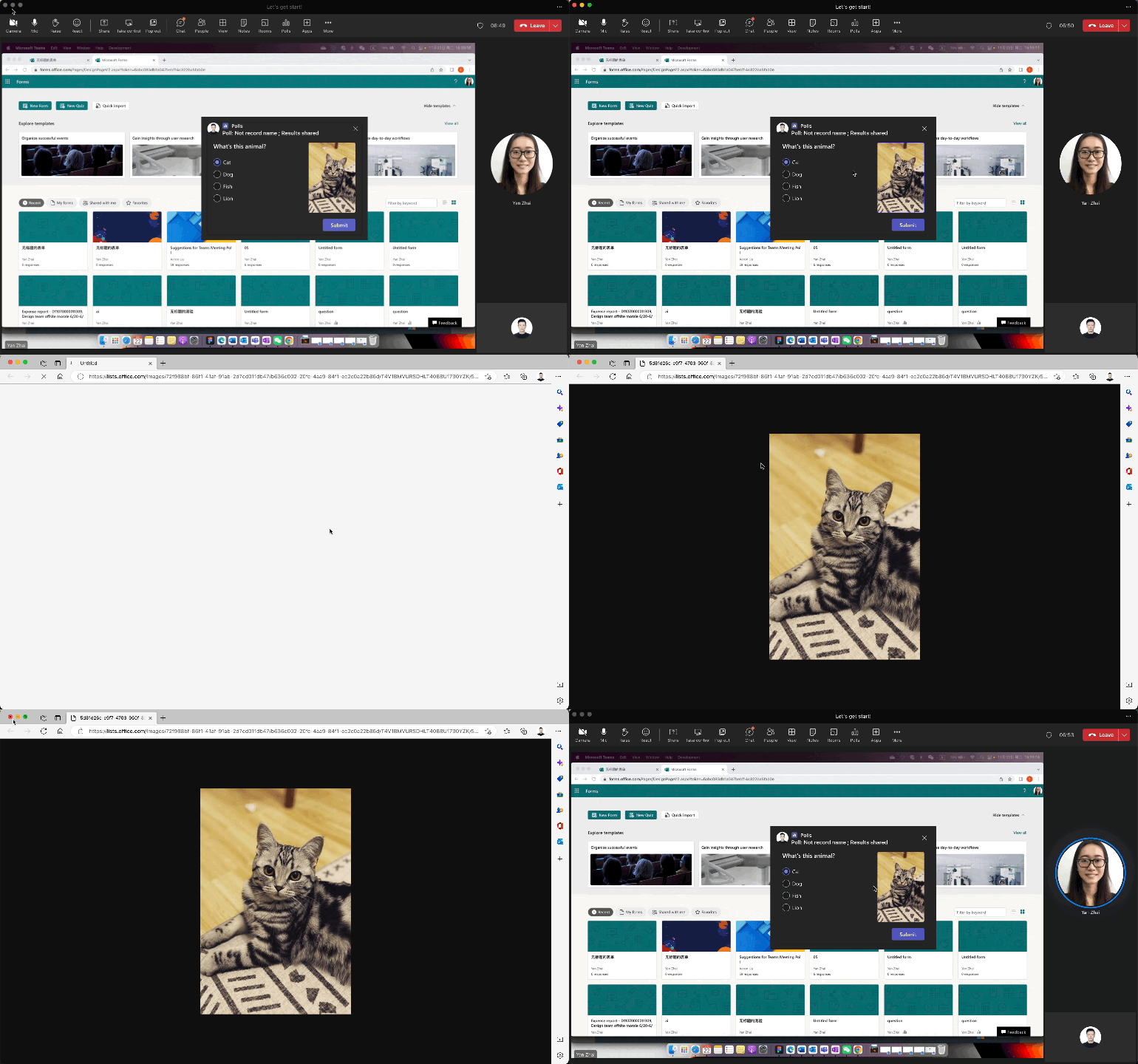
Animation of conducting a poll with an image

Microsoft recommends that users should use the 2:3 ratio when uploading images. This will present the respondents with the best layout results. It is worth noting that you can only add static images to meeting polls, support for GIFs is not available currently.

The feature is available for both Business and Education subscribers. In related news, Microsoft announced the debut of a new feature to the Polls app in Teams, Instant Polls which is designed to quickly engage with the audience and collect feedback from them.

Via: Microsoft

Share This Post:

Share this article:
Tags:
Microsoft Teams
Previous Article Teams Rooms on Android now features new touch and collaboration experiences – onmsft.com Next Article The Witcher 3 next-gen update is now available on Xbox and Windows – onmsft.com

Related Articles

Chrome tests Google Drive file uploads in the AI Mode compose box

April 14, 2026
Gemini image creation using right click desktop Chrome

Chrome lets you remake images with Gemini on desktop using just a right-click

April 13, 2026
Samsung Display crosses 5 million QD-OLED monitor shipments as demand grows fast, with new panels and strong premium market expansion worldwide.

Samsung Display Ships 5 Million QD-OLED Monitor Panels in Four Years

April 9, 2026

Leave a Comment Cancel reply

Your email address will not be published. Required fields are marked *

Recent Posts

  • Chrome tests Google Drive file uploads in the AI Mode compose box
  • Chrome lets you remake images with Gemini on desktop using just a right-click
  • Samsung Display Ships 5 Million QD-OLED Monitor Panels in Four Years
  • Intel Arc Pro B70 Teardown Reveals Blower Cooler and Early Board Design Details
  • Users Modify RTX 5090 Lightning Z Hardware to Unlock MSI’s Restricted 2500W BIOS

Recent Comments

  1. XxRIVTYxX on Intel Says It Tried to Help Before Crimson Desert Dropped Arc Support
  2. Gaurav Kumar on Chrome Prepares Nudge to ‘Move Tabs to the Side’ as Vertical Tabs Near Release
OnMSFT.com

The Tech News Site

Categories

  • Windows
  • Surface
  • Xbox
  • How-To
  • OnPodcast
  • Gaming
  • Edge
  • Teams

Recent Posts

  • Chrome tests Google Drive file uploads in the AI Mode compose box
  • Chrome lets you remake images with Gemini on desktop using just a right-click
  • Samsung Display Ships 5 Million QD-OLED Monitor Panels in Four Years
  • Intel Arc Pro B70 Teardown Reveals Blower Cooler and Early Board Design Details
  • Users Modify RTX 5090 Lightning Z Hardware to Unlock MSI’s Restricted 2500W BIOS

Quick Links

  • About OnMSFT.com
  • Contact OnMSFT
  • Join Our Team
  • Privacy Policy
© 2010–2026 OnMSFT.com LLC. All rights reserved.
About OnMSFT.comContact OnMSFTPrivacy Policy

