Skip to content
OnMSFT.com
  • Home
  • About
  • Contact
  • Windows
  • Surface
  • Xbox
  • How-To
  • OnPodcast
  • Edge
  • Teams
  • Gaming
Menu
  • Home
  • About
  • Contact
  • Windows
  • Surface
  • Xbox
  • How-To
  • OnPodcast
  • Edge
  • Teams
  • Gaming
  1. Home
  2. News
  3. Microsoft Teams Now Provides Meetings Recaps To Participants – onmsft.com

Microsoft Teams Now Provides Meetings Recaps To Participants – onmsft.com

Rabia Noureen Rabia Noureen
March 23, 2021
1 min read

Microsoft Teams has introduced a new “Meeting recap” feature, allowing participants to get a quick overview of important information after the meeting is over. This capability was first announced at Ignite 2020 conference, and it is now rolling out in the Teams desktop and web app.

In its updated release notes, Microsoft explained that the new feature enables users to access an auto-generated meeting summary of the entire meeting. This means that participants will now be able to view meeting recordings, chat messages, notes, and transcripts directly from the meeting chat tab or the details tab for each meeting. In addition, a link to the Meeting recap will also be available in the meeting event in their Outlook calendar.
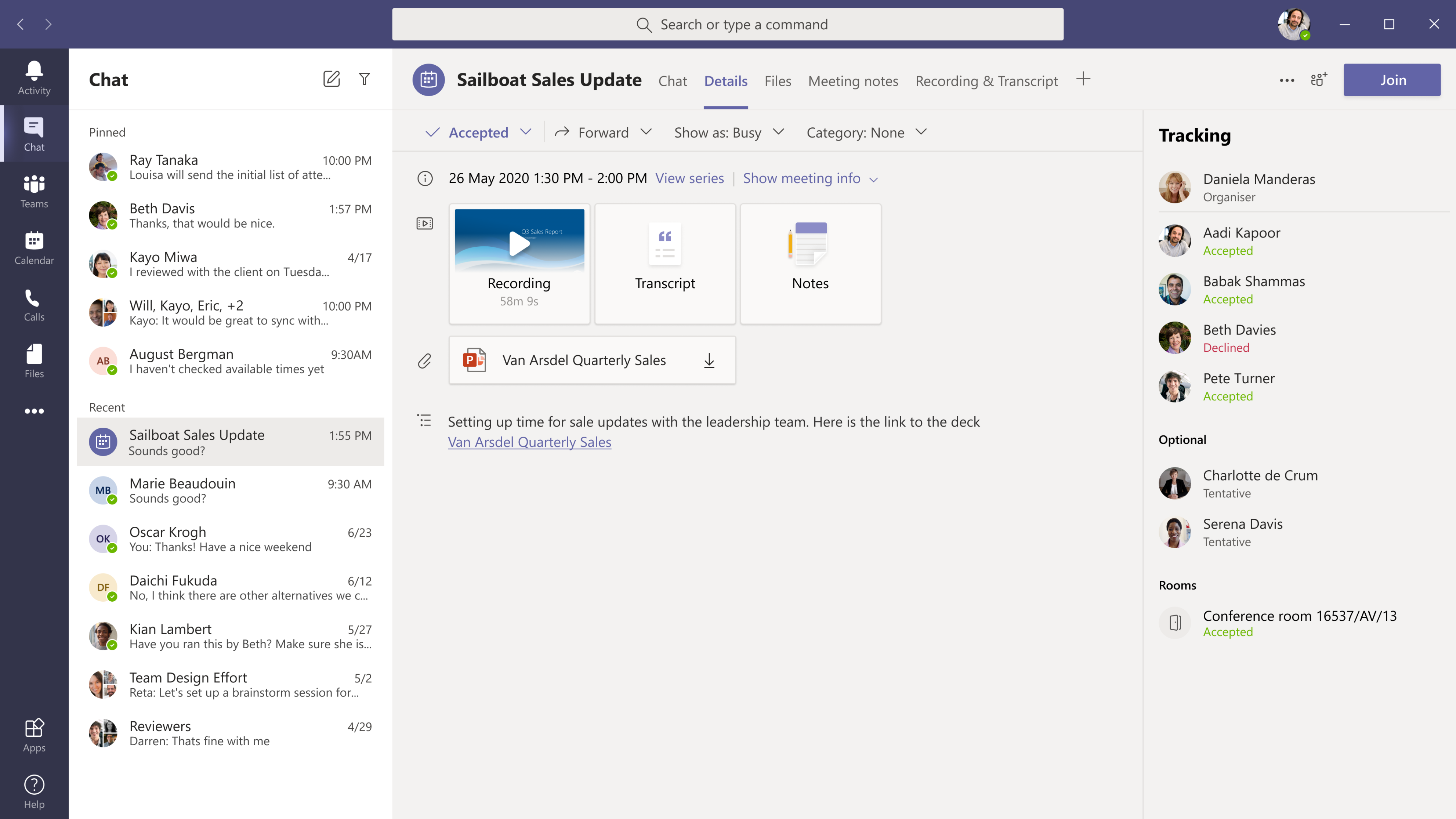
Meeting summary invitee view

However, there are some limitations to consider as well. Microsoft says that this update will not be enabled on channel meetings. Furthermore, meeting participants will need to turn on the meeting recordings and transcripts to include them in the recaps, with support available for English transcription only.

In addition to the meeting recap functionality, Microsoft has also launched a couple of other features for its Teams collaboration platform. Recently, the app added a new flyout panel to the Meet button in the Calendar tab to make it easier to share meeting invites with other people. The company has also made it possible to start a Teams meeting instantly from Outlook for Windows.

Share This Post:

Share this article:
Tags:
Microsoft 365 Microsoft Teams
Previous Article Microsoft’s Yammer Gets More Collaborative With Guest Access Support – onmsft.com Next Article What Is Xbox Game Pass And How Do I Get Started?

Related Articles

Leak Says Sony Still Plans PS6 and PlayStation Handheld for Holiday 2027

Leak Says Sony Still Plans PS6 and PlayStation Handheld for Holiday 2027

March 12, 2026
LEGO Reportedly Working on PlayStation 1 Building Set for 2026

LEGO Reportedly Working on PlayStation 1 Building Set for 2026

March 12, 2026
Disney+ Launches ‘Verts’ Vertical Video Feature on iPhone in the US

Disney+ Launches ‘Verts’ Vertical Video Feature on iPhone in the US

March 12, 2026

Leave a Comment Cancel reply

Your email address will not be published. Required fields are marked *

Recent Posts

  • Leak Says Sony Still Plans PS6 and PlayStation Handheld for Holiday 2027
  • LEGO Reportedly Working on PlayStation 1 Building Set for 2026
  • Disney+ Launches ‘Verts’ Vertical Video Feature on iPhone in the US
  • Firefox for Android Tests Hidden “Shake to Summarize” AI Feature
  • ChatGPT Atlas Update Adds Multi-Account Sign-In for Separate Profiles

Recent Comments

No comments to show.
OnMSFT.com

OnMSFT.com covers Microsoft news, reviews, and how-to guides. Formerly known as WinBeta, we have been your source for Microsoft news since 1998.

Categories

  • Windows
  • Surface
  • Xbox
  • How-To
  • OnPodcast
  • Gaming
  • Edge
  • Teams

Recent Posts

  • Leak Says Sony Still Plans PS6 and PlayStation Handheld for Holiday 2027
  • LEGO Reportedly Working on PlayStation 1 Building Set for 2026
  • Disney+ Launches ‘Verts’ Vertical Video Feature on iPhone in the US
  • Firefox for Android Tests Hidden "Shake to Summarize" AI Feature
  • ChatGPT Atlas Update Adds Multi-Account Sign-In for Separate Profiles

Quick Links

  • About OnMSFT.com
  • Contact OnMSFT
  • Join Our Team
  • Privacy Policy
© 2010–2026 OnMSFT.com LLC. All rights reserved.
About OnMSFT.comContact OnMSFTPrivacy Policy