Skip to content
OnMSFT.com
  • Home
  • About
  • Contact
  • Windows
  • Surface
  • Xbox
  • How-To
  • OnPodcast
  • Edge
  • Teams
  • Gaming
Menu
  • Home
  • About
  • Contact
  • Windows
  • Surface
  • Xbox
  • How-To
  • OnPodcast
  • Edge
  • Teams
  • Gaming
  1. Home
  2. News
  3. Microsoft Planner now lets users move tasks to any of their plans – OnMSFT.com

Microsoft Planner now lets users move tasks to any of their plans – OnMSFT.com

Rabia Noureen Rabia Noureen
September 30, 2021
2 min read

Microsoft has announced some important updates for Planner on the web that should help users easily find their plans and organize tasks. Indeed, the new recommended plans and move task features are now generally available worldwide for all Planner customers.

Microsoft Planner already allows users to move tasks between plans in the same Microsoft 365 Group, but this release gives the ability to quickly move tasks to any plan of their choice in a different group. The feature is accessible by clicking the three dots menu on a task and selecting the “Move task” option. Once done, choose the specific plan from the drop-down menu and then click the “Move” button. However, users cannot move certain fields (such as comments) to a plan in a different group, and label information will be lost across plans.

Thumbnail image 2 captioned image description: a screenshot of a planner board that shows the ellipses (three dots) in the upper right corner of a task and a drop-down with the words move task highlighted

Recommended plans is another new capability that is now available in Planner for the web. This means that users will now see a new Recommended section that should help them find plans that are most relevant to them. This section is accessible in the left pane and the Planner hub, and it will contain new plans with unopened tasks assigned to that specific user.
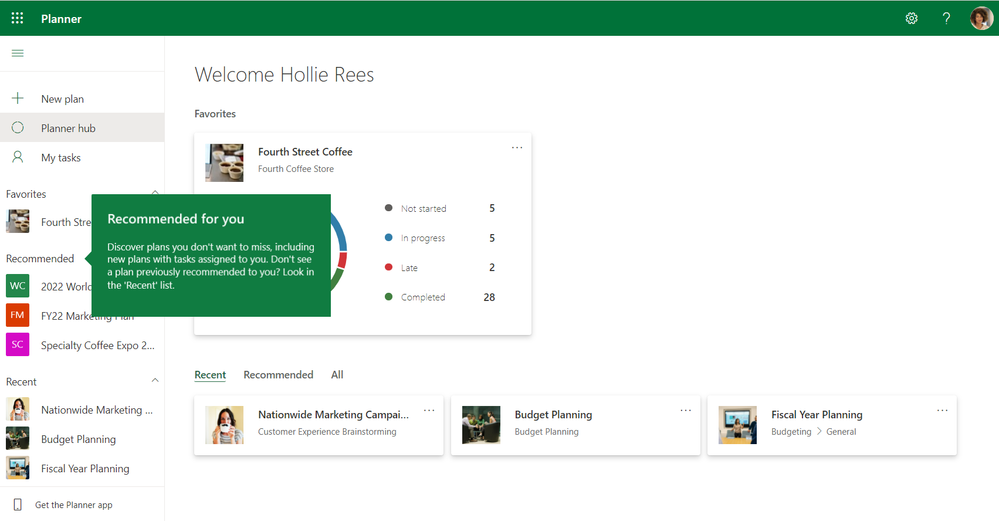
Thumbnail image 1 captioned image description: a screenshot of a planner board with a teaching callout to highlight the recommended for you section in the planner web experience

It is important to note that both these features are only supported in Planner for the web, but Microsoft says the move tasks feature is coming soon to the Tasks app in Microsoft Teams. Let us know in the comments if you think that these Planner updates will help you save some time and effort.


Share This Post:

Share this article:
Tags:
Microsoft 365 Microsoft Planner
Previous Article PlayGround Games details minimum PC specifications and peripheral support for Forza Horizon 5 Next Article New Halo Waypoint mobile app launches right in time for Halo Infinite’s next beta

Related Articles

OpenAI says ChatGPT ‘Adult Mode’ Needs More Time

March 9, 2026

Claude Opus 4.6 Discovers 22 Firefox Vulnerabilities in Just Two Weeks

March 9, 2026
OpenClaw can now connect with Gmail, Drive, and Docs using Google’s new CLI

OpenClaw can now connect with Gmail, Drive, and Docs using Google’s new CLI

March 9, 2026

Leave a Comment Cancel reply

Your email address will not be published. Required fields are marked *

Recent Posts

  • OpenAI says ChatGPT ‘Adult Mode’ Needs More Time
  • Claude Opus 4.6 Discovers 22 Firefox Vulnerabilities in Just Two Weeks
  • OpenClaw can now connect with Gmail, Drive, and Docs using Google’s new CLI
  • Chrome Prepares Nudge to ‘Move Tabs to the Side’ as Vertical Tabs Near Release
  • How Apple Made the $599 MacBook Neo Without Using Plastic

Recent Comments

No comments to show.
OnMSFT.com

OnMSFT.com covers Microsoft news, reviews, and how-to guides. Formerly known as WinBeta, we have been your source for Microsoft news since 1998.

Categories

  • Windows
  • Surface
  • Xbox
  • How-To
  • OnPodcast
  • Gaming
  • Edge
  • Teams

Recent Posts

  • OpenAI says ChatGPT 'Adult Mode' Needs More Time
  • Claude Opus 4.6 Discovers 22 Firefox Vulnerabilities in Just Two Weeks
  • OpenClaw can now connect with Gmail, Drive, and Docs using Google’s new CLI
  • Chrome Prepares Nudge to 'Move Tabs to the Side' as Vertical Tabs Near Release
  • How Apple Made the $599 MacBook Neo Without Using Plastic

Quick Links

  • About OnMSFT.com
  • Contact OnMSFT
  • Join Our Team
  • Privacy Policy
© 2010–2026 OnMSFT.com LLC. All rights reserved.
About OnMSFT.comContact OnMSFTPrivacy Policy