
\n
Microsoft pulled a surprise last year when it revealed the Surface Headphones. We recently reviewed it and quite enjoyed it, but this year the company is back again with something that is keener to Apple’s infamous AirPods.
\n
We spent some hands-on time with the new Surface Earbuds during Microsoft’s event today in New York City, and we were fairly impressed. Here are our impressions.
\n
Charging Case
\n
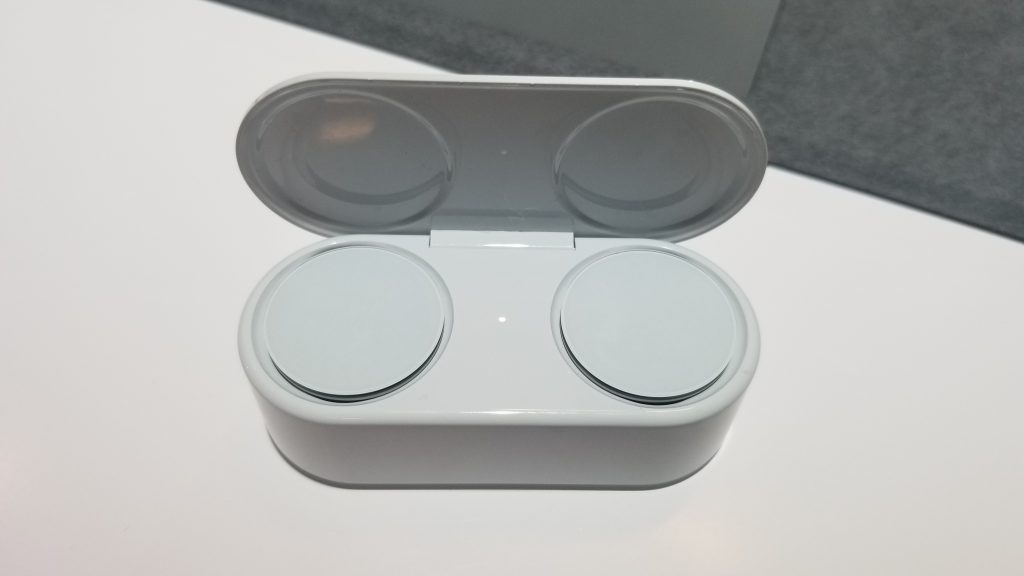
Like the dental floss style case that comes with Apple’s AirPods, the first thing I noticed with Surface Earbuds is its charging case. It’s shaped a bit like a traffic light. You can simply rest the earbuds on the top of the case when it’s open, and the buds will magnetically be pulled in to start charging. If you put the wrong bud in the wrong spot, it won’t accept it.
\n
The case itself charges via USB-C and can hold up to 24 hours of battery life, but the buds themselves will only last 8 hours. That is quite impressive considering that the earbuds will be used all day. It is also outfitted with the Microsoft Logo and features a pairing button on the bottom.
\n
\n
Comfort and fit
\n
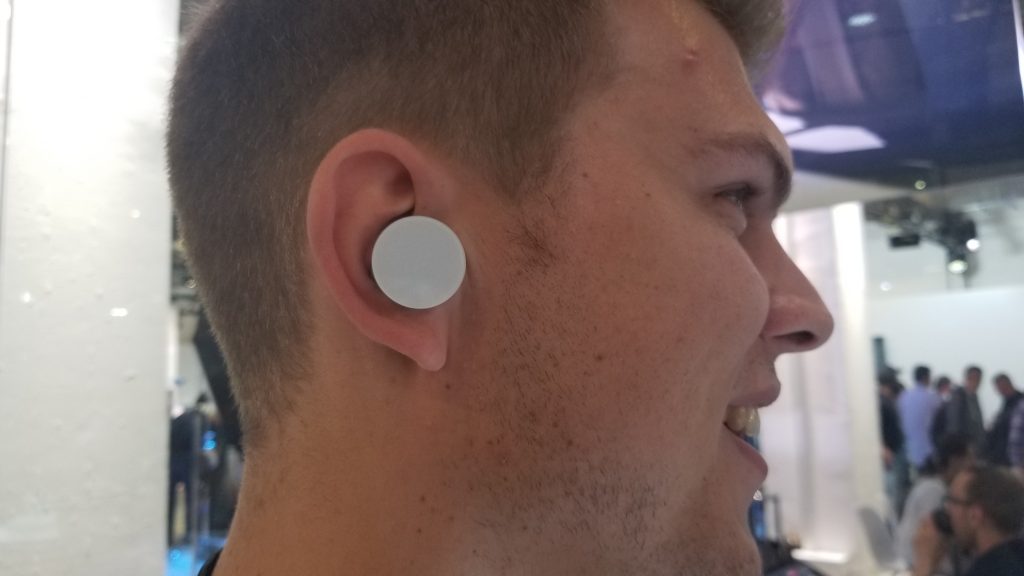
Of course, the Surface Earbuds are not all about the case. Microsoft tells me that the ear tips on the Surface Earbuds can fit 95 percent of all human ears. It was tested extensively in labs with over 1,000 human ears and is designed for comfort and stability.
\n
For the other 5 percent, Microsoft includes options for a small size or large size ear tip. That just so happens to be me, as I needed to try the small tip for the Earbuds to properly fit inside my ear.
\n
As Microsoft demoes in this video above, you need to pop off the tip and then slide it back into the Earbuds for it to snap into place. I had trouble doing this, but Microsoft assured me it’s a seamless process once you get used to it. I should also note that the buds rest inside your ear without touching your ear canal. That means, there’s no sound cancellation, as I discover later.
\n
\n
Microsoft also mentions that you need somewhat of a “screwing” motion to first rest the buds on your ear canal, and then get the Earbuds to fit properly into your ears. I had trouble getting it to sit inside my ears, but once I repeated the process, things were smooth.
\n
Hey, where’s Cortana?
\n
A notable feature on last year’s Surface Headphones was Cortana. The digital assistant was built right in, and you could voice activate it for certain tasks. This time around, with the Surface Earbuds, Microsoft is doing something different. There’s no voice activation or inbuilt Cortana.
\n
Pressing and holding on the touch surface on the outside of the Surface Earbuds will instead summon any digital assistant that you have tied to your device. On Windows devices, that can be Cortana. But, on Android that can be Google Assistant and even Cortana, if you’ve configured it as default on your device. Presumably, this also includes Siri on the iPhone, but we couldn’t confirm that.
\n
Of course, there are also some additional controls on Surface Earbuds. You can swipe up and down on the exterior of the Earbuds for volume control, and you can swipe forward to advance songs on Spotify. You also can swipe back to go back to a previous song in Spotify.
\n
This exterior touch control surface makes the Surface Earbuds look huge, but it’s appreciated. You have a large surface to scroll through and control your device when running, or doing other activities.
\n

\n
Sound quality and other features
\n
Last year’s Surface headphones feature noise cancellation onboard. I expected the same with Surface Earbuds, but, apparently, Microsoft took a different approach. Microsoft instead focused on designing Surface Earbuds so it could be used across different contexts. This includes using it by yourself in silence, or while you’re commuting, talking to a coworker. Essentially, Microsoft doesn’t want you to take the buds out and put it back in every minute. It envisions you keeping these on all day while you need it.
\n
I wasn’t provided a specific answer on the noise cancellation. Instead, Microsoft mentioned the Omnisonic sound it did during the keynote. A Microsoft rep also played some tunes for me and urged me to continue speaking. As I did, I still heard the rep talking to me, as well as the music. Music was clear and concise, and bass was decent, as was the voice of the person speaking to me. There’s some sort of magic going on, but it was hard for me to judge true sound quality in a crowded event hall.
\n
Finally, is a cool feature that I’ve not seen on other earbuds. Surface Earbuds can live caption your PowerPoint slides. When I tried doing this my spoken words were slightly delayed as the PowerPoint presentation picked them up, but Microsoft told me that was due to the WiFi. Still, this is a cool feature. Other features onboard let you access your Outlook calendar and emails with your voice.
\n
\n
You’ll be able to pick up Surface Earbuds in later this year, and pricing starts at $249. That might be a high price to pay compared to other products from competitors (including Apple’s AirPods), but Surface is definitely a premium brand and products are priced accordingly.
\n
Hopefully, the investment should be worth it for Surface fans. Be it the PowerPoint live captions, or the support for other digital Assistants, Microsoft has built quite the number of features in its Surface Earbuds. However, audiophiles may still prefer the Surface headphones and their killer noise cancellation feature, something we’d really like to see in the next version of the Surface Earbuds.
\n\nFurther reading: #MicrosoftEvent, Microsoft, Surface, Surface Earbuds


