Skip to content
OnMSFT.com
  • Home
  • About
  • Contact
  • Windows
  • Surface
  • Xbox
  • How-To
  • OnPodcast
  • Edge
  • Teams
  • Gaming
Menu
  • Home
  • About
  • Contact
  • Windows
  • Surface
  • Xbox
  • How-To
  • OnPodcast
  • Edge
  • Teams
  • Gaming
  1. Home
  2. Here’s all the productivity features added to Microsoft 365 for individuals & families over the past year

Here’s all the productivity features added to Microsoft 365 for individuals & families over the past year

admin admin
January 11, 2023
4 min read

\n

\n

\n

In this article

\n

\n

  • Mobile apps
  • Microsoft Excel
  • Microsoft PowerPoint
  • Microsoft Word
  • Subscribe now!

\n

It’s been almost a year since Microsoft launched Microsoft 365 Personal and Family, and since then a lot has changed in the world. That’s why, today on April 7, the company published a bit of a retrospective post, looking back at some of the work they’ve done, on the subscription service. From updates to Word, Excel, PowerPoint, and a lot more, here’s a look at some of those new features, and why Microsoft 365 is always improving.

\n

Mobile apps

\n

\n

\n

I[ad=1

\n

\n

\n

\n

\n

\n

\n

\n

\n

\n

\n

\n

\n

\n

\n

Mobile App 2

\n

Mobile App 3

\n

Mobile App 4

\n

Mobile App 5

\n

\n

\n\n

Leading the list is a look at some of the improvements and changes for the mobile apps falling under the Microsoft 365 banner. This includes the Office app for iPad, new AI experiences for Cortana on Outlook for iPhone, the Microsoft Lens app, and more.

\n

\n

\n

\n

\n

\n

\n

\n

\n

\n

\n

\n

\n

\n

In February 2020, Microsoft announced a new Office app for the iPad. The app provides a simple, integrated experience that combines Word, Excel, and PowerPoint into a single app, without having to switch between different apps. You can learn more about the app right here.

\n

In addition in February 2021, Microsoft also introduced new conversational AI experiences with Cortana on Outlook for iPhone. Thanks to this feature, Cortana can be used to schedule meetings, compose email messages, find files, and a lot more. All it takes is to just use the power of your voice.

\n

Another big improvement comes with a bit of a rebrand in February 2021. Microsoft rebranded Office Lens as Microsoft Lens, with added enhancements to improve quality and performance. The app picked up Image to Table, Image to Text, Immersive Reader, Image to Contact, and QR Code Scan features.

\n

Some smaller changes a happened to Microsoft To Do on iOS, as well as OneDrive. Thanks to iOS 14, it’s now possible to add To Do widgets to the home screen on iPhones. And, with March 2021 updates to the OneDrive iOS app, it became possible to view your iPhone’s Live Photos directly inside of OneDrive.

\n

Microsoft Excel

\n
\n

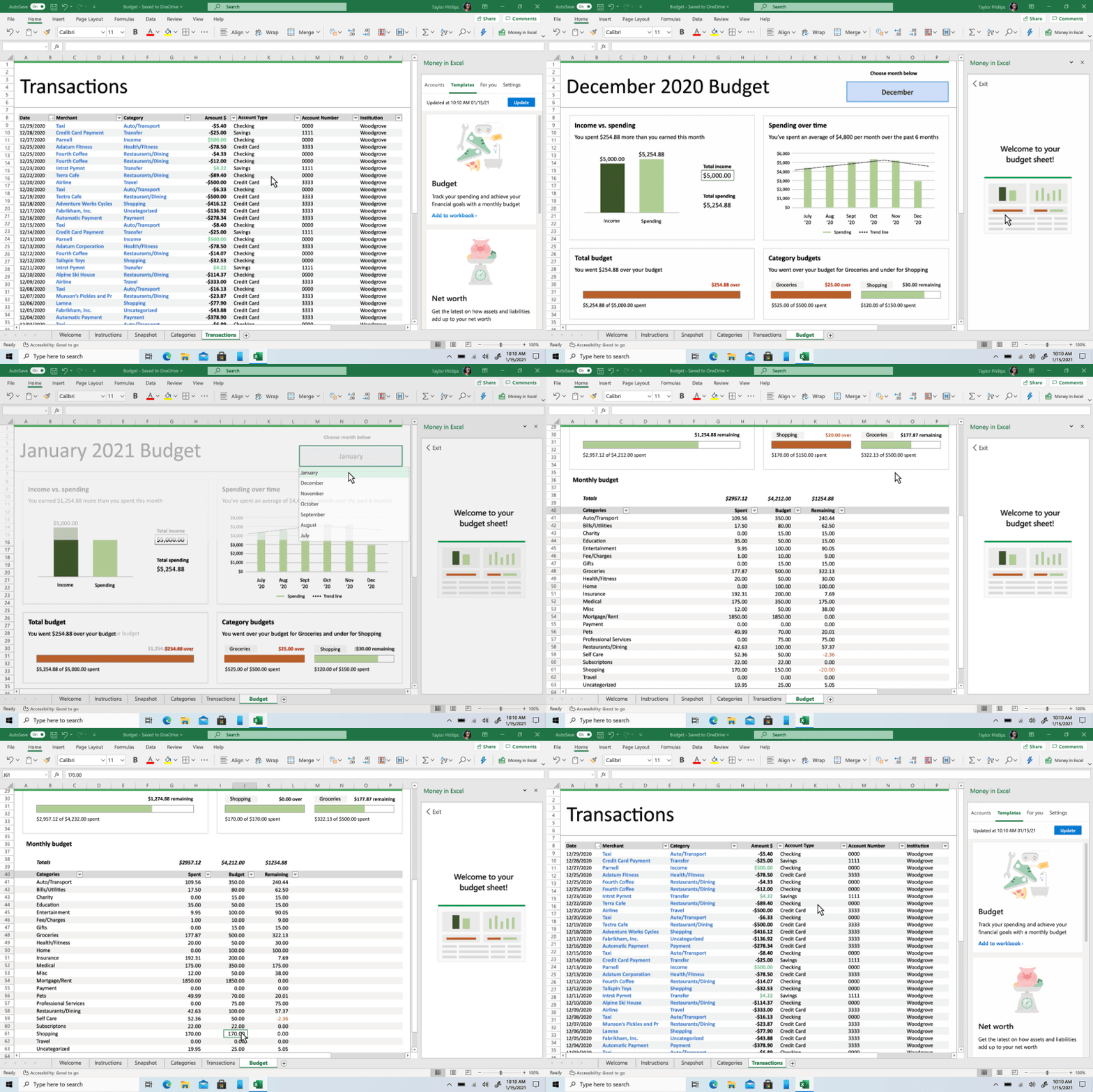
Moving onto Microsoft Excel, there was quite a number of improvements over the past year, mainly catered to the Money in Excel feature. We went hands-on with the feature back in June of 2020, but Microsoft recently introduced some big tweaks for the experience.

\n

\n

\n

\n

\n

\n

\n

\n

\n

\n

\n

\n

\n

\n

Indeed, Microsoft released a Money in Excel budget template which can help you target spend and specific categories that matter to you, like groceries, gas, shopping. Also new are cash flow insights to help you monitor your monthly expenses. Finally, you can manually input transactions and account balances directly into Money in Excel to track cash purchases and more.

\n

Elsewhere in Excel, Microsoft announced that Microsoft 365 subscribers will soon have access to over 100 data types powered by Wolfram. This means that you can import and refresh data directly into Excel instead of using multiple apps or sites to copy and paste external data into tables. This builds on the smart templates feature. This will be coming soon, according to Microsoft.

\n

Microsoft PowerPoint

\n
\n

As for PowerPoint, the most notable thing was the introduction of the PowerPoint Presenter Coach. The feature is now on Windows, macOS, iOS, Android, and the web. Microsoft added things such as feedback on body language, tips to help avoid reputation, pronunciation practice tools, and more. We talked about these features back in March.

\n

Microsoft Word

\n

\n

We’ve saved the best for last and will now get into Microsoft Word. Over the past year, Microsoft has added new features to the Microsoft Editor feature in Word. It’s now possible to check your document for plagiarism and get options for how to properly cite sources.

\n

Microsoft even added multi-lingual support and additional website support to the Microsoft Editor browser extension, too. And, for folks who like design, there’s Designer in Word for web, which is now rolling out in preview. Microsoft says this can help you create documents with a polished, professional, and consistent look and feel

\n

Also new is Text Predictions, which Microsoft says it is actively working to introduce to “all the places where you use Word and Outlook.” It’s now available for Microsoft 365 Personal and Family subscribers in Word for web, plus in Word for Windows via the Office Insiders program.

\n

Finally, you can see the background on a writing suggestion in Word thanks to Microsoft Editor. Just click the lightbulb icon, and see more information. The feature is coming soon in Microsoft Editor in Word for the web.

\n

Subscribe now!

\n

This is just a quick look at some of the features Microsoft has introduced to Microsoft 365 over the past year. As you can tell, compared to the stand-alone versions of Microsoft Office, there are always new features to play with when you’re a Microsoft 365 subscriber. You can try a one-month trial here, and check out more at Microsoft.

\n

\n

Related

\n

\n

Share this article:
Previous Article Dell 27 Video Conferencing Monitor review: The do it all Microsoft Teams monitor for any home or office setup Next Article Microsoft is set to offer unlimited paid time off – is that a bad thing?

Related Articles

PowerToys 0.75 released; Environment Variables editor is here

October 31, 2023

Former Halo developer Bungie announces layoffs in wake of game delays

October 31, 2023

Siemens and Microsoft partner to bring GenAI to industries worldwide

October 31, 2023

Leave a Comment Cancel reply

Your email address will not be published. Required fields are marked *

Recent Posts

  • PowerToys 0.75 released; Environment Variables editor is here
  • Former Halo developer Bungie announces layoffs in wake of game delays
  • Siemens and Microsoft partner to bring GenAI to industries worldwide
  • 43 Microsoft Edge keyboard shortcuts to remember for stylish and speedy web surfing
  • Here is what’s coming to (and leaving) Xbox Game Pass soon

Recent Comments

No comments to show.

Archives

  • October 2023
  • September 2023
  • August 2023
  • July 2023
  • June 2023
  • May 2023
  • April 2023
  • March 2023
  • February 2023
  • January 2023
  • December 2022
  • November 2022
  • October 2022
  • September 2022
  • August 2022
  • July 2022
  • June 2022
  • May 2022
  • April 2022
  • March 2022
  • February 2022
  • January 2022
  • December 2021
  • November 2021
  • October 2021
  • September 2021
  • August 2021
  • July 2021
  • June 2021
  • May 2021
  • April 2021
  • March 2021
  • February 2021
  • January 2021
  • December 2020
  • November 2020
  • October 2020
  • September 2020
  • August 2020
  • July 2020
  • June 2020
  • May 2020
  • April 2020
  • March 2020
  • February 2020
  • January 2020
  • December 2019
  • November 2019
  • October 2019
  • September 2019
  • August 2019
  • July 2019
  • June 2019
  • May 2019
  • April 2019
  • March 2019
  • February 2019
  • January 2019
  • December 2018
  • November 2018
  • October 2018
  • September 2018
  • August 2018
  • July 2018
  • June 2018
  • May 2018
  • April 2018
  • March 2018
  • February 2018
  • January 2018
  • December 2017
  • November 2017
  • October 2017
  • September 2017
  • August 2017
  • July 2017
  • June 2017
  • May 2017
  • April 2017
  • March 2017
  • February 2017
  • January 2017
  • December 2016
  • November 2016
  • October 2016
  • September 2016
  • August 2016
  • July 2016
  • June 2016
  • May 2016
  • April 2016
  • March 2016
  • February 2016
  • January 2016
  • December 2015
  • November 2015
  • October 2015
  • September 2015
  • August 2015
  • July 2015
  • June 2015
  • May 2015
  • April 2015
  • March 2015
  • February 2015
  • January 2015
  • December 2014
  • November 2014
  • October 2014
  • September 2014
  • August 2014
  • July 2014
  • June 2014
  • May 2014
  • April 2014
  • March 2014
  • February 2014
  • January 2014
  • December 2013
  • November 2013
  • October 2013
  • September 2013
  • August 2013
  • July 2013
  • June 2013
  • May 2013
  • April 2013
  • March 2013
  • February 2013
  • January 2013
  • December 2012
  • November 2012
  • October 2012
  • September 2012
  • August 2012
  • July 2012
  • June 2012
  • May 2012
  • April 2012
  • March 2012
  • February 2012
  • January 2012
  • December 2011
  • November 2011
  • October 2011
  • September 2011
  • August 2011
  • July 2011
  • June 2011
  • May 2011
  • April 2011
  • March 2011
  • February 2011
  • January 2011
  • December 2010
  • November 2010
  • October 2010
  • September 2010

Categories

  • Announcements
  • Deals
  • Developer
  • Editorial
  • Feature
  • Feature stories
  • Hero-post
  • Hotdeals
  • How-to
  • Latest news
  • Microsoft / office 365
  • News
  • Office 365
  • Onpodcast
  • Opinion
  • Our featured post
  • Polls
  • Review
  • Reviews
  • Videos
OnMSFT.com

OnMSFT.com covers Microsoft news, reviews, and how-to guides. Formerly known as WinBeta, we have been your source for Microsoft news since 1998.

Categories

  • Windows
  • Surface
  • Xbox
  • How-To
  • OnPodcast
  • Gaming
  • Edge
  • Teams

Recent Posts

  • PowerToys 0.75 released; Environment Variables editor is here
  • Former Halo developer Bungie announces layoffs in wake of game delays
  • Siemens and Microsoft partner to bring GenAI to industries worldwide
  • 43 Microsoft Edge keyboard shortcuts to remember for stylish and speedy web surfing
  • Here is what’s coming to (and leaving) Xbox Game Pass soon

Quick Links

  • About OnMSFT.com
  • Contact OnMSFT
  • Join Our Team
© 2010–2026 OnMSFT.com LLC. All rights reserved.
About OnMSFT.comContact OnMSFT