Skip to content
OnMSFT.com
  • Home
  • About
  • Contact
  • Windows
  • Surface
  • Xbox
  • How-To
  • OnPodcast
  • Edge
  • Teams
  • Gaming
Menu
  • Home
  • About
  • Contact
  • Windows
  • Surface
  • Xbox
  • How-To
  • OnPodcast
  • Edge
  • Teams
  • Gaming
  1. Home
  2. Starfield’s full release goes live today – here’s everything you need to know to get started

Starfield’s full release goes live today – here’s everything you need to know to get started

admin admin
September 6, 2023
4 min read

\n

\n

\n

In this article

\n

\n

  • How to Play Starfield
  • Starfield release time in various regions
  • You need 125Gb SSD storage to install Starfield
  • Some essential gameplay tips for Starfield beginners

\n

The grueling wait for one of the most highly anticipated games in recent memory is finally over as Starfield’s release date is at last upon us. The early access period is over and the reviews are in. While it isn’t a complete blowout for Starfield in terms of the critical reception, overall the game has been received very positively. No doubt legions of gamers are raring to dive into Bethesda’s epic space RPG. If you happen to be one of them, then here are some things you need to know before playing Starfield.

\n

How to Play Starfield

\n

Starfield is available for Xbox Series X|S and Windows PC. It is a day one release on both console and PC versions of Xbox Game Pass. Various upgraded editions are also available on Xbox.com and other retailers.

\n\n

\n

Starfield

\n

\nStarfield\n

\n

\n

\nDownload\nQR-Code\n

\n

\n

\n

Starfield

\n

\nDeveloper: \nBethesda Softworks\n

\n

\nPrice: \nFree\n

\n

\n

\n

\n

Starfield release time in various regions

\n

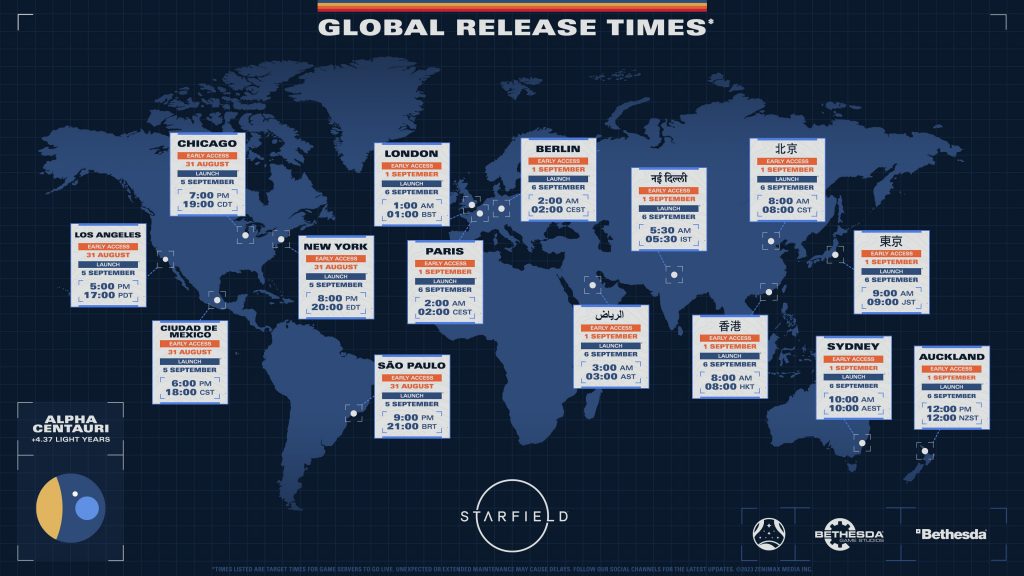
The early access period for those who purchased the Premium Edition started on September 1. For the rest of us, today’s full general release is here at last. The following are the release times for various time zones.

\n

    \n

  • 5pm PST
  • \n

  • 8pm (Tuesday, September 5) EST
  • \n

  • 1am BST
  • \n

  • 2pm CEST
  • \n

\n

Starfield Release Times Map

\n

You need 125Gb SSD storage to install Starfield

\n

That right: those 1,000 planets to explore will require a hefty chunk of storage. 125GB of it to be more precise, and an SSD will be required. The preinstall has been available for some time now, and if you haven’t started the download you need to do that yesterday.

\n

And on that same note, below are the minimum PC specs you’ll need if you are playing the Windows version.

\n

    \n

  • OS: Windows 10
  • \n

  • Processor: AMD Ryzen 5 2600x, Intel Core i7-6800K
  • \n

  • Memory: 16 GB RAM
  • \n

  • Graphics: AMD Radeon RX 5700, NVIDIA GeForce 1070 Ti
  • \n

  • Network: Internet connection required
  • \n

  • Disk Space: 125 GB available space
  • \n

  • Direct X: Version 12
  • \n

  • Additional notes: SSD Required
  • \n

  • Architecture: Requires a 64-bit processor and operating system
  • \n

\n

Starfield Early Access Custom

\n

Some essential gameplay tips for Starfield beginners

\n

    \n

  • Get in the habit of hard saving your game. Its a dangerous galaxy out there, and you never know when things might go sour. Don’t rely on the autosave feature.
  • \n

  • Scan everything. As in similar games like No Man’s Sky, you can use your helmet sensor to scan things with a tap of the LB shoulder bumper including flora, fauna and entire planets. Use it.
  • \n

  • Rest often. Like with past Bethesda RPGs, you can sleep to pass time and heal your character. Sleeping also bestows the “well-rested” buff which grants more XP. Don’t underestimate how much this will cumulatively add up if you rest often.
  • \n

\n

starfield screen shot 13

\n

    \n

  • Remember to map favorite weapons and items. Also with other Bethesda titles, namely those in the Elder Scrolls and Fallout franchises, you can map weapons and items to the D-pad. This will make your life in Starfield much easier, especially in the midst of a firefight.
  • \n

  • Put your companions to work for you. While they can be used a pack mules, companions can also be useful as fighting comrades if you take the care to manually equip them with some solid gear and weaponry.
  • \n

\n

starfield screen shot 12

\n

    \n

  • Don’t be afraid to explore, but don’t forget the main storyline either. There are some worthwhile side quests with some worthwhile loot to be found. And since explorations is such a core part of Starfield, it would be a shame to miss out on what the game has to offer by simply sticking to the main quest. That said, the main quest is upwards of around 40 hours long. So it’s probably best to not get lost in those 1,000 or so planets to the point where you forget about the main objective. Rather, try to alternate between the main quest and gaining more XP and abilities through completing side missions and pure exploration for a smooth experience.
  • \n

\n

And there you have it—just a few essential tips that will prove particularly helpful for anyone who hasn’t experienced a Bethesda RPG before. Lastly is the most important tip of all: have fun out there in space.

\n

Are you playing Starfield? What are your first impressions? Let us know in the comments below.

\n

\n

Related

\n

Share this article:
Previous Article How to stop Microsoft Edge from automatically capturing screenshots of the web pages you visit – 2 concise solutions Next Article Zoom CEO wants the US to treat Microsoft as it is in Europe

Related Articles

PowerToys 0.75 released; Environment Variables editor is here

October 31, 2023

Former Halo developer Bungie announces layoffs in wake of game delays

October 31, 2023

Siemens and Microsoft partner to bring GenAI to industries worldwide

October 31, 2023

Leave a Comment Cancel reply

Your email address will not be published. Required fields are marked *

Recent Posts

  • PowerToys 0.75 released; Environment Variables editor is here
  • Former Halo developer Bungie announces layoffs in wake of game delays
  • Siemens and Microsoft partner to bring GenAI to industries worldwide
  • 43 Microsoft Edge keyboard shortcuts to remember for stylish and speedy web surfing
  • Here is what’s coming to (and leaving) Xbox Game Pass soon

Recent Comments

No comments to show.

Archives

  • October 2023
  • September 2023
  • August 2023
  • July 2023
  • June 2023
  • May 2023
  • April 2023
  • March 2023
  • February 2023
  • January 2023
  • December 2022
  • November 2022
  • October 2022
  • September 2022
  • August 2022
  • July 2022
  • June 2022
  • May 2022
  • April 2022
  • March 2022
  • February 2022
  • January 2022
  • December 2021
  • November 2021
  • October 2021
  • September 2021
  • August 2021
  • July 2021
  • June 2021
  • May 2021
  • April 2021
  • March 2021
  • February 2021
  • January 2021
  • December 2020
  • November 2020
  • October 2020
  • September 2020
  • August 2020
  • July 2020
  • June 2020
  • May 2020
  • April 2020
  • March 2020
  • February 2020
  • January 2020
  • December 2019
  • November 2019
  • October 2019
  • September 2019
  • August 2019
  • July 2019
  • June 2019
  • May 2019
  • April 2019
  • March 2019
  • February 2019
  • January 2019
  • December 2018
  • November 2018
  • October 2018
  • September 2018
  • August 2018
  • July 2018
  • June 2018
  • May 2018
  • April 2018
  • March 2018
  • February 2018
  • January 2018
  • December 2017
  • November 2017
  • October 2017
  • September 2017
  • August 2017
  • July 2017
  • June 2017
  • May 2017
  • April 2017
  • March 2017
  • February 2017
  • January 2017
  • December 2016
  • November 2016
  • October 2016
  • September 2016
  • August 2016
  • July 2016
  • June 2016
  • May 2016
  • April 2016
  • March 2016
  • February 2016
  • January 2016
  • December 2015
  • November 2015
  • October 2015
  • September 2015
  • August 2015
  • July 2015
  • June 2015
  • May 2015
  • April 2015
  • March 2015
  • February 2015
  • January 2015
  • December 2014
  • November 2014
  • October 2014
  • September 2014
  • August 2014
  • July 2014
  • June 2014
  • May 2014
  • April 2014
  • March 2014
  • February 2014
  • January 2014
  • December 2013
  • November 2013
  • October 2013
  • September 2013
  • August 2013
  • July 2013
  • June 2013
  • May 2013
  • April 2013
  • March 2013
  • February 2013
  • January 2013
  • December 2012
  • November 2012
  • October 2012
  • September 2012
  • August 2012
  • July 2012
  • June 2012
  • May 2012
  • April 2012
  • March 2012
  • February 2012
  • January 2012
  • December 2011
  • November 2011
  • October 2011
  • September 2011
  • August 2011
  • July 2011
  • June 2011
  • May 2011
  • April 2011
  • March 2011
  • February 2011
  • January 2011
  • December 2010
  • November 2010
  • October 2010
  • September 2010

Categories

  • Announcements
  • Deals
  • Developer
  • Editorial
  • Feature
  • Feature stories
  • Hero-post
  • Hotdeals
  • How-to
  • Latest news
  • Microsoft / office 365
  • News
  • Office 365
  • Onpodcast
  • Opinion
  • Our featured post
  • Polls
  • Review
  • Reviews
  • Videos
OnMSFT.com

OnMSFT.com covers Microsoft news, reviews, and how-to guides. Formerly known as WinBeta, we have been your source for Microsoft news since 1998.

Categories

  • Windows
  • Surface
  • Xbox
  • How-To
  • OnPodcast
  • Gaming
  • Edge
  • Teams

Recent Posts

  • PowerToys 0.75 released; Environment Variables editor is here
  • Former Halo developer Bungie announces layoffs in wake of game delays
  • Siemens and Microsoft partner to bring GenAI to industries worldwide
  • 43 Microsoft Edge keyboard shortcuts to remember for stylish and speedy web surfing
  • Here is what’s coming to (and leaving) Xbox Game Pass soon

Quick Links

  • About OnMSFT.com
  • Contact OnMSFT
  • Join Our Team
© 2010–2026 OnMSFT.com LLC. All rights reserved.
About OnMSFT.comContact OnMSFT