Skip to content
OnMSFT.com
  • Home
  • About
  • Contact
  • Windows
  • Surface
  • Xbox
  • How-To
  • OnPodcast
  • Edge
  • Teams
  • Gaming
Menu
  • Home
  • About
  • Contact
  • Windows
  • Surface
  • Xbox
  • How-To
  • OnPodcast
  • Edge
  • Teams
  • Gaming
  1. Home
  2. Everything new in Microsoft Teams Premium in February 2023

Everything new in Microsoft Teams Premium in February 2023

admin admin
March 1, 2023
3 min read

In this article

  • Smarter meeting experience
  • Enhanced personalization
  • Better protection
  • Advanced webinars experience

We just concluded the month of February which was jam-packed, specifically when it comes to new features that Microsoft added to its online communication platform, Teams. Around this time, Microsoft usually releases a changelog rounding up all the new features.

However, this isn’t the case this time, Microsoft has now split it into two sections: Teams Premium and non-Teams Premium. Early in February Microsoft shipped Teams Premium to general availability featuring advanced webinars. Perhaps, this is what warranted the change.

Here are some of the key features that Microsoft added to Team Premium in February:

Smarter meeting experience

While launching Teams Premium Microsoft indicated that the offering is designed to enhance the meeting experience by personalizing it and making it more secure with end-to-end encryption.

That being said, the offering now ships with a feature dubbed Intelligent recap. It is designed to make the meeting recordings review process easier.

Essentially, the feature makes use of AI-generated chapters based on PowerPoint Live to split the meeting into sections based on the contents of the meeting. This makes it easy for you to pinpoint the most important sections.
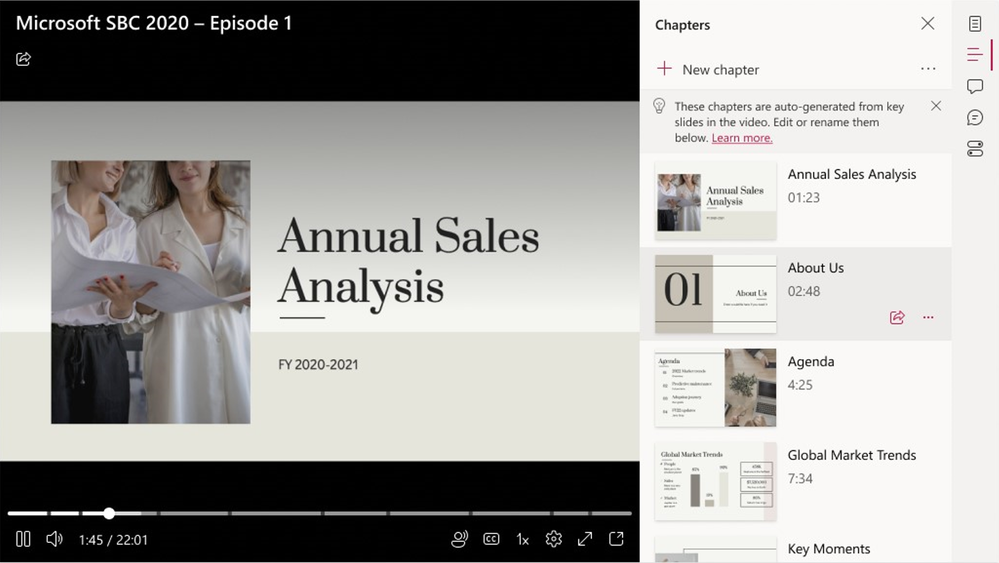
thumbnail image 1 captioned Available today, you can quickly see relevant PowerPoint Live chapters in the meeting recording.

What’s more, you can also highlight specific moments or sections that stood out for you during the meeting using personalized timeline markers for future reference. “Personalized timeline markers will expand to include when your name was mentioned and when a screen was shared,” stated Microsoft.

Additionally, Teams Premium also ships with AI-powered real-time translations in 40 spoken languages, to ensure that communication barriers don’t disrupt the workflow and that everyone is able to air out their views.

It should be noted that as long as the meeting organizer has access to the offering, attendees will also be able to access live translations.

Enhanced personalization

Microsoft has also incorporated new meeting templates into Teams Premium which admins can use to customize meeting experiences. This goes a long way to save time that would have otherwise been spent curating and tailoring a suitable experience while the meeting is ongoing.

thumbnail image 4 captioned Meeting templates, once configured by your IT admin, are easy to use to schedule a new meeting.

What’s more, you can personalize the experience further by adding your company’s logo or brand colors. They will be displayed on the screen throughout the entire meeting. What’s more, you can enable brand-approved organization backgrounds and organization together mode scenes.

Better protection

Microsoft has introduced watermarking, a meeting option that helps prevent leaks when sharing confidential information. What’s more, users will now have more control over who has the ability to record meetings, this will further help you keep sensitive information private.thumbnail image 7 captioned Easily watermark content and speakers during a meeting and automatically apply relevant Teams meeting options based on sensitivity labels. Teams Premium will let you enable end-to-end encryption (E2EE) to the meeting which will in turn block some features like meeting recording.

Advanced webinars experience

The meeting experience has been enhanced courtesy of advanced webinars that provide rich and dynamic experiences throughout the whole event.

What’s more, users have access to more customization options when it comes to registration details as well as event settings since both the setup and management of registration have been redesigned.

Through the new customization options, you can check the attendees’ status for registrations and cancellations, showcase your brand to align with the theme of your event, designate co-organizers, and more.

Event organizers can now manage registration for forums better by enabling registration waitlists and approving them manually.
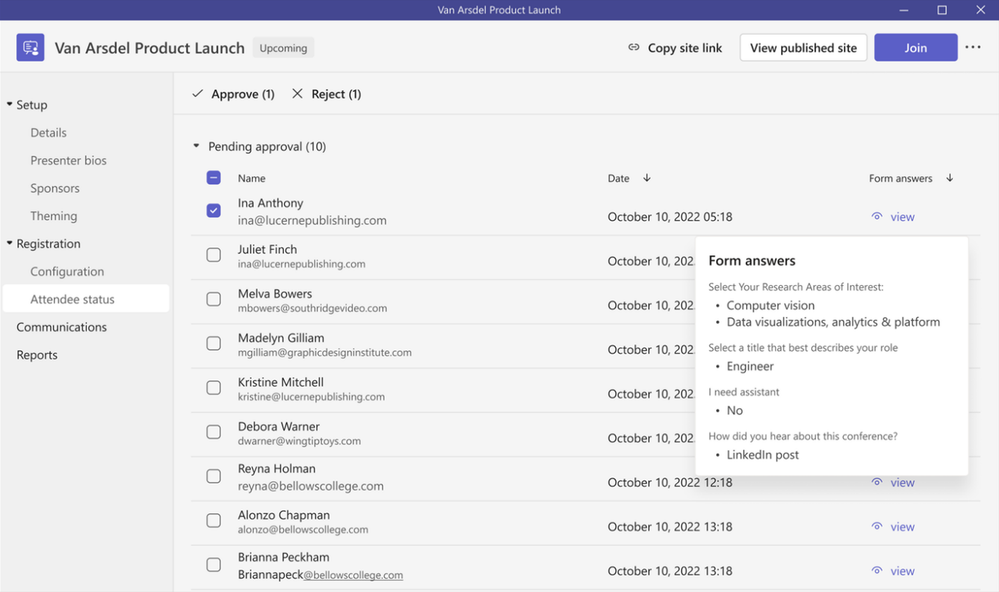
thumbnail image 8 captioned Manage registration by enabling the waitlist to manage event capacity and manual approval to view registrant information.

Microsoft has also incorporated Microsoft Enterprise Content Deliver Network (eCDN) into the add-on tool to enhance live streaming of global meetings as well as reduce the load on the corporate network thus ensuring that connectivity is seamless throughout the event.

Moreover, the add-on now features a new app, the Virtual Appointments app. It is in place to provide a convenient location where professionals and admins can come together to “create and manage scheduled and on-demand Virtual Appointments in Microsoft Teams.”

These are some of the key features that made it to Teams Premium in the month of February, we invite you to check out Microsoft’s Tech community blog post for more insightful details regarding these features and more.

Are you using Teams Premium? Let us know in the comment section.

Share this article:
Previous Article Microsoft’s Windows 365 app hits broad availability Next Article Here’s what’s new in Microsoft Excel (February 2023)

Related Articles

PowerToys 0.75 released; Environment Variables editor is here

October 31, 2023

Former Halo developer Bungie announces layoffs in wake of game delays

October 31, 2023

Siemens and Microsoft partner to bring GenAI to industries worldwide

October 31, 2023

Leave a Comment Cancel reply

Your email address will not be published. Required fields are marked *

Recent Posts

  • PowerToys 0.75 released; Environment Variables editor is here
  • Former Halo developer Bungie announces layoffs in wake of game delays
  • Siemens and Microsoft partner to bring GenAI to industries worldwide
  • 43 Microsoft Edge keyboard shortcuts to remember for stylish and speedy web surfing
  • Here is what’s coming to (and leaving) Xbox Game Pass soon

Recent Comments

No comments to show.

Archives

  • October 2023
  • September 2023
  • August 2023
  • July 2023
  • June 2023
  • May 2023
  • April 2023
  • March 2023
  • February 2023
  • January 2023
  • December 2022
  • November 2022
  • October 2022
  • September 2022
  • August 2022
  • July 2022
  • June 2022
  • May 2022
  • April 2022
  • March 2022
  • February 2022
  • January 2022
  • December 2021
  • November 2021
  • October 2021
  • September 2021
  • August 2021
  • July 2021
  • June 2021
  • May 2021
  • April 2021
  • March 2021
  • February 2021
  • January 2021
  • December 2020
  • November 2020
  • October 2020
  • September 2020
  • August 2020
  • July 2020
  • June 2020
  • May 2020
  • April 2020
  • March 2020
  • February 2020
  • January 2020
  • December 2019
  • November 2019
  • October 2019
  • September 2019
  • August 2019
  • July 2019
  • June 2019
  • May 2019
  • April 2019
  • March 2019
  • February 2019
  • January 2019
  • December 2018
  • November 2018
  • October 2018
  • September 2018
  • August 2018
  • July 2018
  • June 2018
  • May 2018
  • April 2018
  • March 2018
  • February 2018
  • January 2018
  • December 2017
  • November 2017
  • October 2017
  • September 2017
  • August 2017
  • July 2017
  • June 2017
  • May 2017
  • April 2017
  • March 2017
  • February 2017
  • January 2017
  • December 2016
  • November 2016
  • October 2016
  • September 2016
  • August 2016
  • July 2016
  • June 2016
  • May 2016
  • April 2016
  • March 2016
  • February 2016
  • January 2016
  • December 2015
  • November 2015
  • October 2015
  • September 2015
  • August 2015
  • July 2015
  • June 2015
  • May 2015
  • April 2015
  • March 2015
  • February 2015
  • January 2015
  • December 2014
  • November 2014
  • October 2014
  • September 2014
  • August 2014
  • July 2014
  • June 2014
  • May 2014
  • April 2014
  • March 2014
  • February 2014
  • January 2014
  • December 2013
  • November 2013
  • October 2013
  • September 2013
  • August 2013
  • July 2013
  • June 2013
  • May 2013
  • April 2013
  • March 2013
  • February 2013
  • January 2013
  • December 2012
  • November 2012
  • October 2012
  • September 2012
  • August 2012
  • July 2012
  • June 2012
  • May 2012
  • April 2012
  • March 2012
  • February 2012
  • January 2012
  • December 2011
  • November 2011
  • October 2011
  • September 2011
  • August 2011
  • July 2011
  • June 2011
  • May 2011
  • April 2011
  • March 2011
  • February 2011
  • January 2011
  • December 2010
  • November 2010
  • October 2010
  • September 2010

Categories

  • Announcements
  • Deals
  • Developer
  • Editorial
  • Feature
  • Feature stories
  • Hero-post
  • Hotdeals
  • How-to
  • Latest news
  • Microsoft / office 365
  • News
  • Office 365
  • Onpodcast
  • Opinion
  • Our featured post
  • Polls
  • Review
  • Reviews
  • Videos
OnMSFT.com

OnMSFT.com covers Microsoft news, reviews, and how-to guides. Formerly known as WinBeta, we have been your source for Microsoft news since 1998.

Categories

  • Windows
  • Surface
  • Xbox
  • How-To
  • OnPodcast
  • Gaming
  • Edge
  • Teams

Recent Posts

  • PowerToys 0.75 released; Environment Variables editor is here
  • Former Halo developer Bungie announces layoffs in wake of game delays
  • Siemens and Microsoft partner to bring GenAI to industries worldwide
  • 43 Microsoft Edge keyboard shortcuts to remember for stylish and speedy web surfing
  • Here is what’s coming to (and leaving) Xbox Game Pass soon

Quick Links

  • About OnMSFT.com
  • Contact OnMSFT
  • Join Our Team
© 2010–2026 OnMSFT.com LLC. All rights reserved.
About OnMSFT.comContact OnMSFT