Skip to content
OnMSFT.com
  • Home
  • About
  • Contact
  • Windows
  • Surface
  • Xbox
  • How-To
  • OnPodcast
  • Edge
  • Teams
  • Gaming
Menu
  • Home
  • About
  • Contact
  • Windows
  • Surface
  • Xbox
  • How-To
  • OnPodcast
  • Edge
  • Teams
  • Gaming
  1. Home
  2. Microsoft’s working on its most significant update to File Explorer yet

Microsoft’s working on its most significant update to File Explorer yet

admin admin
January 25, 2023
2 min read

\n

According to a report from Windows Central, the Windows 11 team is testing some rather significant updates for File Explorer that will bring tighter OneDrive integration, new Microsoft 365 features and some UI tweaks.

\n

Based on internal mock ups obtained by the folks over at Windows Central, there are upcoming redesign efforts to modernize, arguably the heart of Windows, File Explorer.

\n

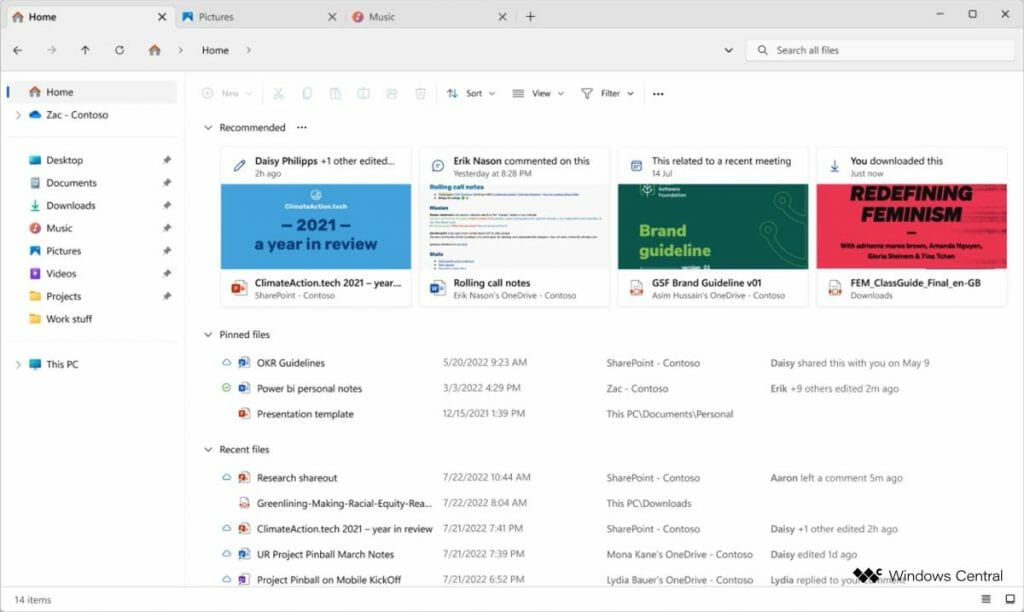
The updated app will feature a redesigned header with a modern file directory box, a modern search box, and a new “home” button. The existing header buttons, such as “new,” “copy,” and “paste,” will be moved into the file/folder view just below the header.

\n

Other possible visual updates to the File Explorer include a new “recommend files” area that will mimic the look of the recently updated Office/Microsoft 365 app, with large colorful content thumbnails.

\n

\n

\n

\n

\n

\n

\n
\n

\n

\n

\n

\n

\n

\n

Windows 11 - 2023 File Explorer

\n

There are proposed code updates to the left-side navigation pane as well as rounded highlight buttons. The details pane will show additional file details as well as Microsoft 365 integration that include email thread details, recent comments, and collaborative activity and related files.

\n
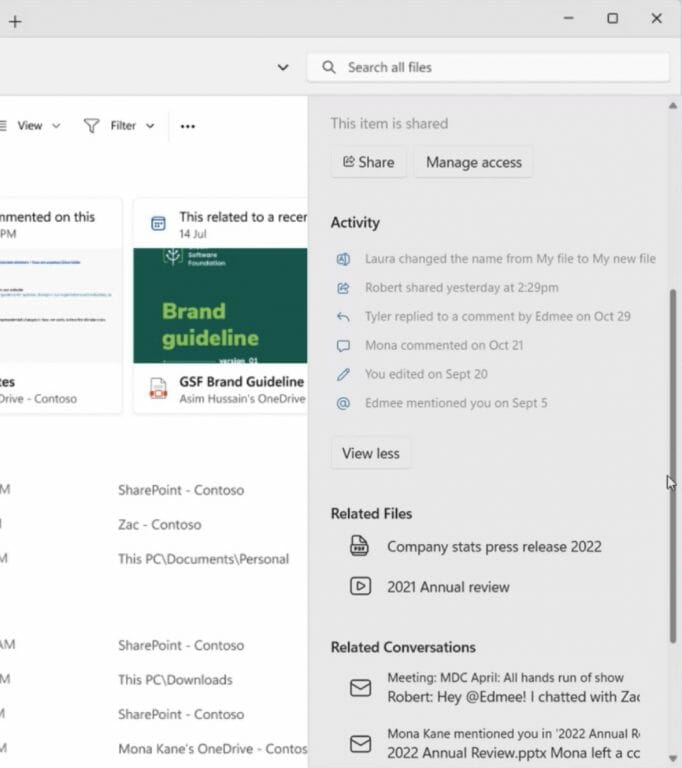
Windows 11 File Explorer 2023 - Details Pane

\n

Perhaps the most intriguing addition for casual Windows users is a new image viewing experience that isn’t the Photos app as well manual tagging. While Microsoft has done a lot work to make viewing images in Windows 11 a nicer experience with a dedicated app, many Windows users tend to view their image content directly from the File Explorer.

\n

\n

\n

\n

\n

\n

\n

\n

\n

\n

\n

\n

\n

\n

A new “Gallery” area will be added to the File Explorer to help improve the image viewing experience natively in the File Explorer app. In addition to the Gallery view, the Windows team is borrowing a feature from the macOS Finder by bringing manual tagging to the improved File Explorer that will allow users to organize and categorize files via keywords or color markers.

\n

Lastly, the Windows team still has touch in mind as it looks to make many of these new additions more touch-friendly as well. The October update for Windows 11 saw the File Explorer get larger touch targets and more spacious placement of items, in an effort to improve the tablet-friendly experience of the operating system.

\n

Reporter Zac Bowden explains Microsoft’s plan is to have the proposed features out to users before the end of 2023, which means the updates could be delivered to Windows Insiders soon as they iron out the kinks for a Moments Update that could be released to the general public as soon as late Summer.

\n\n

Share this article:
Previous Article Azure, Microsoft services hit with widespread outage, affects OnMSFT.com Next Article How to look up error codes in the Terminal on Windows 11

Related Articles

PowerToys 0.75 released; Environment Variables editor is here

October 31, 2023

Former Halo developer Bungie announces layoffs in wake of game delays

October 31, 2023

Siemens and Microsoft partner to bring GenAI to industries worldwide

October 31, 2023

Leave a Comment Cancel reply

Your email address will not be published. Required fields are marked *

Recent Posts

  • PowerToys 0.75 released; Environment Variables editor is here
  • Former Halo developer Bungie announces layoffs in wake of game delays
  • Siemens and Microsoft partner to bring GenAI to industries worldwide
  • 43 Microsoft Edge keyboard shortcuts to remember for stylish and speedy web surfing
  • Here is what’s coming to (and leaving) Xbox Game Pass soon

Recent Comments

No comments to show.

Archives

  • October 2023
  • September 2023
  • August 2023
  • July 2023
  • June 2023
  • May 2023
  • April 2023
  • March 2023
  • February 2023
  • January 2023
  • December 2022
  • November 2022
  • October 2022
  • September 2022
  • August 2022
  • July 2022
  • June 2022
  • May 2022
  • April 2022
  • March 2022
  • February 2022
  • January 2022
  • December 2021
  • November 2021
  • October 2021
  • September 2021
  • August 2021
  • July 2021
  • June 2021
  • May 2021
  • April 2021
  • March 2021
  • February 2021
  • January 2021
  • December 2020
  • November 2020
  • October 2020
  • September 2020
  • August 2020
  • July 2020
  • June 2020
  • May 2020
  • April 2020
  • March 2020
  • February 2020
  • January 2020
  • December 2019
  • November 2019
  • October 2019
  • September 2019
  • August 2019
  • July 2019
  • June 2019
  • May 2019
  • April 2019
  • March 2019
  • February 2019
  • January 2019
  • December 2018
  • November 2018
  • October 2018
  • September 2018
  • August 2018
  • July 2018
  • June 2018
  • May 2018
  • April 2018
  • March 2018
  • February 2018
  • January 2018
  • December 2017
  • November 2017
  • October 2017
  • September 2017
  • August 2017
  • July 2017
  • June 2017
  • May 2017
  • April 2017
  • March 2017
  • February 2017
  • January 2017
  • December 2016
  • November 2016
  • October 2016
  • September 2016
  • August 2016
  • July 2016
  • June 2016
  • May 2016
  • April 2016
  • March 2016
  • February 2016
  • January 2016
  • December 2015
  • November 2015
  • October 2015
  • September 2015
  • August 2015
  • July 2015
  • June 2015
  • May 2015
  • April 2015
  • March 2015
  • February 2015
  • January 2015
  • December 2014
  • November 2014
  • October 2014
  • September 2014
  • August 2014
  • July 2014
  • June 2014
  • May 2014
  • April 2014
  • March 2014
  • February 2014
  • January 2014
  • December 2013
  • November 2013
  • October 2013
  • September 2013
  • August 2013
  • July 2013
  • June 2013
  • May 2013
  • April 2013
  • March 2013
  • February 2013
  • January 2013
  • December 2012
  • November 2012
  • October 2012
  • September 2012
  • August 2012
  • July 2012
  • June 2012
  • May 2012
  • April 2012
  • March 2012
  • February 2012
  • January 2012
  • December 2011
  • November 2011
  • October 2011
  • September 2011
  • August 2011
  • July 2011
  • June 2011
  • May 2011
  • April 2011
  • March 2011
  • February 2011
  • January 2011
  • December 2010
  • November 2010
  • October 2010
  • September 2010

Categories

  • Announcements
  • Deals
  • Developer
  • Editorial
  • Feature
  • Feature stories
  • Hero-post
  • Hotdeals
  • How-to
  • Latest news
  • Microsoft / office 365
  • News
  • Office 365
  • Onpodcast
  • Opinion
  • Our featured post
  • Polls
  • Review
  • Reviews
  • Videos
OnMSFT.com

OnMSFT.com covers Microsoft news, reviews, and how-to guides. Formerly known as WinBeta, we have been your source for Microsoft news since 1998.

Categories

  • Windows
  • Surface
  • Xbox
  • How-To
  • OnPodcast
  • Gaming
  • Edge
  • Teams

Recent Posts

  • PowerToys 0.75 released; Environment Variables editor is here
  • Former Halo developer Bungie announces layoffs in wake of game delays
  • Siemens and Microsoft partner to bring GenAI to industries worldwide
  • 43 Microsoft Edge keyboard shortcuts to remember for stylish and speedy web surfing
  • Here is what’s coming to (and leaving) Xbox Game Pass soon

Quick Links

  • About OnMSFT.com
  • Contact OnMSFT
  • Join Our Team
© 2010–2026 OnMSFT.com LLC. All rights reserved.
About OnMSFT.comContact OnMSFT