Skip to content
OnMSFT.com
  • Home
  • About
  • Contact
  • Windows
  • Surface
  • Xbox
  • How-To
  • OnPodcast
  • Edge
  • Teams
  • Gaming
Menu
  • Home
  • About
  • Contact
  • Windows
  • Surface
  • Xbox
  • How-To
  • OnPodcast
  • Edge
  • Teams
  • Gaming
  1. Home
  2. Microsoft’s Design team talks about rearchitecting Teams “from the ground up”

Microsoft’s Design team talks about rearchitecting Teams “from the ground up”

admin admin
March 28, 2023
4 min read

\n

As Microsoft takes the wraps off its new Teams upgrade that uses half the system resources as its predecessor, utilizes easier to use UI elements, quick account switching, AI integration and more, the company dropped a companion note about all the work that went into today’s release.

\n

Today marks the debut of the new Microsoft Teams app, released in public preview for Windows customers. As one of our most customer and design-driven releases ever, it’s crafted from the ground up to be faster, simpler, and more flexible. It also reflects a multi-disciplinary journey of customer understanding — from redesigning channels and simplifying chats, to leveraging motion design and enhancing personalization options, everything currently on view is the result of deep collaboration and iteration. While most features detailed here will be available this June, others will roll out between then and the end of the year.

\n

Microsoft kicks off its companion blog with an emphasis on the company’s self-reflection that led to some of the major changes that are now present in Teams 2.0 such as how to “fully adopt Fluent Design System,” and addressing perhaps the biggest customer pain point in performance.

\n

The adoption of Fluent Design System led the Microsoft team down the road of simplification and making the Teams app more streamlined.

\n

\n

\n

\n

\n

\n

\n

\n

\n

\n

\n

\n

\n

\n

Initially, we chose to follow a chat-like model for channels (open field at the bottom and a conversation that flows bottom-up) because threaded conversations were a unique differentiator for Teams. But this is where we needed to be humble and admit mistakes based on feedback; differentiator or not, the model confused people. Now, we’ve flipped things to adopt a post-and-reply experience at the top, which feels much more familiar.

\n
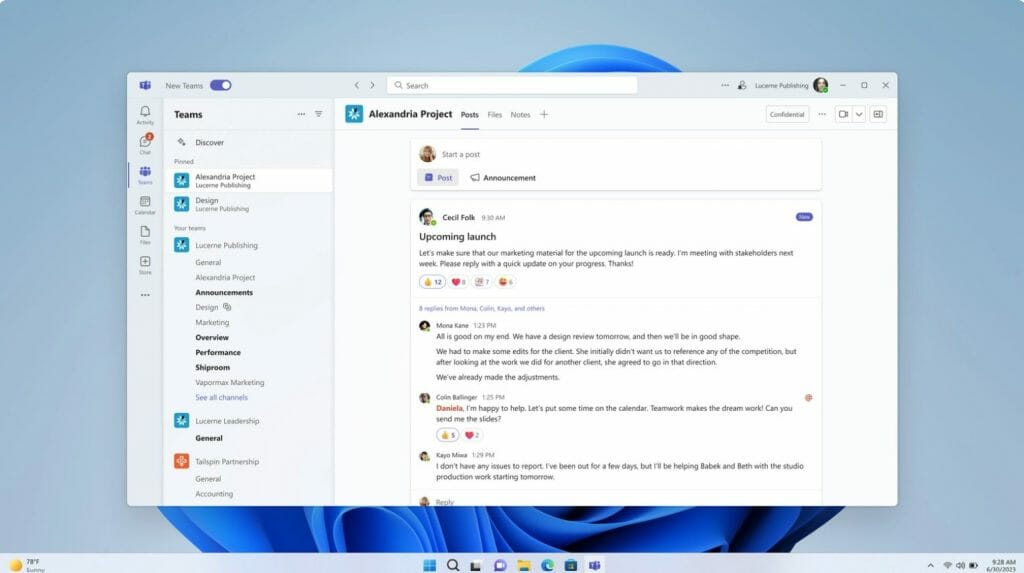
Microsoft Teams 2.0 UI Flow

\n

In addition to creating a more chat-like experience with in thread @mentions and organizing channels, users can now look forward to fewer buttons being displayed at all times as well as a simplified compose window with less clutter.

\n

Microsoft Loop makes an appearance in the preview version of Teams 2.0, allowing users to use recently made components such as Excel tables, charts, notes or lists from other Office 365 applications within Teams chat.

\n

Perhaps the most notable visual change awaiting users is the new presenter view that allows those presenting in a conference video to see the other participants while sharing visual data, and does so in a sort of Adobe Photoshop island-like way.

\n

In Teams 2.0, Microsoft’s design team purposefully de-emphasized the classic purple accented motif to, “step back and create room for these other experiences — which you bring into Teams — to shine because your personality and expressions shouldn’t have to compete with our brand.”

\n

\n

\n

\n

\n

\n

\n
\n

\n

\n

\n

\n

\n

\n

Teams 2.0 Color Schemes

\n

Not to fear, dark modes will still adhere to system preferences and restore the brooding dark greys of the old app, but now the app boosts other colors to draw attention differing actions within the application.

\n

Similar to Facebook Messenger, the Teams adopted color theming and group chat profile pictures to help Teams members create a personal space within Teams as well as draw on a sense of community.

\n

The Microsoft team also admits that it leverages animations now to reduce users perceived load times with the application, “In the context of loading, we use carefully orchestrated animated sequences to speed up our customers’ perception of time by keeping them focused and engaged during the process.”

\n
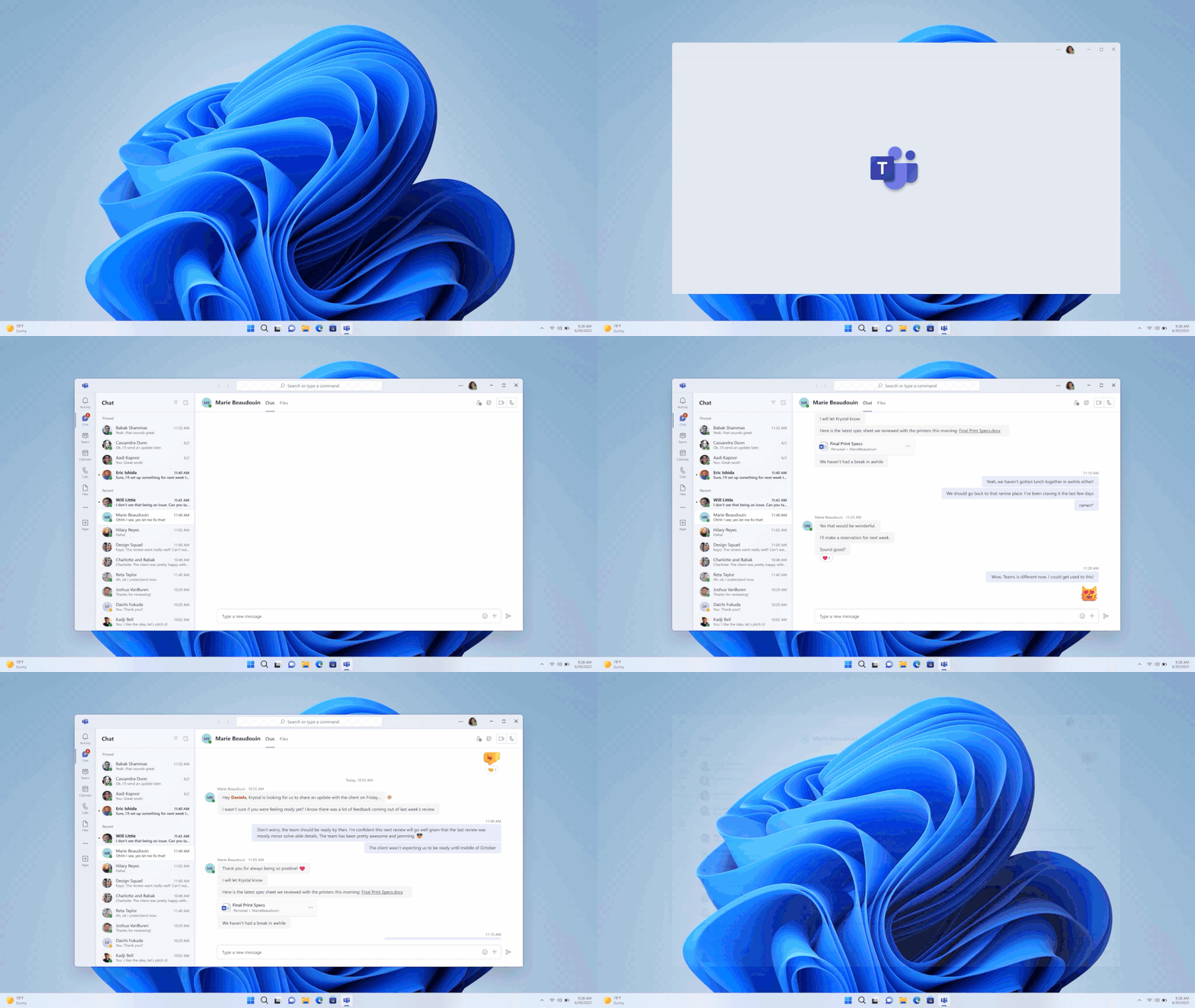
Teams 2.0 Animation UI

\n


\n

\n

\n

\n

\n

\n

\n

\n

\n

\n

\n

\n

\n

\n

That is not to say that Microsoft didn’t actually address load times in Teams, which it did through a scenario-by-scenario process of investigating load sequences and tackling those that fell below an estimated internal threshold based on a prioritization of customer feedback.

\n

Another leading cause in the reduction in load times is the platform switch to React which adhered to Microsoft’s next level Fluent design standards in Fluent 2 from the previous Fluent UI React v9. Moving to Fluent 2 allowed the Teams engineers to leverage a more robust theming system which offers a better holistic design-language as well as a performance and accessibility boosts through coding integrations.

\n

While Teams is also rolling out its 3D avatars to help users be a bit more expressive when they don’t actually want to be on camera, the team behind Teams 2.0 wants to also tout the more practical application of its Together Emoji platform that will probably be used more often than 3D avatars, respectfully.

\n
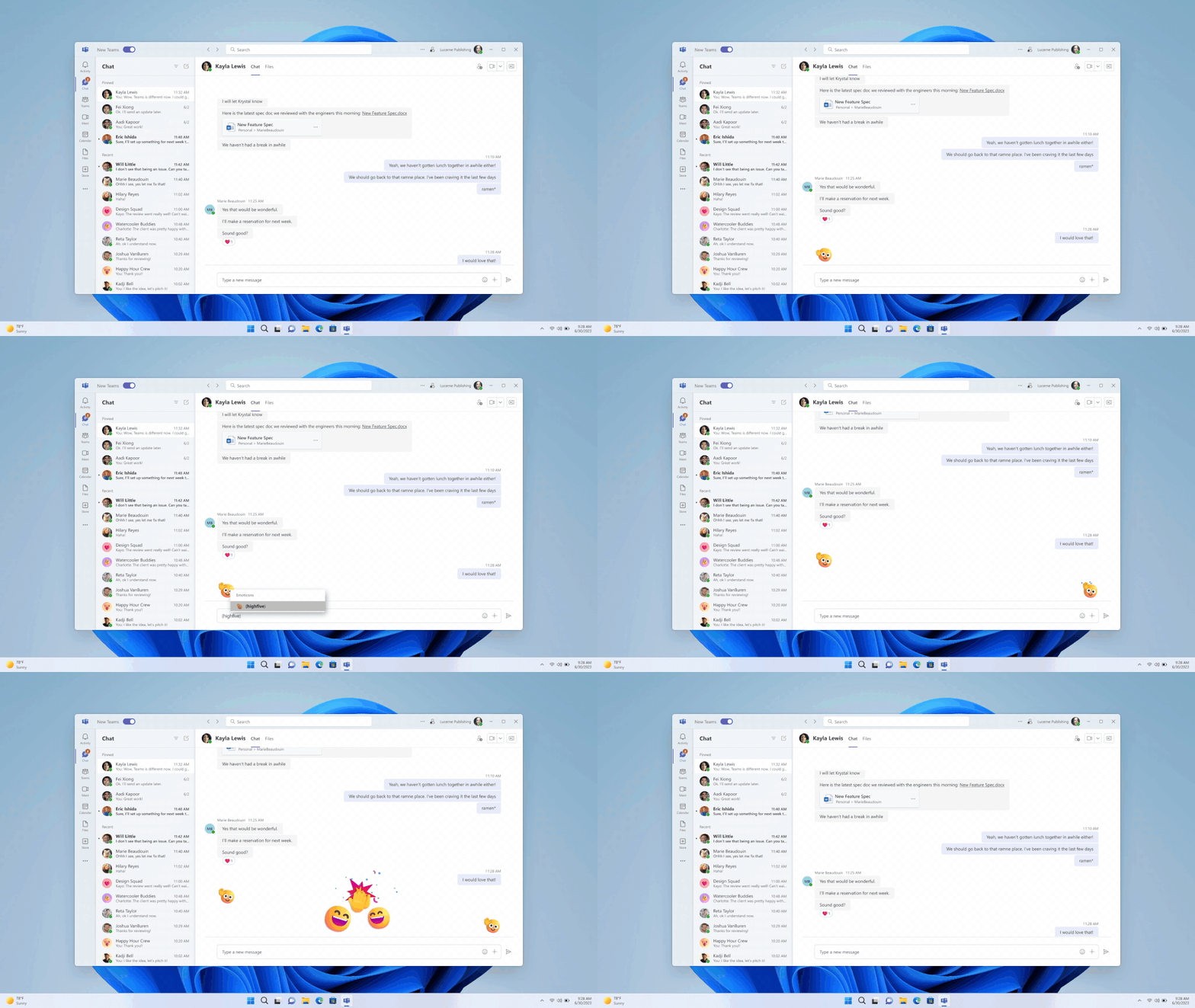
Teams 2.0 Animations

\n

With Together emoji’s, users can leverage a more “dynamic form of expression.” Some of these shared experiences between two people using the Together Emojis will begin with animated hi-fives with more to come.

\n

All in all, the new Teams 2.0 update is a rather massive under-the-hood upgrade that should net customers better performance and a bit more personalization when using Teams, however, it being enough to endear people to corporate chat is an entirely different thing to measure.

\n\n

Share this article:
Previous Article Getting started with the new Teams – setup and some quirks Next Article Microsoft launches Viva Connections for Education

Related Articles

PowerToys 0.75 released; Environment Variables editor is here

October 31, 2023

Former Halo developer Bungie announces layoffs in wake of game delays

October 31, 2023

Siemens and Microsoft partner to bring GenAI to industries worldwide

October 31, 2023

Leave a Comment Cancel reply

Your email address will not be published. Required fields are marked *

Recent Posts

  • PowerToys 0.75 released; Environment Variables editor is here
  • Former Halo developer Bungie announces layoffs in wake of game delays
  • Siemens and Microsoft partner to bring GenAI to industries worldwide
  • 43 Microsoft Edge keyboard shortcuts to remember for stylish and speedy web surfing
  • Here is what’s coming to (and leaving) Xbox Game Pass soon

Recent Comments

No comments to show.

Archives

  • October 2023
  • September 2023
  • August 2023
  • July 2023
  • June 2023
  • May 2023
  • April 2023
  • March 2023
  • February 2023
  • January 2023
  • December 2022
  • November 2022
  • October 2022
  • September 2022
  • August 2022
  • July 2022
  • June 2022
  • May 2022
  • April 2022
  • March 2022
  • February 2022
  • January 2022
  • December 2021
  • November 2021
  • October 2021
  • September 2021
  • August 2021
  • July 2021
  • June 2021
  • May 2021
  • April 2021
  • March 2021
  • February 2021
  • January 2021
  • December 2020
  • November 2020
  • October 2020
  • September 2020
  • August 2020
  • July 2020
  • June 2020
  • May 2020
  • April 2020
  • March 2020
  • February 2020
  • January 2020
  • December 2019
  • November 2019
  • October 2019
  • September 2019
  • August 2019
  • July 2019
  • June 2019
  • May 2019
  • April 2019
  • March 2019
  • February 2019
  • January 2019
  • December 2018
  • November 2018
  • October 2018
  • September 2018
  • August 2018
  • July 2018
  • June 2018
  • May 2018
  • April 2018
  • March 2018
  • February 2018
  • January 2018
  • December 2017
  • November 2017
  • October 2017
  • September 2017
  • August 2017
  • July 2017
  • June 2017
  • May 2017
  • April 2017
  • March 2017
  • February 2017
  • January 2017
  • December 2016
  • November 2016
  • October 2016
  • September 2016
  • August 2016
  • July 2016
  • June 2016
  • May 2016
  • April 2016
  • March 2016
  • February 2016
  • January 2016
  • December 2015
  • November 2015
  • October 2015
  • September 2015
  • August 2015
  • July 2015
  • June 2015
  • May 2015
  • April 2015
  • March 2015
  • February 2015
  • January 2015
  • December 2014
  • November 2014
  • October 2014
  • September 2014
  • August 2014
  • July 2014
  • June 2014
  • May 2014
  • April 2014
  • March 2014
  • February 2014
  • January 2014
  • December 2013
  • November 2013
  • October 2013
  • September 2013
  • August 2013
  • July 2013
  • June 2013
  • May 2013
  • April 2013
  • March 2013
  • February 2013
  • January 2013
  • December 2012
  • November 2012
  • October 2012
  • September 2012
  • August 2012
  • July 2012
  • June 2012
  • May 2012
  • April 2012
  • March 2012
  • February 2012
  • January 2012
  • December 2011
  • November 2011
  • October 2011
  • September 2011
  • August 2011
  • July 2011
  • June 2011
  • May 2011
  • April 2011
  • March 2011
  • February 2011
  • January 2011
  • December 2010
  • November 2010
  • October 2010
  • September 2010

Categories

  • Announcements
  • Deals
  • Developer
  • Editorial
  • Feature
  • Feature stories
  • Hero-post
  • Hotdeals
  • How-to
  • Latest news
  • Microsoft / office 365
  • News
  • Office 365
  • Onpodcast
  • Opinion
  • Our featured post
  • Polls
  • Review
  • Reviews
  • Videos
OnMSFT.com

OnMSFT.com covers Microsoft news, reviews, and how-to guides. Formerly known as WinBeta, we have been your source for Microsoft news since 1998.

Categories

  • Windows
  • Surface
  • Xbox
  • How-To
  • OnPodcast
  • Gaming
  • Edge
  • Teams

Recent Posts

  • PowerToys 0.75 released; Environment Variables editor is here
  • Former Halo developer Bungie announces layoffs in wake of game delays
  • Siemens and Microsoft partner to bring GenAI to industries worldwide
  • 43 Microsoft Edge keyboard shortcuts to remember for stylish and speedy web surfing
  • Here is what’s coming to (and leaving) Xbox Game Pass soon

Quick Links

  • About OnMSFT.com
  • Contact OnMSFT
  • Join Our Team
© 2010–2026 OnMSFT.com LLC. All rights reserved.
About OnMSFT.comContact OnMSFT