
\n
\n
There are dozens of good note taking apps available on the web. Each of them has a different bouquet of features to offer along with the standard note writing. Here I take a closer look at Google Keep and Microsoft OneNote. One is a free application while the other follows a freemium model for offering additional features.
\n
\n
Let us compare them on different platforms and explore the individual features that set them apart.
\n
OneNote vs. Keep – Head On
\n
I took both the apps on a test drive on my Android phone. Do note that Keep has been with me for a longer period but this time around I dig in to explore everything that these note taking apps has to offer.
\n
Before moving forward, you should know that in Microsoft OneNote, a “notebook” is a collection of notes that are organized together in a single file. Each notebook can contain multiple sections and pages, and each page can contain text, images, and other content.
\n
A “note” is a single piece of content within a notebook. It can be a text note, an image, or a file that you’ve added to a page. Notes can be organized and rearranged within a notebook as needed.
\n
Mobile App
\n
Notes Visibility
\n
The mobile users are growing at an exponential rate compared to desktops so it is only fitting to start with the user experience on the mobile app. Microsoft OneNote focuses on taking advantage of the display size and shows significantly more notes. You can see first-two lines of a note in tile and list view on a 6.5 inch screen.
\n
\n
\n
\n
\n

\n
OneNote misses out on the feature to pin notes to the top. They have the option to display by recent access, creation date, and alphabetical but its not the same. Sometimes you need more than one note at the top for quick access for a project.
\n
Google Keep shows you fewer notes but more information from them. The visible notes can preview up to 6 lines, which feels more than enough to get the idea about when scrolling through notes.
\n

\n
Keep lets you pin 3-7 notes, depending on the size, that appears at the top of the home screen. Other notes appear below the pinned items. Unlike OneNote, you cannot sort the notes here and they appear in the order you arrange them.
\n
Notes Taking Experience
\n
Jot down notes by tapping on the page button at the bottom. This will create a page in your default notebook which can be re-arranged. On the other hand, taking a sticky note has an extra step which could have been avoided. You tap on the vertical-three-dots and then select Create a Sticky Note to start writing a note.
\n

\n
Hand written notes work without a sweat while tapping on camera icon lets you take pictures through the device’s camera. You can always add it on any note or page from the editor menu.
\n
The dictation has impressed me on the first try. You can select from 9 different spoken to get better results apart from the 16 plus preview languages which are in beta. The dictation really comes together once you learn the phrases for new line, paragraphs, full stops, smileys, and more.
\n

\n
Keep starts strong with a big plus button for a new note. The positioning is ideal for right-hand users with average size hands. It will be a stretch for left-handed people on larger displays.
\n

\n
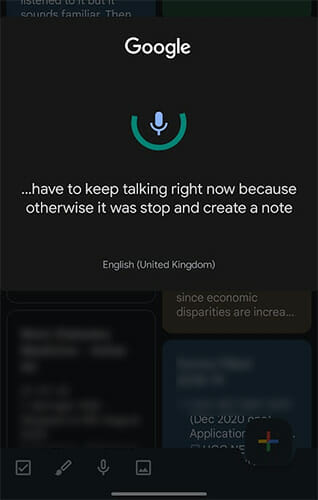
The audio dictation here will need you to hold your breath and keep talking to continue the dictation session. You take a pause for more than 2 seconds and the dictation session will be over.
\n
It will appear in sentences with punctuation. That is not all, you will get an audio recording of your dictation which comes in handy when the dictation session has lower accuracy. You can always go back and listen to the recording to fill in the gaps.
\n
\n
Deleted Notes
\n
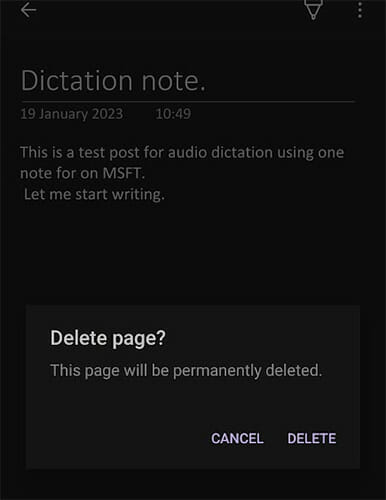
When you delete a note or page on OneNote, it gets deleted permanently and there is no way to recover them. Only the shared notebooks have a chance of recovery through backups.
\n
\n
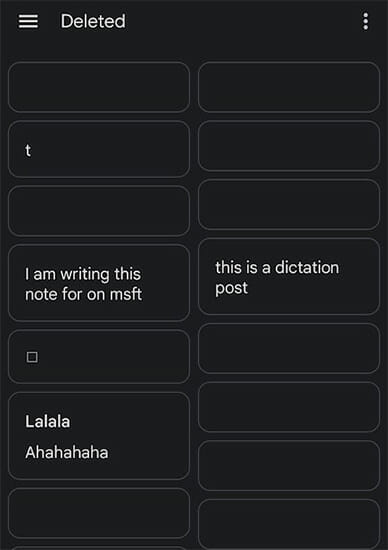
Keep lets you preserve the deleted items in the bin for 7 days before they are permanently deleted. Deleting notes by mistake is not uncommon and Keep has a safety measure in the form of trash/deleted folder. You can recover deleted notes from there within a week’s time.
\n
\n
Widgets
\n
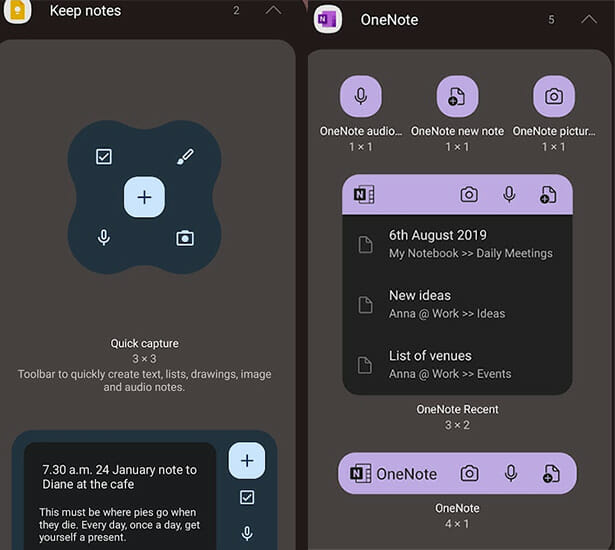
Opening the app is not plausible at all times. Widgets let you create notes instantly without looking for the app on the home screen.
\n
OneNote has five widgets to offer, aimed at single use scenarios. Keep has two widgets which have all the note-taking functionalities in one place. It’s a matter of personal preference in this regard.
\n
\n
Desktop Experience
\n
OneNote clearly has the upper hand here with its robust apps and web experience. Sticky notes are available on onenote.com/stickynotes or your Microsoft email’s notes section so you don’t have to install the app for quick notes.
\n
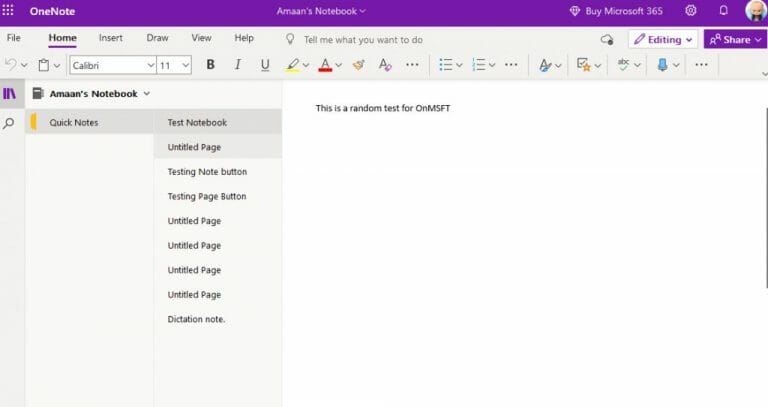
You can access OneNote web through any browser by logging into your linked Microsoft account. The user interface is similar to a moderately powered Word document with lot of formatting tools.
\n
\n
Similarly the OneNote app for Windows is a part of the Office suite. You can install it as a standalone version or with the package. The desktop app has additional export and history feature that lets you have more control over the notes.
\n

\n
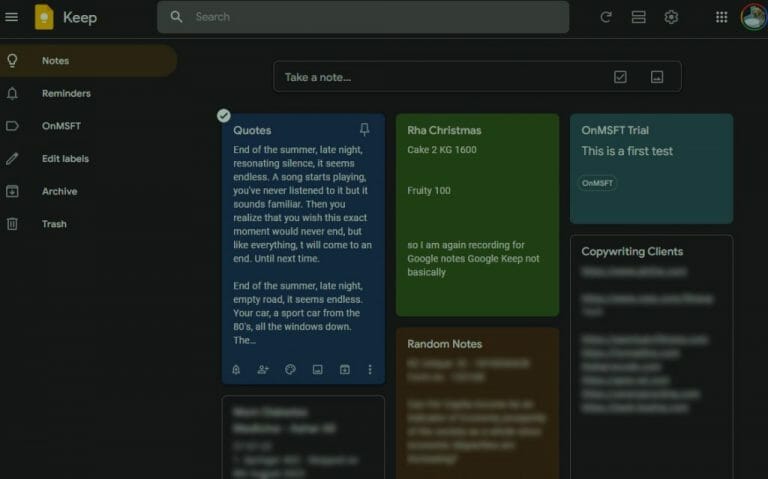
Keep does not offer a dedicated desktop and the support for the Chrome app ended a year ago. The web user-interface takes inspiration from the app. Access pinned and standard notes in the same order. You can create a new note using the note-taking box positioned at the top.
\n
\n
Browser Integration
\n
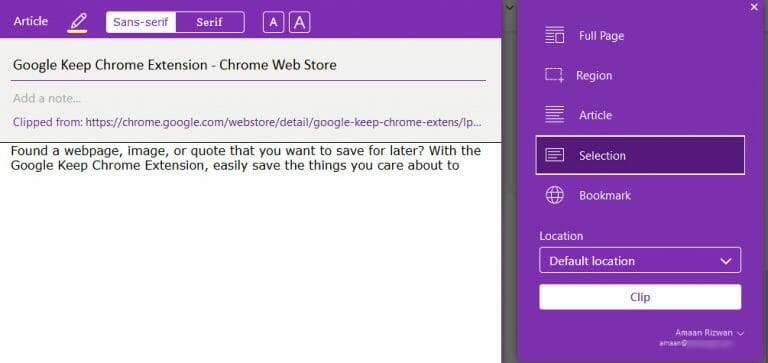
OneNote Web clipper is available for Chrome, Firefox, and Edge, essentially covering all browsers. Format the text selection and then add it to your Notebook or as an individual note. The web clipper lets you clip different parts of the page with its box selection.
\n

\n
Keep falls a little behind here as their browser extension is available only for Chrome. While two third of the internet uses Google’s browser, it would have nice to have something for Firefox.
\n
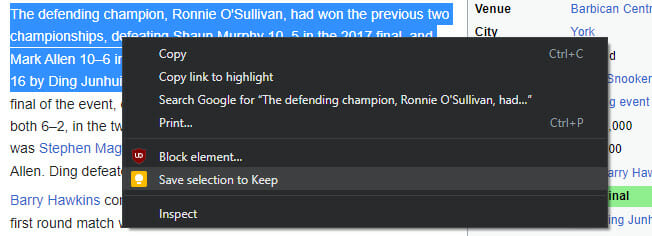
Select a region and click on the Keep icon in the toolbar to open the clipper for saving to notes.
\n

\n
Collaboration and Sharing Options
\n
The desktop and web versions of OneNote let you share pages and the entire Notebooks using shareable links. Collaborate with others on a Notebook and manage it together.
\n
You can set the link to view-only or edit. Email-only invites to the notes are also available. OneNote also lets you email a notebook or its page.
\n

\n
Google Keep lets you add people or groups for collaboration via email. You can also create of copy of the note on Google docs.
\n

\n
\n
\n
Over to You
\n
Now all depends on your note taking style. If you are more inclined towards dictation for taking notes, then OneNote is much better suited. On the other hand, Google Keep can accompany you for quick note taking on different devices.
\n\n