Skip to content
OnMSFT.com
  • Home
  • About
  • Contact
  • Windows
  • Surface
  • Xbox
  • How-To
  • OnPodcast
  • Edge
  • Teams
  • Gaming
Menu
  • Home
  • About
  • Contact
  • Windows
  • Surface
  • Xbox
  • How-To
  • OnPodcast
  • Edge
  • Teams
  • Gaming
  1. Home
  2. Microsoft launches the new Teams app for Windows

Microsoft launches the new Teams app for Windows

admin admin
March 27, 2023
3 min read

In this article

  • Faster Teams experience
  • Easier to use
  • Flexibility
  • More intelligent

Today, Microsoft has delivered on its promise and is now launching a new and faster Microsoft Teams app for Windows in public preview. It was previously in internal testing.

Building on Microsoft's premise of doing less with more, the new Teams app will use 50 percent less memory, ultimately promoting efficiency by saving time and allowing people to collaborate easily. The company has also indicated that the new platform.

Microsoft's President for collaborative Apps, and Platforms, Jeff Teper indicated that:

These enhancements also provide the foundation for game-changing new AI-powered experiences, such as Copilot for Microsoft Teams, announced earlier this month.

Here's everything you need to know about the new Microsoft Teams app:

Faster Teams experience

As highlighted above, the new Teams uses fewer resources to achieve more. Unlike the previous version, the new Teams app is faster and only utilizes half the system resources.

Microsoft revamped and overhauled Teams "to optimize the data, network, chat, and video architecture for speed and performance." The company has also indicated that this doesn't mark the end of its attempt to make the app even faster.

According to GigaOm's findings, a research firm commissioned by Microsoft to track the new Teams app's performance index "both app launch and join meeting are already twice as fast, and memory consumption has decreased by half when testing the new Teams preview compared with classic Teams."

Easier to use

The new Teams app also features a simple experience that's easy to navigate and use. The platform also ships with plenty of features that are designed to help users keep tabs on their notifications, organize their channels, and enable better management of messages.
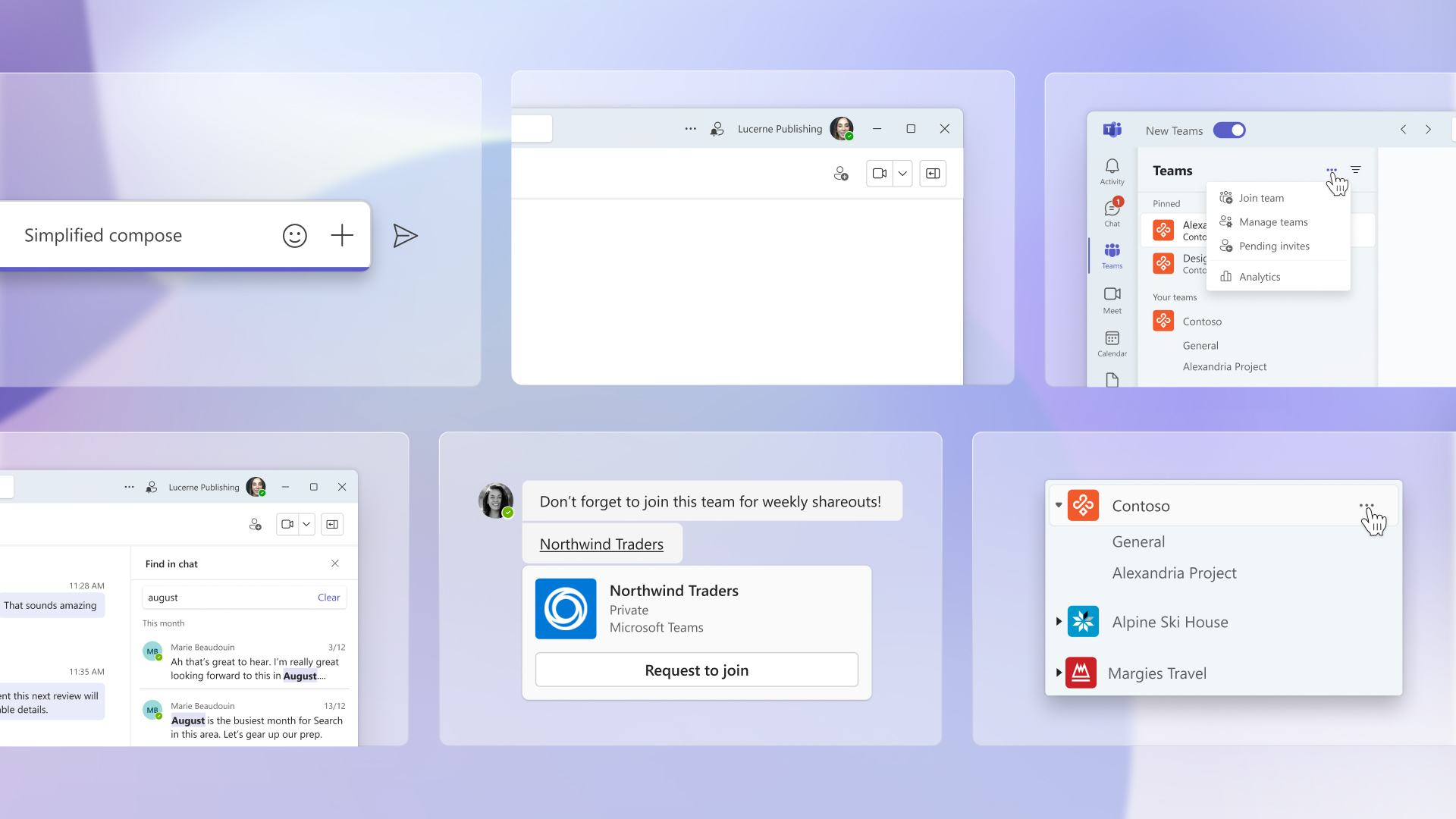
Collage of usability improvements in new Microsoft Teams app.

Flexibility

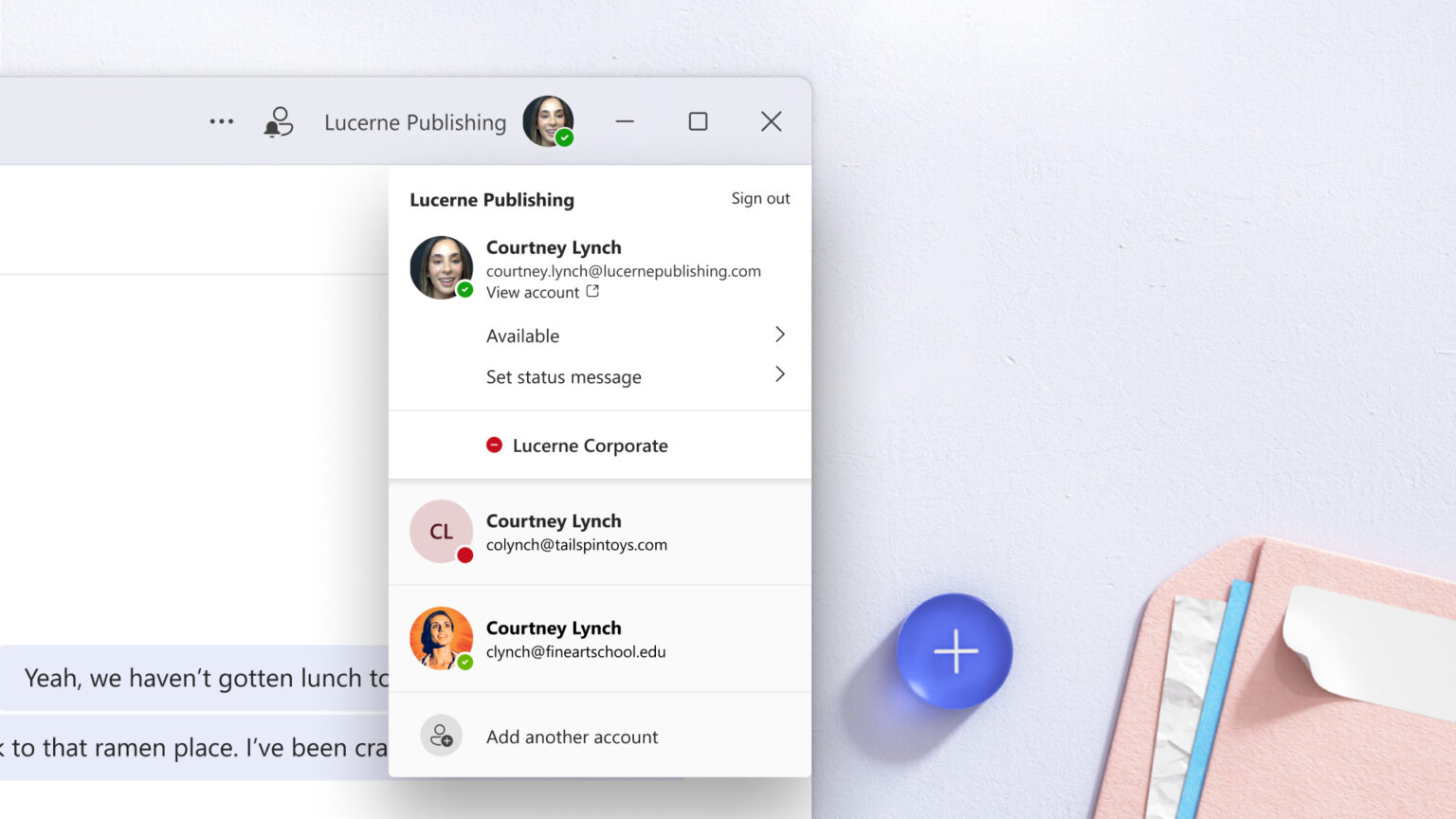
If you use Teams and have multiple tenants and accounts, the new Teams app will help you manage them better as it promotes flexibility. Microsoft has highlighted that it has made major enhancements to its authentication model, synchronization, and notification systems to ensure that it meets this need.
Microsoft launches the new Teams app for Windows - OnMSFT.com - March 27, 2023

What's more, you'll no longer need to sign in and out of your different tenants and accounts to keep track of what's going on at work, the new Teams app now provides a unified experience that allows users to stay logged in to multiple accounts simultaneously.

More intelligent

And with Microsoft deeply integrating AI across its products and services, it shouldn't come as a surprise that the new Teams is also leveraging these capabilities to enhance its experience overall.

The company further added that the new app will be its foundation for next-generation AI experiences, that is, intelligent recap and Copilot for Microsoft Teams that have already been announced.

"We will use AI to take the work out of working together by getting you up to speed on what happened before you joined a meeting or chat and answering your questions all in the flow of the discussion," says Microsoft. The company has also promised to make such additions in the future to ensure that users are able to realize the full potential of AI.

Microsoft has laid out its plans to roll out the new Teams to general availability later this year. It has also shared its intent to tap into a broader market with the new app by allowing Mac users to access the preview release later this year.

The new experience might not roll out automatically to all users and might call for the admin to opt in first. After this, all users part of Microsoft's Public Preview program will see a toggle switch that will allow them to transition to the new Teams.

Note: You can roll back to the Classic Teams whenever you want using the toggle.

Be sure to also check out Microsoft's side-by-side comparison of the classic Teams alongside the new Teams:

What are your thoughts on the new Teams? Have you accessed it yet? Share your experience with us in the comments.

Share this article:
Previous Article Latest MidJourney update fixes the hand problem, will Bing Image Creator be next? Next Article Fallout season 1 filming wraps up as show aims for 2024 release

Related Articles

PowerToys 0.75 released; Environment Variables editor is here

October 31, 2023

Former Halo developer Bungie announces layoffs in wake of game delays

October 31, 2023

Siemens and Microsoft partner to bring GenAI to industries worldwide

October 31, 2023

Leave a Comment Cancel reply

Your email address will not be published. Required fields are marked *

Recent Posts

  • PowerToys 0.75 released; Environment Variables editor is here
  • Former Halo developer Bungie announces layoffs in wake of game delays
  • Siemens and Microsoft partner to bring GenAI to industries worldwide
  • 43 Microsoft Edge keyboard shortcuts to remember for stylish and speedy web surfing
  • Here is what’s coming to (and leaving) Xbox Game Pass soon

Recent Comments

No comments to show.

Archives

  • October 2023
  • September 2023
  • August 2023
  • July 2023
  • June 2023
  • May 2023
  • April 2023
  • March 2023
  • February 2023
  • January 2023
  • December 2022
  • November 2022
  • October 2022
  • September 2022
  • August 2022
  • July 2022
  • June 2022
  • May 2022
  • April 2022
  • March 2022
  • February 2022
  • January 2022
  • December 2021
  • November 2021
  • October 2021
  • September 2021
  • August 2021
  • July 2021
  • June 2021
  • May 2021
  • April 2021
  • March 2021
  • February 2021
  • January 2021
  • December 2020
  • November 2020
  • October 2020
  • September 2020
  • August 2020
  • July 2020
  • June 2020
  • May 2020
  • April 2020
  • March 2020
  • February 2020
  • January 2020
  • December 2019
  • November 2019
  • October 2019
  • September 2019
  • August 2019
  • July 2019
  • June 2019
  • May 2019
  • April 2019
  • March 2019
  • February 2019
  • January 2019
  • December 2018
  • November 2018
  • October 2018
  • September 2018
  • August 2018
  • July 2018
  • June 2018
  • May 2018
  • April 2018
  • March 2018
  • February 2018
  • January 2018
  • December 2017
  • November 2017
  • October 2017
  • September 2017
  • August 2017
  • July 2017
  • June 2017
  • May 2017
  • April 2017
  • March 2017
  • February 2017
  • January 2017
  • December 2016
  • November 2016
  • October 2016
  • September 2016
  • August 2016
  • July 2016
  • June 2016
  • May 2016
  • April 2016
  • March 2016
  • February 2016
  • January 2016
  • December 2015
  • November 2015
  • October 2015
  • September 2015
  • August 2015
  • July 2015
  • June 2015
  • May 2015
  • April 2015
  • March 2015
  • February 2015
  • January 2015
  • December 2014
  • November 2014
  • October 2014
  • September 2014
  • August 2014
  • July 2014
  • June 2014
  • May 2014
  • April 2014
  • March 2014
  • February 2014
  • January 2014
  • December 2013
  • November 2013
  • October 2013
  • September 2013
  • August 2013
  • July 2013
  • June 2013
  • May 2013
  • April 2013
  • March 2013
  • February 2013
  • January 2013
  • December 2012
  • November 2012
  • October 2012
  • September 2012
  • August 2012
  • July 2012
  • June 2012
  • May 2012
  • April 2012
  • March 2012
  • February 2012
  • January 2012
  • December 2011
  • November 2011
  • October 2011
  • September 2011
  • August 2011
  • July 2011
  • June 2011
  • May 2011
  • April 2011
  • March 2011
  • February 2011
  • January 2011
  • December 2010
  • November 2010
  • October 2010
  • September 2010

Categories

  • Announcements
  • Deals
  • Developer
  • Editorial
  • Feature
  • Feature stories
  • Hero-post
  • Hotdeals
  • How-to
  • Latest news
  • Microsoft / office 365
  • News
  • Office 365
  • Onpodcast
  • Opinion
  • Our featured post
  • Polls
  • Review
  • Reviews
  • Videos
OnMSFT.com

OnMSFT.com covers Microsoft news, reviews, and how-to guides. Formerly known as WinBeta, we have been your source for Microsoft news since 1998.

Categories

  • Windows
  • Surface
  • Xbox
  • How-To
  • OnPodcast
  • Gaming
  • Edge
  • Teams

Recent Posts

  • PowerToys 0.75 released; Environment Variables editor is here
  • Former Halo developer Bungie announces layoffs in wake of game delays
  • Siemens and Microsoft partner to bring GenAI to industries worldwide
  • 43 Microsoft Edge keyboard shortcuts to remember for stylish and speedy web surfing
  • Here is what’s coming to (and leaving) Xbox Game Pass soon

Quick Links

  • About OnMSFT.com
  • Contact OnMSFT
  • Join Our Team
© 2010–2026 OnMSFT.com LLC. All rights reserved.
About OnMSFT.comContact OnMSFT